






Deprecated Applications from Windows 11 | Features
Let’s see Deprecated Applications from Windows 11 | Features. Microsoft announced more details about the features and applications removed from Windows 11, now available on Windows 10 PCs.
Microsoft announced Windows 11 on 25 June 2021 and is working on a commercial enterprise offering. Windows 11 comes with major changes for enterprises, and migration from Windows 10 to Windows 11 is another topic enterprises might seek.
If the PC meets the minimum system requirement, Microsoft gives a free upgrade from Windows 10 to Windows 11. You can also check the list of deprecated/removed applications and features from Windows 11.
As I mentioned in the previous blog, you can check compatibility using the PC Health Check app to see if your current PC meets the minimum system requirements to run Windows 11.

In this post, you will see the list of removed features from Windows 11.
Table of Contents
Windows 11 New Features
Microsoft Windows 11 is the next generation, designed for the next decade. Microsoft announced many UI enhancements and enhanced features, including more integration with the cloud.
- Redesigned for productivity, creativity, and ease
- A faster way to connect to the people you care about
- Delivering the best PC gaming experiences yet
- A faster way to get the information you care about
- An all-new Microsoft Store where your favorite apps and entertainment come together
- Creating a more open ecosystem unlocking new opportunities for developers and creators
- Microsoft Windows 11
- DotNet Applications Fail to Open on Windows 11 after KB5012643 Update
- Add Remove Apps to Graphics
- Settings List | Graphics Performance Preferences for Apps in Windows 11
- Best Ways to Enable or Disable Built-in Administrator in Windows 11
Removed Features from Windows 11
The following features might be deprecated or removed when you upgrade to Windows 11 or perform a fresh install of Windows 11. The below list provides you with information regarding some of the key features impacted by Windows 11 fresh install or upgrade:
Removed Apps with Windows 11
The following apps will not be removed when upgrading from Windows 10; however, they will no longer be installed by default for Windows 11.
| Removed Apps with Windows 11 |
|---|
| 3D Viewer |
| OneNote for Windows 10 |
| Paint 3D |
| Skype |

Removed Features from Windows 11 Start Menu
Let’s understand Windows 11 Start Menu Alignment Options and align Center or Left from the following post. How to align the start menu to Center or Left.
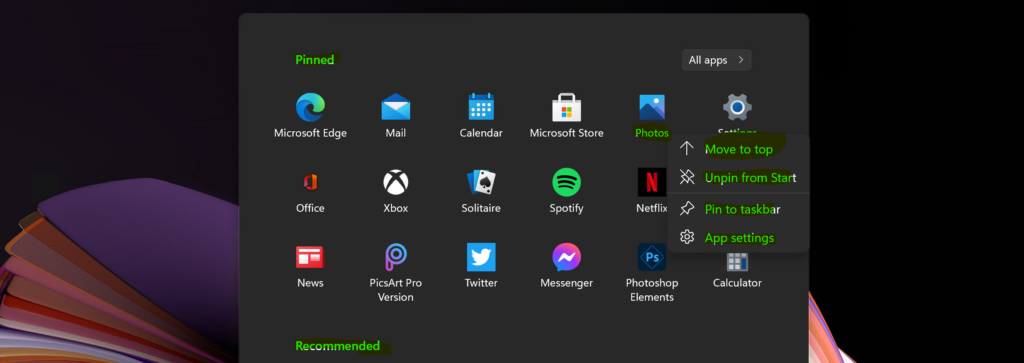
Let’s check what features were removed from the Windows 11 start menu.
| Removed Features from Windows 11 Start Menu |
|---|
| Named groups and folders of apps are no longer supported |
| The layout is not currently resizable |
| Pinned apps and sites will not migrate when upgrading from Windows 10 |
| Live Tiles are no longer available in Windows 11 |
| Glanceable and Dynamic content is replaced with Widgets icon |
Features Removed from Windows 11 Taskbar
The following table gives you a quick overview of the deprecated features of the Windows 11 taskbar.
| Features Removed from Windows 11 Taskbar |
|---|
| Cortana will no longer be included |
| News & Interests Evolved with Widgets icon on the Taskbar |
| People app is removed from the Taskbar |
| Some icons may no longer appear in the System Tray (systray) for upgraded devices, including previous customizations. |
| Alignment to the bottom of the screen is the only location allowed |
| Apps can no longer customize areas of the Taskbar |

Windows 11 Removed Features – Deprecated Applications from Windows 11
Now, let’s look at the features Microsoft plans to remove from Windows 11 PC. Some exciting features removed from Windows 11 PC are Tablet mode and Cortana.
| Removed Features/Deprecated Applications | Description |
|---|---|
| Windows 11 First Boot Experience | Cortana will no longer be included |
| Tablet Mode | Tablet Mode is removed, and new functionality |
| Timeline | The timeline is removed. Some similar functionality |
| Touch Keyboard | Touch Keyboard will no longer dock and undock keyboard layouts on screen sizes 18 inches and larger. |
| Wallet | Wallet is removed |
| Math Input Panel | Quick Status from the Lock screen and associated settings are removed |
| Desktop wallpaper | Desktop wallpaper cannot be roamed to or from the device when signed in with a Microsoft account. |
| Internet Explorer | Internet Explorer is disabled, and IE Mode will be available |
| Quick Status | Quick Status from the Lockscreen and associated settings are removed |
| S Mode | S Mode is removed from Windows 11 professional and enterprise editions |
| Snipping Tool | Snipping Tool Replaced with Snip & Sketch. |
Resources
- Windows insider rings
- Windows 11 Feature deprecation and removal
- Download Windows 11 Picture Gallery
- Windows 11 Minimum System Requirements | Fix This PC can’t run Windows 11 Error? Latest List
- Windows 11 How to Turn On Dark Mode System Wide | Easy Method | Color Options
We are on WhatsApp. To get the latest step-by-step guides and news updates, Join our Channel. Click here –HTMD WhatsApp.
Author
Anoop C Nair has been Microsoft MVP for 10 consecutive years from 2015 onwards. He is a Workplace Solution Architect with more than 22+ years of experience in Workplace technologies. He is a Blogger, Speaker, and Local User Group Community leader. His primary focus is on Device Management technologies like SCCM and Intune. He writes about technologies like Intune, SCCM, Windows, Cloud PC, Windows, Entra, Microsoft Security, Career, etc.




Discussion