






Ensuring Fast and Reliable Windows Device to Cloud PC Connections using Azure Front Door
Key Takeaways
- A resilient global platform is used to maximise service uptime for Windows cloud services.
- The connection begins with the Windows App client used for Windows 365 and Azure Virtual Desktop.
- The client first connects to Azure Front Door, which acts as the global low-latency entry point to the Windows cloud.
- Azure Front Door operates across 300+ Azure edge locations worldwide, helping users connect to the closest infrastructure.
- It automatically routes traffic to the nearest Azure Virtual Desktop gateway with the lowest latency.
Ensuring Fast and Reliable Windows Device to Cloud PC Connections using Azure Front Door! When a user opens the Windows App to access Windows 365 or Azure Virtual Desktop, the connection first goes to Azure Front Door. Azure Front Door is a global entry point for Microsoft cloud services and is available in 300+ Azure edge locations around the world. Because these locations are spread globally, the user’s request is automatically directed to the nearest and fastest location, which reduces delay. This helps ensure that the connection to the Windows cloud is fast, reliable, and always available, improving the overall user experience.
Table of Content
Ensuring Fast and Reliable Windows Device to Cloud PC Connections using Azure Front Door
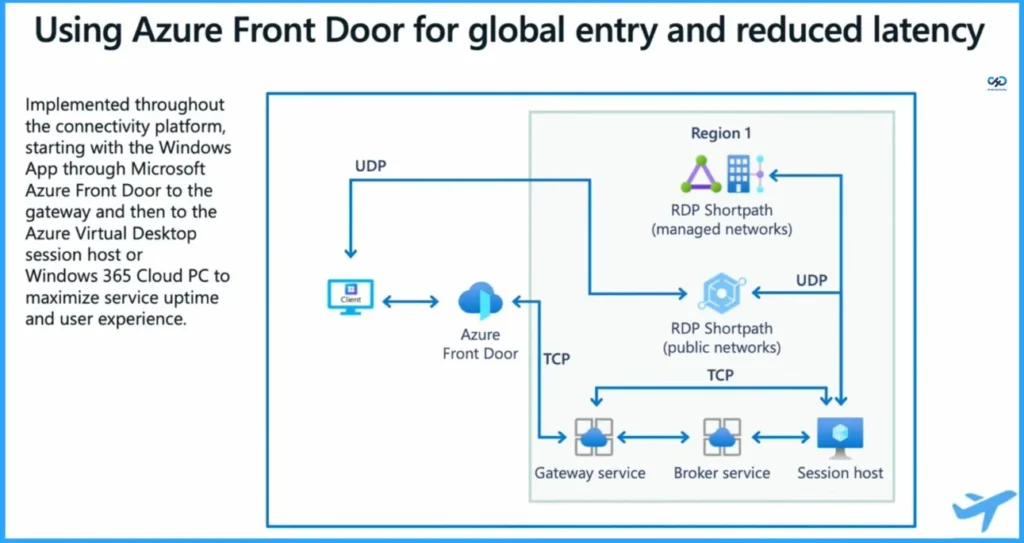
After the user connects through Azure Front Door, it automatically sends the request to the closest and fastest gateway of Azure Virtual Desktop. This means the system chooses the gateway with the lowest latency, so the user experiences a faster connection. Because the gateway is closer, the distance the data travels over the public internet is reduced.
After reaching the gateway, the connection continues through the Microsoft private backbone network, which is more reliable and faster, until it reaches the user’s Windows 365 Cloud PC or the Azure Virtual Desktop session host. A broker service manages the session and connects the user to the correct virtual machine. Microsoft also provides RDP Shortpath, which uses UDP transport to further reduce latency and improve performance. Overall, this architecture ensures a fast, resilient, and optimized connection path from the client device to the Cloud PC or session host.
- Ensuring Fast and Reliable Windows Device to Cloud PC Connections Using Azure Front Door – Session Presented at Microsoft Technical Takeoff by Tom Hickling
- Azure Front Door routes the user to the nearest Azure Virtual Desktop gateway with the lowest latency.
- This reduces the distance and time data travels across the internet.
- After reaching the gateway, the connection continues through the Microsoft backbone network, improving reliability.
- A broker service manages and establishes the session connection.
- The client is then connected to the Cloud PC or session host virtual machine.
- RDP Shortpath (UDP transport) can further reduce latency and improve performance.
- The slide shows the basic connectivity path from the client device to the Cloud PC or session host VM.
| Using Azure Front Door for Global Entry and Reduced Latency |
|---|
| Implemented throughout the connectivity platform, starting with the Windows App through Microsoft Azure Front Door to the gateway and then to the Azure Virtual Desktop session host or Windows 365 Cloud PC to maximize service uptime and user experience. |
- How to Configure New Windows App Settings for Windows 365 using Intune
- Explore the Windows 365 Cloud PC Overview Reports in Intune
- Seamless Provisioning of Windows 365 Cloud PCs for External Identities with Intune
- Cloud PC Zero to Hero Journey DaaS solution Windows 365
Need Further Assistance or Have Technical Questions?
Join the LinkedIn Page and Telegram group to get the latest step-by-step guides and news updates. Join our Meetup Page to participate in User group meetings. Also, join the WhatsApp Community and the Whatsapp channel to get the latest news on Microsoft Technologies. We are there on Reddit as well.

Author
Anoop C Nair has been Microsoft MVP for 10 consecutive years from 2015 onwards. He is a Workplace Solution Architect with more than 22+ years of experience in Workplace technologies. He is a Blogger, Speaker, and Local User Group Community leader. His primary focus is on Device Management technologies like SCCM and Intune. He writes about technologies like Intune, SCCM, Windows, Cloud PC, Windows, Entra, Microsoft Security, Career, etc.



Discussion