






How RDP Multipath Improves Azure Virtual Desktop Connectivity Using Dynamic UDP Path Selection
Key Takeaways
- Azure Virtual Desktop introduces redundant TCP transport paths to enhance connection resiliency.
- Ensures better reliability across both optimized and restricted networks.
- Automatically selects the best available network path without user or admin action.
- Handles packet loss, NAT issues, UDP restrictions, and enterprise network policies.
- Seamless failover and reconnection reduce disruptions and user impact.
How RDP Multipath Improves Azure Virtual Desktop Connectivity Using Dynamic UDP Path Selection! RDP Multipath creates multiple connection paths between your device and the remote desktop instead of relying on just one. It continuously checks which path is performing best and automatically switches if one becomes slow or drops. This ensures a smoother and more reliable experience without interruptions.
Table of Content
Can I Disable this Feature if Needed?
Yes, you can choose to opt out at any time.
How Do I Opt Out?
You can opt out by removing your host pool from the validation ring. This will revert your setup to the previous configuration.
When Should I Consider Opting Out?
If you face compatibility issues or want to stick with your existing setup, opting out can help you return to the earlier behavior.
Can I Re-enable the Feature Later?
Yes, you can always opt back in by adding your host pool to the validation ring again.
RDP Multipath over TCP Enabling Like-Local Connectivity for Windows 365 and Azure Virtual Desktop
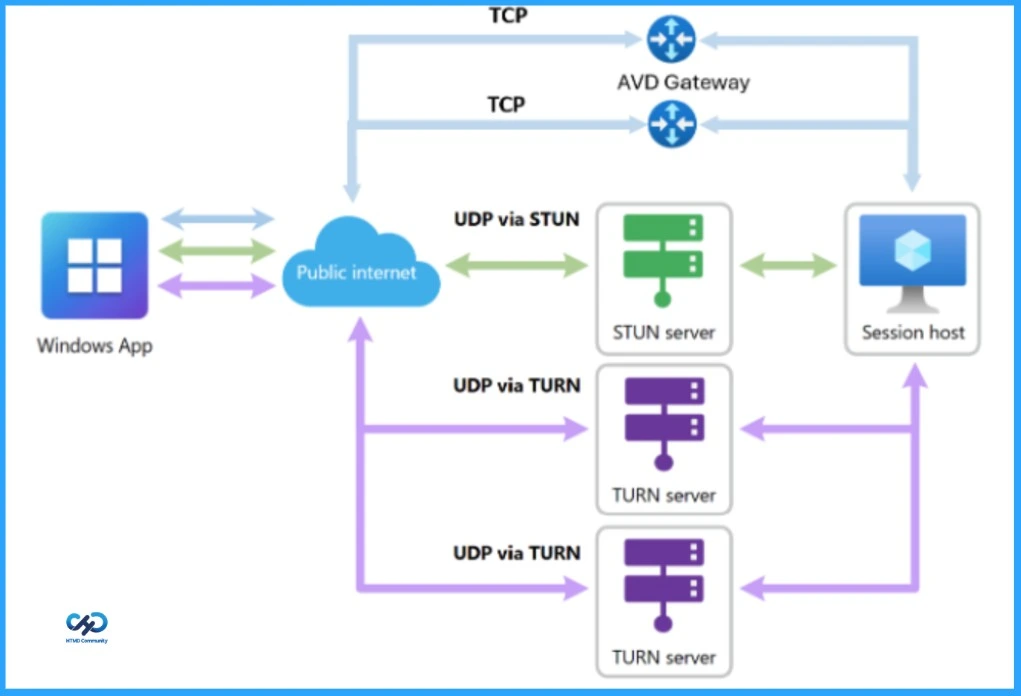
Initially, it focused on using UDP connections, which are faster and better for real-time interactions like typing and screen updates. The system keeps multiple UDP paths active and ready, so if one has issues, it quickly switches to another. It always chooses the fastest route and instantly changes paths if traffic appears.
| How to Enable this Feature | Details |
|---|---|
| How to Enable | Tag your host pool to the validation ring |
| Availability | Public Preview |
| Default Behavior | Automatically enabled for all host pools in the validation ring |
| User/IT Action Required | No changes needed from IT admins or end users |
| Supported Platform | Windows devices only |
| Client Requirement | Windows App on Windows (version 2.0.1069.0 or later) |
| Key Benefit | Improved connectivity with redundant TCP paths |
- New way to Take RDP of Windows PC from Windows PC using Windows App
- How New TURN Relay IP Range Enhances RDP Shortpath for AVD and Windows 365
- RDP Port 3389 is Disabled by Default for All Newly Provisioned Windows 365 Cloud PCs
Stronger Connections with Backup Paths
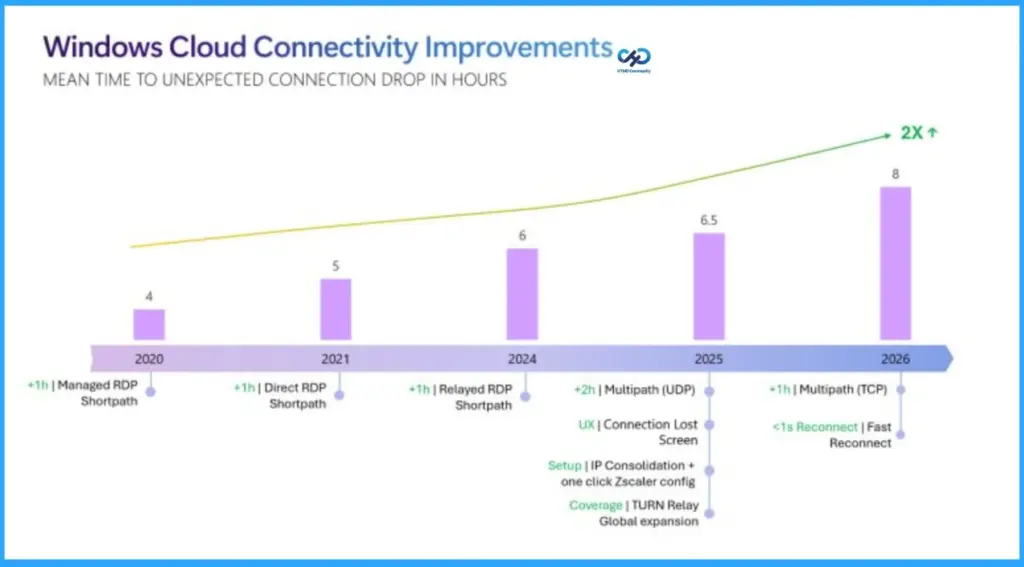
With this update, Azure Virtual Desktop now uses both UDP and TCP backup connections to make your session more reliable. Earlier, it mainly relied on UDP, but now it also keeps extra TCP paths ready. This means fewer problems if your network becomes unstable.
If one connection slows down or stops working, the system automatically switches to another without disconnecting you. Even if your internet briefly goes down, your session will reconnect on its own once the network is back, so your work continues smoothly.

Better Connection Even When UDP Is Blocked
In some networks, UDP connections are not allowed, so Azure Virtual Desktop uses only TCP to connect to the session. Earlier, this meant there was just one active TCP connection, which could be affected if the network became unstable.
With this update, Azure Virtual Desktop can now keep multiple backup TCP paths ready. If the main connection becomes slow or fails, it automatically switches to another available TCP path. This helps keep the session stable and reduces interruptions, even in strict or restricted network environments.
Need Further Assistance or Have Technical Questions?
Join the LinkedIn Page and Telegram group to get the latest step-by-step guides and news updates. Join our Meetup Page to participate in User group meetings. Also, join the WhatsApp Community and the Whatsapp channel to get the latest news on Microsoft Technologies. We are there on Reddit as well
Useful Link
Announcing public preview of redundant TCP support for RDP Multipath for Azure Virtual Desktop
Author
Anoop C Nair has been Microsoft MVP for 10 consecutive years from 2015 onwards. He is a Workplace Solution Architect with more than 22+ years of experience in Workplace technologies. He is a Blogger, Speaker, and Local User Group Community leader. His primary focus is on Device Management technologies like SCCM and Intune. He writes about technologies like Intune, SCCM, Windows, Cloud PC, Windows, Entra, Microsoft Security, Career, etc.



Discussion