






Difficult to Read Store Log File Information Here is the Solution with SCOM
Let’s discuss how difficult it is to Read and Store Log File Information. Here is the Solution with SCOMMost applications write loads of details into log files, and logs are very important for troubleshooting.
Business-critical applications write health and performance information to log files, which are often left unattended and archived. It is difficult to Read Store Log File Information. Here is the Solution with SCOM.
Is there any way to tap into the pool of information contained in the log files? Yes, this is possible with NiCE Log File MP. The NiCE Log File MP is a SCOM add-on, a powerful tool that analyzes log content in full detail using all.
Nice Log File MP has great log file analytic capabilities for your Windows Servers. LOB applications are more critical, and Log File MP provides a powerful way to monitor and parse log files.

Table of Contents
- SCOM 2025 is here with the Latest System Center
- SCCM Server Infrastructure Monitoring Script without SCOM OpsMgr Automation ConfigMgr
- Monitor Office 365 with SCOM NiCE Management Pack
- SCCM Management Pack – How to Fine Tune SCOM Alerts
Difficulty Reading Store Log File Information: Here is the Solution with SCOM
Microsoft Out-of-the-box capabilities vs. The NiCE Log File MP: You can download the NiCE Log File MP from here. The functionality or use case is also shown in the table below.
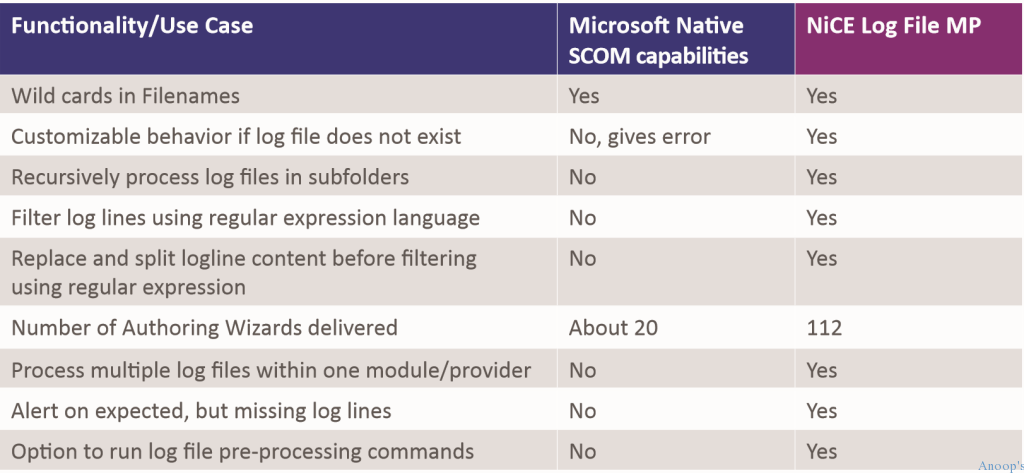
NiCE Log File MP Supports Java Log File? Applica on log Files?
Difficulty reading store log file information: Here is the solution with SCOM. Any logs in ASCII format are supported. This can be an extracted CSV file, text fi le, or dump file. The wizards included with the Log File MP allow you to easily create an alert rule or a unit monitor for monitoring.
Some of the other features and benefits of this add-on are:-
- It comes with a set of custom authoring wizards
- Allows you to set an alert on missing log files
- Will enable you to define log file names as absolute paths
- The NiCE Log, File MP interface, is part of the Microsoft Monitoring Agent
- Includes a powerful program executed on the interface to run scripts and programs
- Set the log file directory using a regex pattern with no restrictions
- Correlate your log lines
- Customize behavior if log file does not exist
Resources
SCCM Related Posts Real World Experiences Of SCCM Admins (anoopcnair.com)
SCCM Video Tutorials For IT Pros – HTMD Blog #2 (howtomanagedevices.com)
We are on WhatsApp now. To get the latest step-by-step guides, news, and updates, Join our Channel. Click here. HTMD WhatsApp.
Author
Anoop C Nair is Microsoft MVP! He is a Device Management Admin with more than 20 years of experience (calculation done in 2021) in IT. He is a Blogger, Speaker, and Local User Group HTMD Community leader. His primary focus is Device Management technologies like SCCM 2012, Current Branch, and Intune. He writes about ConfigMgr, Windows 11, Windows 10, Azure AD, Microsoft Intune, Windows 365, AVD, etc.


Discussion · 1 comment