






Top 4 Security Copilot Use Cases and Prompts for Entra Shared by Microsoft
In this post, we are excited to share the top 4 security Copilot Use Cases and Prompts for Entra Shared by Microsoft. The ignite 2024 announcement of innovations will go on at Microsoft Entra. According to the report, Microsoft Entra and Security Copilot are enhancing identity and network access security to help against cyber attacks.
We all know that nowadays, cyber attacks happen at every point. In this situation, Microsoft entra is giving positive feedback. Microsoft Entra now blocks over 7,000 password attacks per second, a 75% increase from last year.
There is a new focus in Entra on AI and Secure Access Service Edge (SASE) updates for Microsoft Entra. Security Copilot in Microsoft Entra is an upcoming improvement in managing identity and access. It uses AI to give valuable insights and features in the Microsoft Entra admin centre.
These updates are designed to improve security, simplify processes, and simplify how organizations manage access. They make it easier and more accurate for security professionals to handle tasks. Microsoft Entra is now helping organizations achieve Zero Trust goals by integrating AI features with Entra and network security.

Table of Contents
How do Security Copilots Help Security and IT Professionals?
1. This tool is continuously improving to expand its features and skills.
2. Security Copilot helps organizations use AI tools securely to reach their business goals.
3. It reduces the workload and time.
4. Security Copilot ensuring safe access to resources for any identity.
Top 4 security Copilot Use Cases and Prompts for Entra Shared by Microsoft
Above, we discussed the overall view of the Top 4 security copilot use cases and prompts for Entra shared by Microsoft during the ignite 2024. Security Copilot is built to help security professionals by integrating powerful tools for managing identities and directly accessing the Microsoft Entra admin center.
- Security Copilot is available for purchase now, and you can use it in the public preview within the Microsoft Entra admin center.
- Transform On Screen Tables Into Ready To Use Excel Data With A Single Click
- Pricing Details of Microsoft Security Copilot
- Free Microsoft Copilot for Security Training in Audit Mode | 5 Modules
- New Capabilities in Microsoft Copilot for Security
Security Copilot in Microsoft Entra
Security Copilot focuses on improving identity security and troubleshooting access issues in the public preview. This will help reduce the time spent on identity and access management tasks.
| No | Top 4 security copilot use cases | Info |
|---|---|---|
| 1 | Rapidly retrieve relevant identity data and context for users | It gives you useful advice in your work and helps security professionals find identity information about users, like their location and how they log in. |
| 2 | Automated Risk Investigations | AI to automatically detect, understand, and fix threats for users and workload identities. |
| 3 | Troubleshooting and Analysis | AI will automatically detect, understand, and fix threats to users and workload identities. |
| 4 | Identify, understand, and remediate risks | In December, new skills will be added to help identify, understand, and fix risks with copilot prompts. |
The generative AI for identity and access is an innovation. Security Copilot is now available directly in the Microsoft Entra admin center for identity admins.
- The main features of Security Copilot’s public preview focus on improving identity security and troubleshooting access issues.
- This will help save time and increase accuracy for identity and access management tasks.
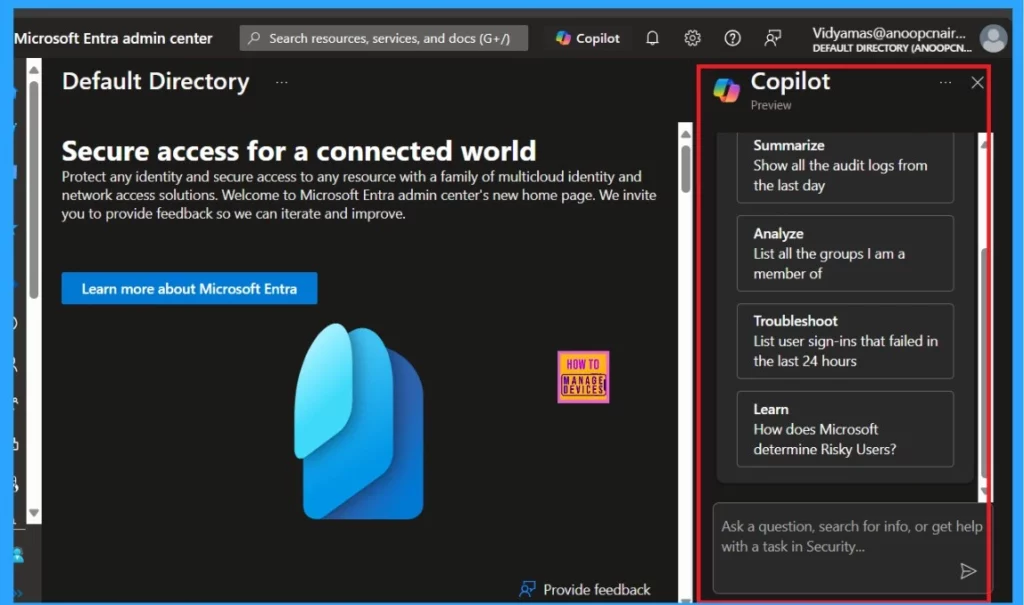
- Copilot offers built-in prompts when you first open the Entra ID copilot section.
Note: New skills coming in December will help you identify, understand, and fix risks. For example, you can ask Security Copilot, “Which apps could be malicious or compromised?” or “Show me unused apps,” followed by “How do I remove these?”
Troubleshooting and Analysis
This innovation in the security copilot allows you to ask prompts like “Show me the high-risk users in my tenant.” When we give a prompt, the copilot generates the results in seconds. Copilot users completed sign-in troubleshooting tasks 46.11% faster.
- These prompts help with tasks such as troubleshooting failed sign-ins in the last 24 hours, checking identity-related risks, and more.
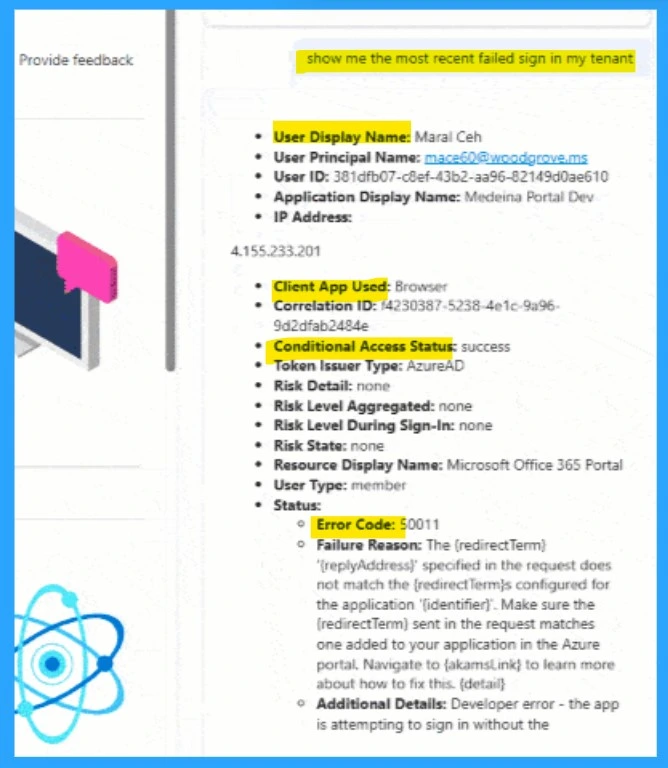
- When you enter the Prompt, like “Show me the most recent failed sign in my tenant,” you will get the complete details in seconds.
- It shows the User Display Name, User ID, Client app used, conditional access status, etc.
- Also failure reasons
Need Further Assistance or Have Technical Questions?
Join the LinkedIn Page and Telegram group to get the latest step-by-step guides and news updates. Join our Meetup Page to participate in User group meetings. Also, Join the WhatsApp Community to get the latest news on Microsoft Technologies. We are there on Reddit as well.
Author
Anoop C Nair has been Microsoft MVP from 2015 onwards for 10 consecutive years! He is a Workplace Solution Architect with more than 22+ years of experience in Workplace technologies. He is also a Blogger, Speaker, and Local User Group Community leader. His primary focus is on Device Management technologies like SCCM and Intune. He writes about technologies like Intune, SCCM, Windows, Cloud PC, Windows, Entra, Microsoft Security, Career, etc.




Discussion