






Microsoft Azure AI Foundry SDK New Feature for Developing AI in Azure
Microsoft Azure AI Foundry SDK New Feature for Developing AI in Azure! Microsoft Azure AI Foundry was announced at Ignite 2024 with several new features, such as the Azure AI Foundry SDK, Azure AI Foundry Portal, Azure AI Agent Service, and more.
Microsoft Azure AI Foundry is a combined AI platform that empowers developers, AI engineers, and IT pros to build, deploy, and manage AI solutions. It simplifies the process, helping teams focus on innovation and business goals.
Coding developers must use data, models, prompts, vector stores, and agents to create great AI experiences. Old ways of coding no longer work, and models are variable. So, they need new methods to survive the fast-changing business AI era.
The Azure AI Foundry SDK is a complete toolchain designed to simplify the development of AI applications on Azure. In this blog post, I will explain the overview of Azure AI Foundry SDK.


Table of Contents
What are the Models available in Azure OpenAI Service?
o1-preview & o1-mini – (Limited Access – Request Access)
GPT-4o & GPT-4o mini
GPT-4 series (including GPT-4 Turbo with Vision)
GPT-3.5-Turbo series
Embeddings series
Microsoft Azure AI Foundry SDK
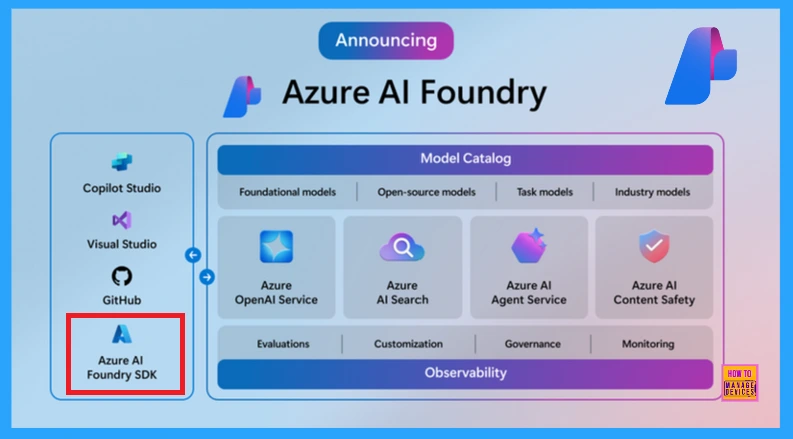
The Azure AI Foundry SDK offers a simple coding experience that can help developers build AI applications easily. It may be in Hub, Visual Studio, or Copilot Studio. It helps you throughout the AI development journey, from initial idea to code to final cloud deployment.
- Free Entra Training Videos | Start Learning Entra ID Azure AD
- Free Download Azure Architecture Icons
- Best Free Microsoft Courses Available in 2024
AI Apps with Azure AI Foundry SDK
To start building AI apps with Azure AI Foundry SDK, create a new project in Azure AI Foundry. It provides everything you want to develop AI apps by connecting data, assets, and services. You can follow the steps to create an AI Project. You can access all the capabilities available to build an AI application using the project client.
from azure.identity import DefaultAzureCredential
from azure.ai.projects import AIProjectClient

project_connection_string="your_connection_string"

project = AIProjectClient.from_connection_string(
conn_str=project_connection_string,
credential=DefaultAzureCredential())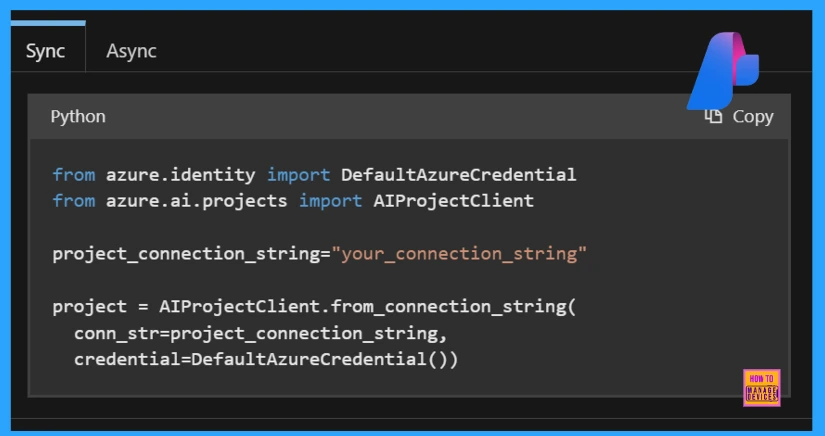
In the initial stage, the SDK includes Azure OpenAI, Model Inference, Azure AI Agent Service, Search Evaluation and Tracing (performance monitoring), and AI App Templates.
The following table shows a brief overview of the features mentioned above.
| Features | Description |
|---|---|
| Azure OpenAI Service | Azure OpenAI Service offers access to powerful AI models for tasks like text generation, summarization, and image understanding. The Azure AI Foundry SDK is currently available in Python and C#. |
| Azure AI Model Inference | The model inference service allows you to build your applications by accessing powerful AI models from leading providers (like OpenAI, Microsoft, etc.). |
| Azure AI Agent Service | Azure AI Agent Service helps developers build, deploy, and maintain quality and extendable AI agents. Using an extensive model from top providers like OpenAI and Microsoft enables a wide range of generative AI use cases. |
| Search Evaluation | It simplifies the process of assessing your AI application’s performance. It offers built-in evaluators and custom evaluators, synthetic data generation, user simulators, and adversarial simulations. |
| Tracing | Tracing to your app helps identify and debug issues for better performance. |
| App Templates | The AI application templates simplify the app’s deployment through cloud infrastructure and automation using infrastructure-as-code. |
Note: The Azure AI Foundry SDK with a JavaScript version is coming soon.
Resources
Need Further Assistance or Have Technical Questions?
Join the LinkedIn Page and Telegram group to get the latest step-by-step guides and news updates. Join our Meetup Page to participate in User group meetings. Also, Join the WhatsApp Community to get the latest news on Microsoft Technologies. We are there on Reddit as well.
Author
Anoop C Nair has been Microsoft MVP for 10 consecutive years from 2015 onwards. He is a Workplace Solution Architect with more than 22+ years of experience in Workplace technologies. He is a Blogger, Speaker, and Local User Group Community leader. His primary focus is on Device Management technologies like SCCM and Intune. He writes about technologies like Intune, SCCM, Windows, Cloud PC, Windows, Entra, Microsoft Security, Career, etc.



Discussion