






Introduction to App Lifecycle Management Agent in Entra for Unified App Control and Visibility
Let’s discuss Introduction to App Lifecycle Management Agent in Entra for unified app control and visibility. App Lifecycle Management Agent in Microsoft Entra is a new feature introduced by Microsoft on the Ignite 2025 Event.
It is designed to provide unified app control and visibility. App Lifecycle Management Agent in Entra helps organizations manage the entire lifecycle of applications from onboarding to retirement within Entra’s identity and access ecosystem.
The core function of App Lifecycle Management Agent in Entra is provide Centralized management of apps across environments, reducing silos. It also Provides admins with clear insights into app usage, compliance, and dependencies.
This new feature relevent for several reasons. For IT Admins, it Simplifies app governance, reduces manual overhead, and ensures consistent policy enforcement. For End Users, it ensures smoother access experiences with fewer disruptions when apps are updated or retired.

Table of Contents
Introduction to App Lifecycle Management Agent in Entra for Unified App Control and Visibility
Lifecycle Automation Streamlines manual work by automating onboarding, updates, and decommissioning. Security Integration ties app lifecycle events into Entra’s identity and access policies, ensuring compliance and reducing risk.
- How to Manage Agents through Microsoft Entra Agent ID Interface for Security and Zero Trust Enforcement
- Understanding Entra Agentic AI in Security From Manual Work to Fully Autonomous Agents
- Setup Risk-Based Conditional Access for Entra Agents to Automatically Protect against Compromised Agents
- Secure Windows Devices with App Control for Business Code Integrity Policy using Intune
How to Start with App Lifecycle Management Agent in Entra
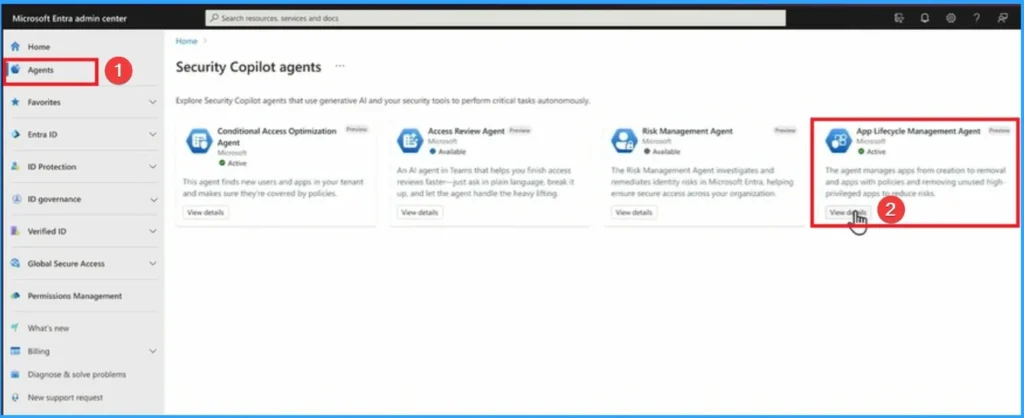
App Lifecycle management Agent in Microsoft Entra released as public preview is the unification of identity and network access. Here i am going to shows the demo which is showned on the Ignite 2025 event by Nichole Peterson Senior Product Marketing Manager at Microsoft. Sign in to Microsoft Entra admin center Go to Agent > App Lifecycle management Agent. Click on the View button.
Onboarding Apps Scenario
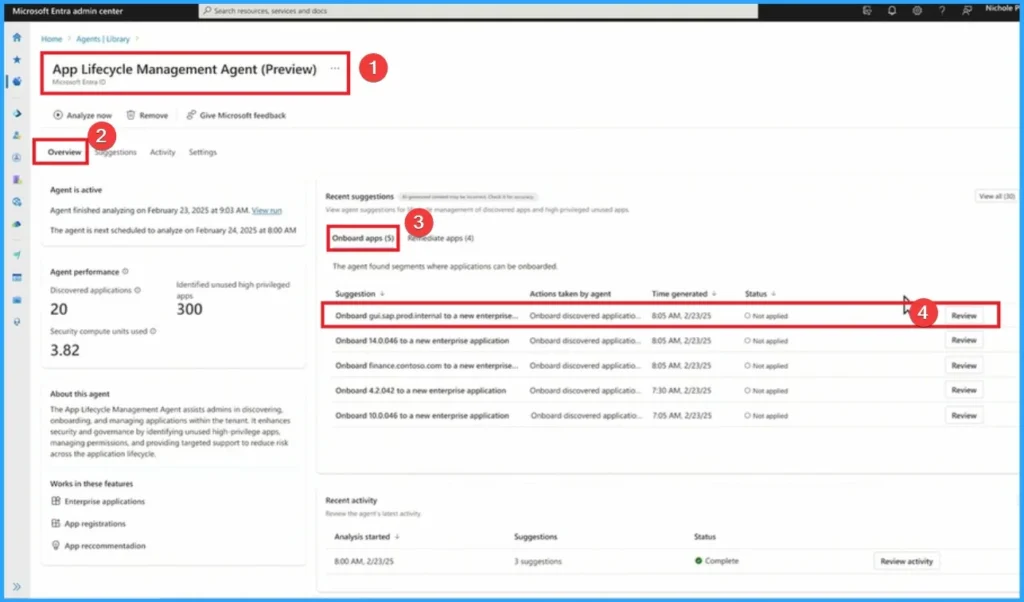
On the Entra Portal, go to Agents library and you will get the App Lifecycle management Agent Preview. Here you can see Onboarded Apps. Here I select on of the onboarded apps Onboard guisap.prodinternal to a new enterprise and click on the Review button.
Remediate Apps
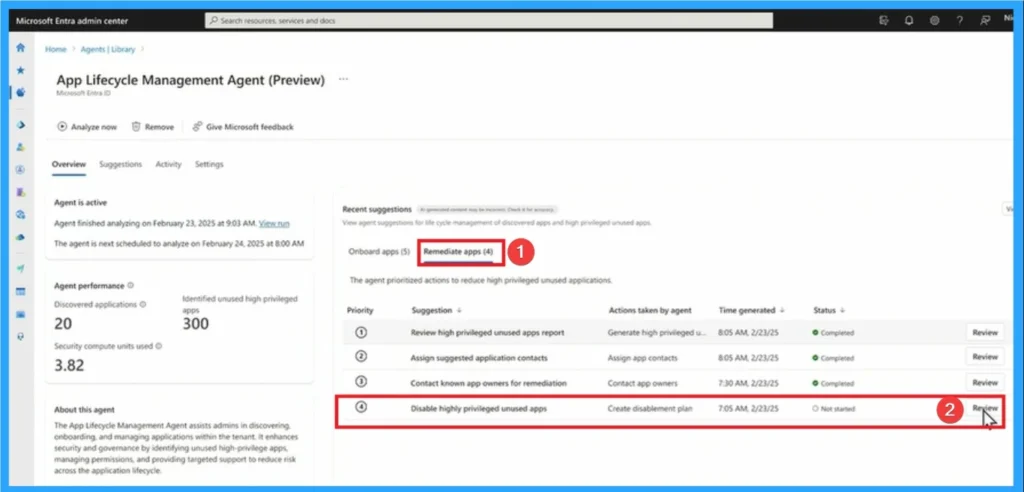
The agent continuously monitors Entra‑integrated applications for issues such as missing security configurations, outdated authentication methods, or unused/abandoned apps. Here choose Review high Privileged unused apps report and click on the Mark as complete button.
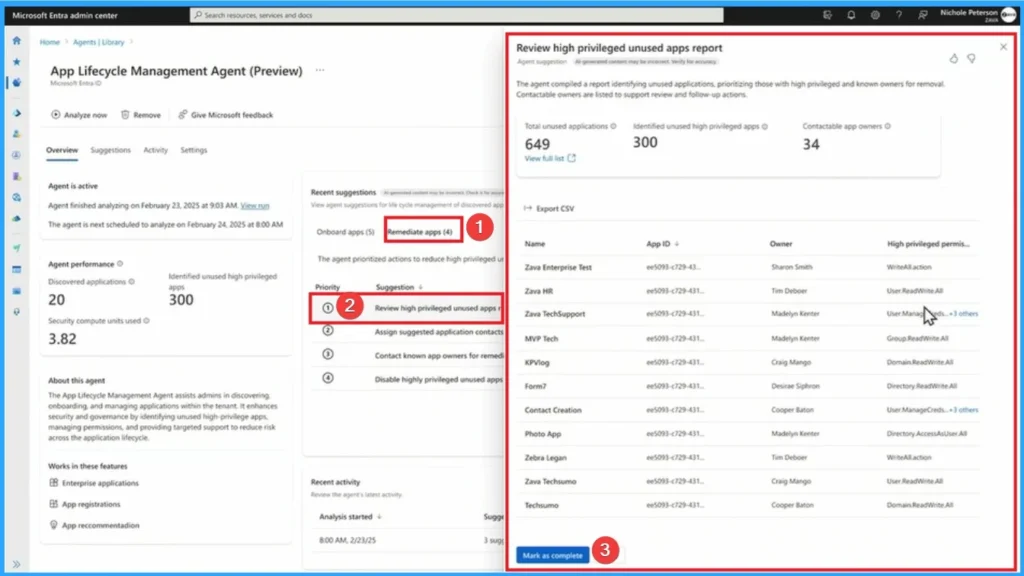
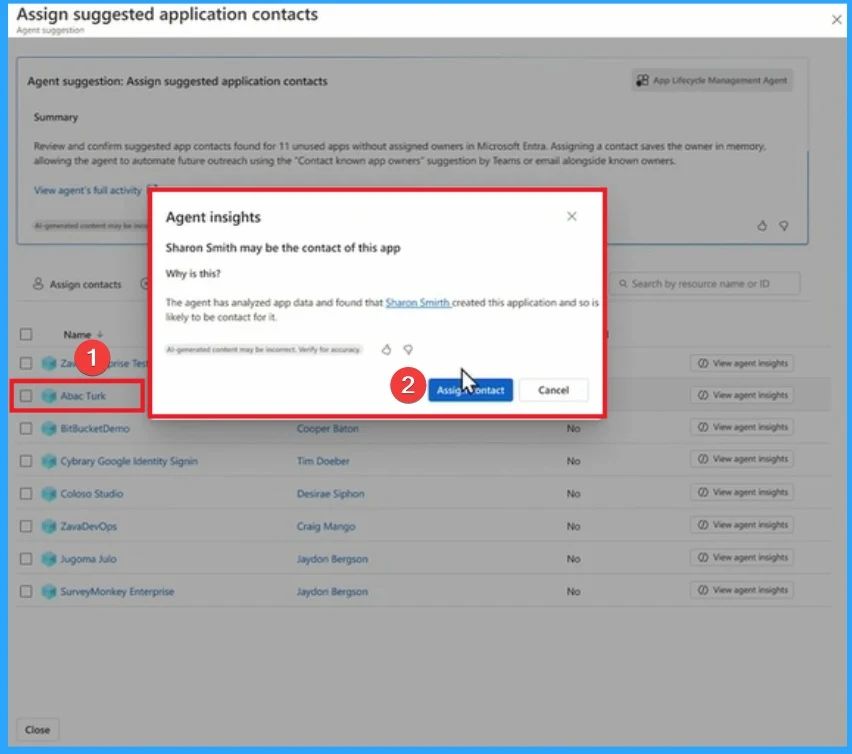
After that, here going to review Assign suggested application contacts remediate app. On this window Aback Tuck is selected and click on the assigning contact.
Review Contact App Owners for Highly Privileged Unused Apps
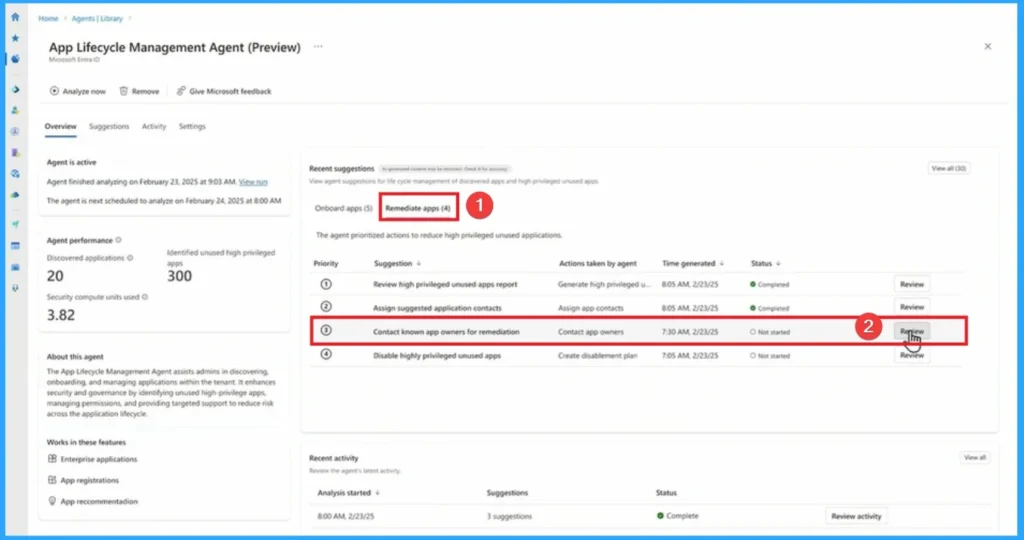
On the Remediate App section, here choosed Contact App Owners for Highly Privileged Unused Apps and click on the Review button. Look at the below screenshot.
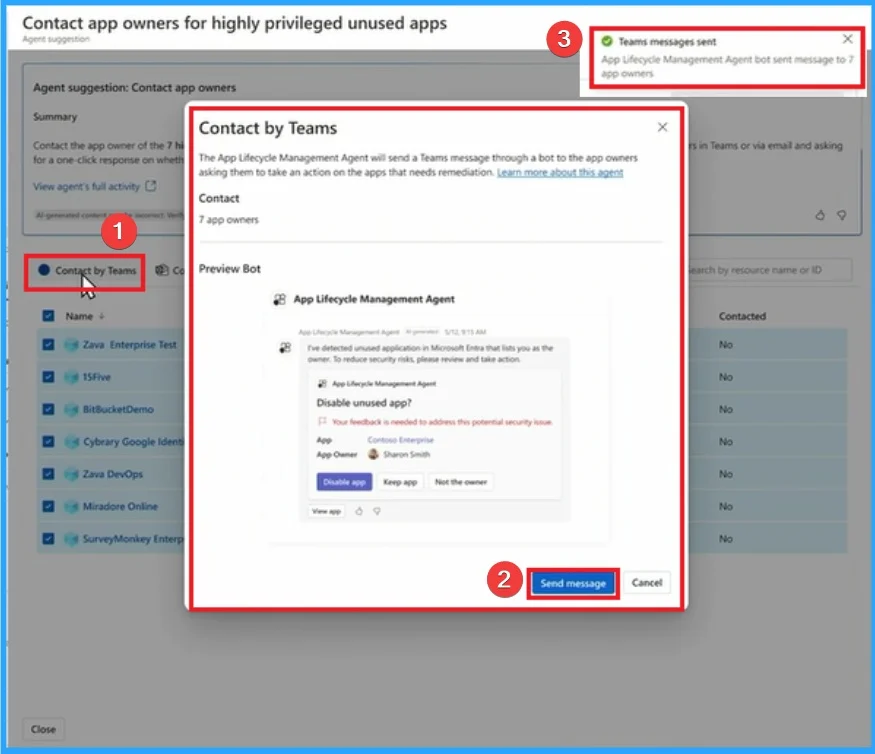
On the below screenshot, click on the contact by Teams and you will another window that shows preview bot. Then click on the Send Message button. After that, you will get a notification on the Entra portal that shows, Teams messages sent.
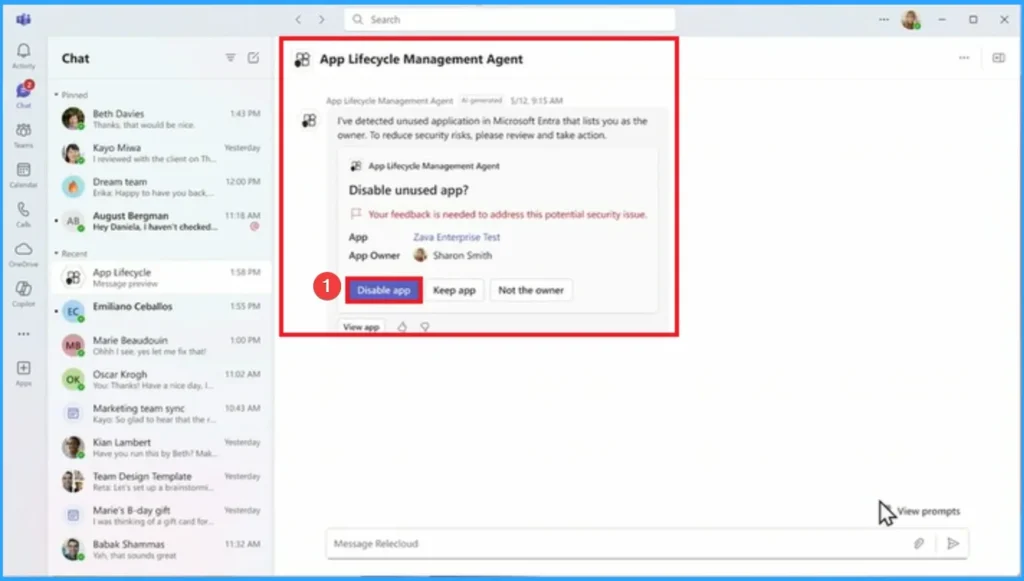
After that, you can open the Microsoft Teams app and then Open the App Lifecycle management Agent. Here you can clcik on the Disable app button and your IT admin will notified that the app is disabled.
Review Disablement Plan for Unused Apps
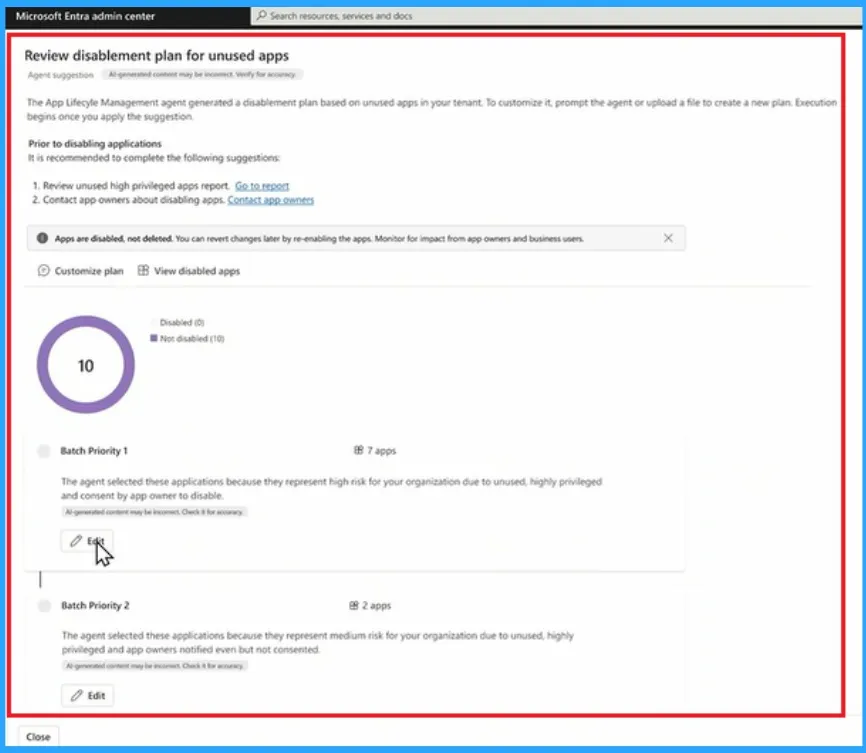
Contact App Owners for Highly Privileged Unused Apps is a new capability there is a new attribute disabled. You can now disable apps before just deleting. Look at the below window.
This is the final stage of communication and after you find the owners, and app you can disable the apps. After desabling this app you can also edit if you want.
Need Further Assistance or Have Technical Questions?
Join the LinkedIn Page and Telegram group to get the latest step-by-step guides and news updates. Join our Meetup Page to participate in User group meetings. Also, Join the WhatsApp Community to get the latest news on Microsoft Technologies. We are there on Reddit as well.
Author
Anoop C Nair has been Microsoft MVP from 2015 onwards for 10 consecutive years! He is a Workplace Solution Architect with more than 22+ years of experience in Workplace technologies. He is also a Blogger, Speaker, and Local User Group Community leader. His primary focus is on Device Management technologies like SCCM and Intune. He writes about technologies like Intune, SCCM, Windows, Cloud PC, Windows, Entra, Microsoft Security, Career, etc.




Discussion