






Azure Virtual Desktop End-User Experience Journey with Intune Management
I presented a session about the Azure Virtual Desktop End-User Experience Journey with Intune Management in Ghana’s Microsoft user group. My presentation focused on the Windows single session (persistent) host enrollment journey.
Let me share the AVD (a.k.a WVD) journey with modern management (Single Session/Persistent VMs) without Autopilot/WhiteGlove. If you are wondering whether you can get a free training course on modern device management and security technology like MEM Intune, refer to 63 Episodes of Free Intune Training for Device Management Admins.
I know most AVD customers use Azure Virtual Desktop with Configuration Manager. My journey is a bit different because it’s a new journey with AVD and MEM Intune.
The Azure Virtual Desktop (previously known as Windows Virtual Desktop) Journey started in 2019.

Table of Contents
Video Tutorial – Azure Virtual Desktop End-User Experience
The following video covers how we can improve the enrollment experience of Azure Virtual Desktop AVD End-User Experience.
- New Azure Virtual Desktop App in the Microsoft Store Winget and Intune
- New Azure Virtual Desktop Client Microsoft Store App
- Download Azure Virtual Desktop eBooks
Azure VDI (a.k.a AVD) vs Traditional VDI
I have seen many conversations in which AVD expectations are similar to legacy VDI. Many organizations are trying to replicate the processes of the traditional VDI world.
My take on this (AVD) is a bit different. I see this as an opportunity to move to modern management MEM Intune and try to manage virtual and physical devices in the same way (wherever possible).
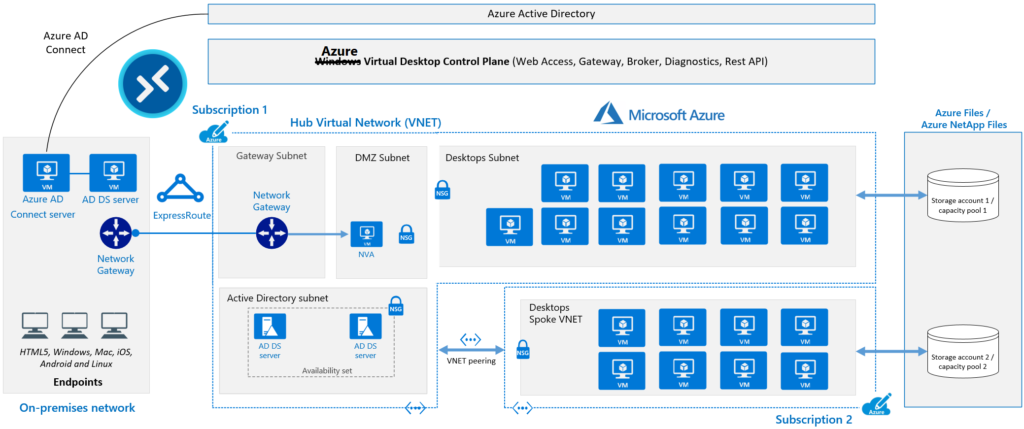
Azure Virtual Desktop is a modern VDI solution built from the ground up for the cloud, keeping all native cloud architecture in mind. Traditional VDI/hybrid solutions are still based on conventional on-prem technology architecture, but some are hosted in the cloud.
When moving towards AVD management, we can reduce the dependency on on-prem technologies by using Azure AD join scenarios instead of Hybrid Azure AD whenever available. Another important strategy is using custom images or Azure gallery images.
You need to choose carefully and understand whether it’s worth creating and managing custom images for single-session VDIs and multi-session scenarios. This is important for the Azure Virtual Desktop End-User Experience Journey with Intune Management.
AVD Enrollment Experience Journey with Modern Management Intune
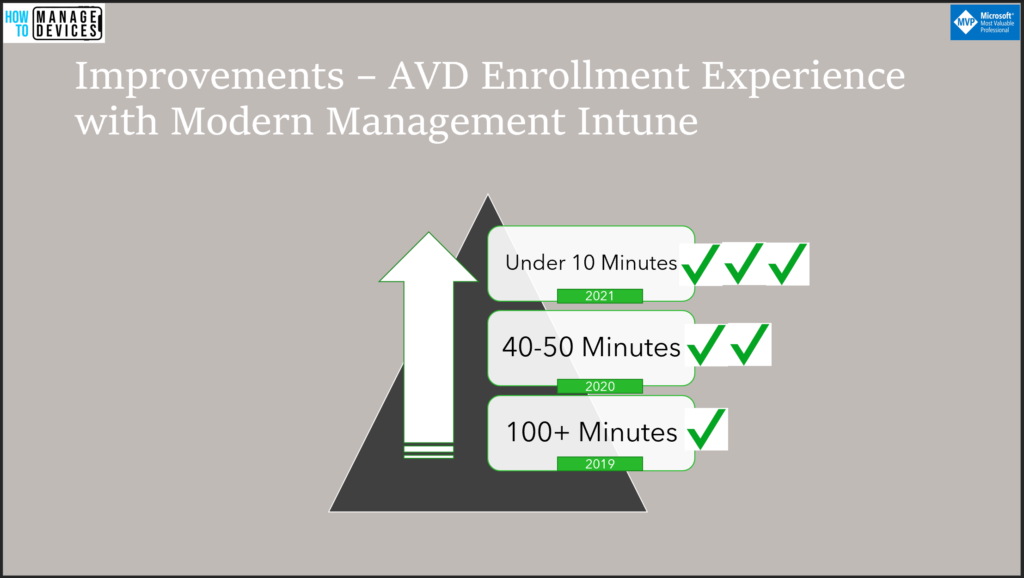
My AVD enrollment experience journey started back in 2019. I never tried to manage the AVD session host with Configuration Manager. So, all my AVD enrollment experience is with MEM Intune. This is a journey because AVD and MEM integration are improving quickly.
What is Enrollment Experience? AVD End-User Experience Journey with Intune Management
The enrollment experience mainly depends on the group policy configuration that you select. The end-user enrollment experience is how long it will take to complete the enrollment process when the end-user logs in to the session host for the first time.
The enrollment process includes three stages, all of which are important for the Azure Virtual Desktop End-User Experience Journey with Intune Management.
- Intune Registration of session host using MDM Group policy.
- Device-based applications and policies deployment.
- User-based applications and policies deployment.
2019 – 100 Minutes – AVD Enrollment Experience
In 2019, the enrollment experience with modern management used to take 100+ minutes. The only working configuration of the MDM enrollment group policy was based on user credentials. So, the Intune enrollment/registration of the session host starts only after the user’s first login.
The following section of the post helps improve the Azure Virtual Desktop End-User Experience Journey with Intune Management.
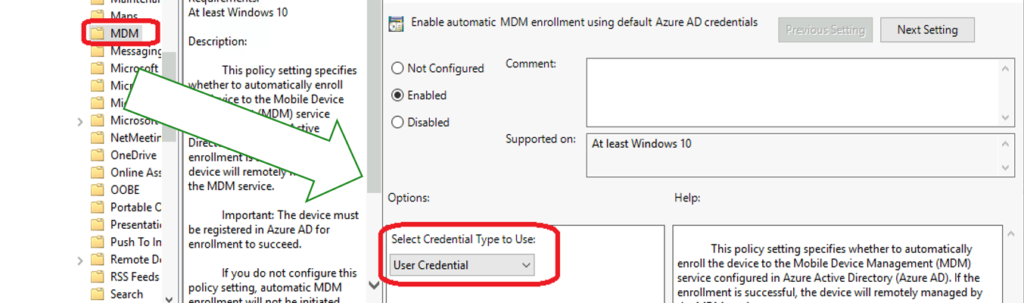
- Intune registration starts only after the user’s first login. Hence no pre-provisioning of apps/policies.
- All the application and policy deployment starts only after users the first login.
- Intune Win32 application deployment using Intune Management Extension(IME) took more than 60 minutes to start. IME policy refresh/sync begins only after 60 minutes of Intune enrollment.
2020 – 40 Minutes – AVD Enrollment Experience
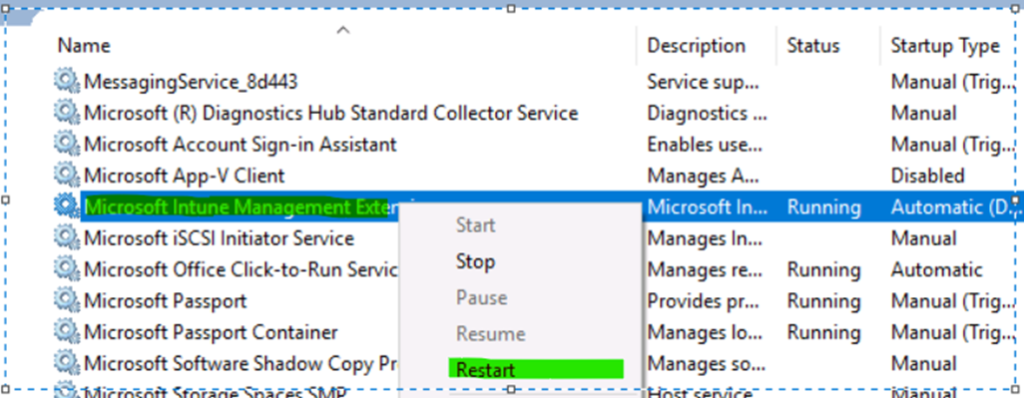
In 2020, the AVD enrollment experience with modern management used to take 40+ minutes. The easy way to improve the enrollment experience was to work on IME. As you can see in the above section, the IME service waited to reinitiate/sync the policies for the first 60 minutes.
To work around the above issue, we created an MSI application to restart the Intune Management Extension service. Thus, we were able to save 60 minutes in the enrollment process.
More enhancements in Azure Virtual Desktop End-User Experience Journey with Intune Management are explained below.
- Intune registration starts only after the user’s first login. Hence no pre-provisioning of apps/policies.
- All the application and policy deployment starts only after the users log in.
- Intune Win32 application deployment using Intune Management Extension(IME) starts immediately after the restart of IME service, as mentioned above.
Under 10 Minutes – AVD Enrollment Experience
Now, you can use the Device credentials option from the MDM Group policy. This helps to pre-provision Intune enrollment, application, and policy deployments before users log in. The application and policy deployment pre-provision happens only when you deploy apps and policies to Azure AD device groups.
Because of the session host pre-provision option, as explained above, we could reduce end-to-end AVD enrollment time significantly. The end-to-end enrollment experience has also improved considerably.
NOTE! – With the device credentials option, you can produce an Autopilot/whiteglove experience with the enrollment status page in the future for Azure Virtual Desktop session host (single session).
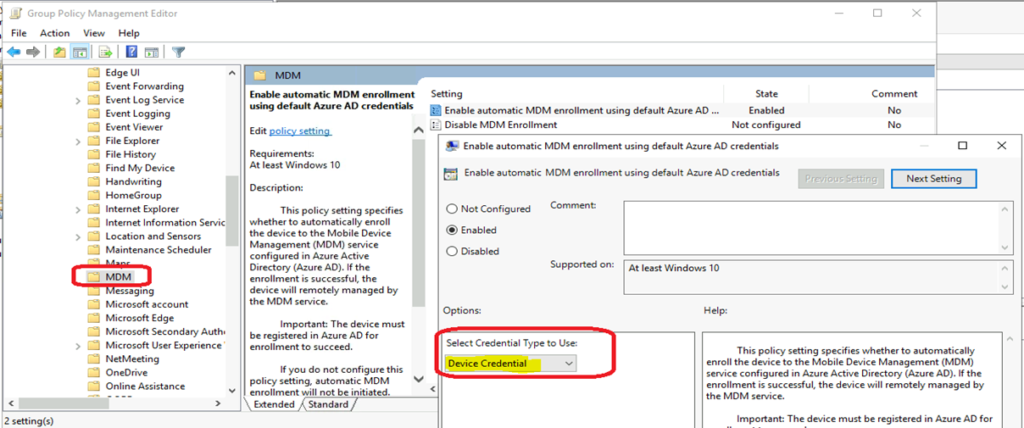
- Intune registration starts before the user’s first login.
- Device-based application and policy deployment happens before the user’s first login.
- User-based application and policy deployment happens only after the user first login.
Download Presentation
You can download the presentation from GitHub.
Resources
- MUGG MEM-AVD Bootcamp – Session Recording.
- Using Azure Virtual Desktop with Intune https://docs.microsoft.com/en-us/mem/intune/fundamentals/azure-virtual-desktop
- AVD Management with Intune | Azure Virtual Desktop | AVD | Windows Virtual Desktop
We are on WhatsApp. To get the latest step-by-step guides and news updates, Join our Channel. Click here –HTMD WhatsApp.
Author
Anoop C Nair has been Microsoft MVP for 10 consecutive years from 2015 onwards. He is a Workplace Solution Architect with more than 22+ years of experience in Workplace technologies. He is a Blogger, Speaker, and Local User Group Community leader. His primary focus is on Device Management technologies like SCCM and Intune. He writes about technologies like Intune, SCCM, Windows, Cloud PC, Windows, Entra, Microsoft Security, Career, etc.




Hi Anoop,
Thanks for the nice article. Got lot of information. I am facing issue with AVD Host pool creation issue, the deployments are failing when I select Intune enrolment. The error message states ” the AAD domain join has failed”. I am using a free Azure subscription and followed all the prerequisites you mentioned, Am i missing anything here in terms of Intune license or any other? Please suggest.
-Sandeep
StaffI think this should be because of Domain Join account privileges or connectivity issues. You can have a quick look at the VM to check the details of the error.
Hi Anoop. Two questions
#1 is universal Print supported on AVD.
#2 with respect to local printers on an intune managed workstation what policy settings impact the ability to configure a local printer. I don’t see any but am unable to add a local printer I’d like to know how to enable and disable that ability for a user.