






AVD VM Force Restart Issue with reason code 0x80000000
I don’t know whether anyone noticed AVD VM force restart issue before hybrid AD join with reason code 0x80000000. But is this normal restart as part of the provisioning process, or is this something you need to worry about? Let’s find out more details below.
There is already a known issue with Hybrid Azure AD joined devices to receive the user-based policies. I tried to work around the user policy issue with a forced logoff/restart immediately after the first login. I know force logoff/restart is not an optimal solution. But it works.
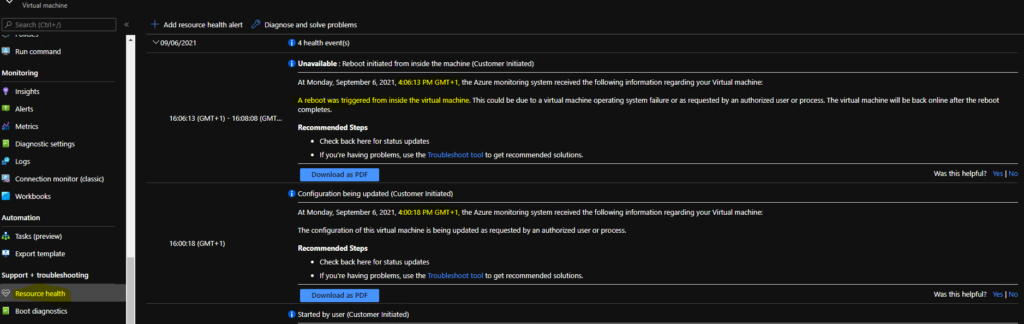
I was worried mainly because of the following alert in the Azure portal resource health tab of the VM. Initially, I thought this restart was happening because of the workaround script we implemented for the user-policy issue. Even I thought whether this was related to the Intune policy issue after the user’s first login.
AVD VM Force Rboot – Customer Initiated
I was wondering why the AVD VM is getting restarted. The reboot was triggered from inside the virtual machine. Let’s dig more into the details by logging into the VM.

- Unavailable: Reboot initiated from inside the machine (Customer Initiated)
- On Monday, September 6, 2021, 4:06:13 PM GMT+1, the Azure monitoring system received the following information regarding your Virtual machine:
- A reboot was triggered from inside the virtual machine. This could be due to a virtual machine operating system failure or as requested by an authorized user or process. The virtual machine will be back online after the reboot completes.
Restart Event ID for AVD VM
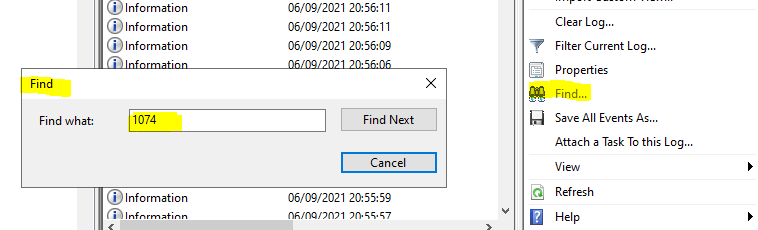
To find out what is happening with that VM and operating system using System event logs. The best way to find out restart event ID for AVD VM. Normally the restart event ID for all Windows operating systems is 1074.
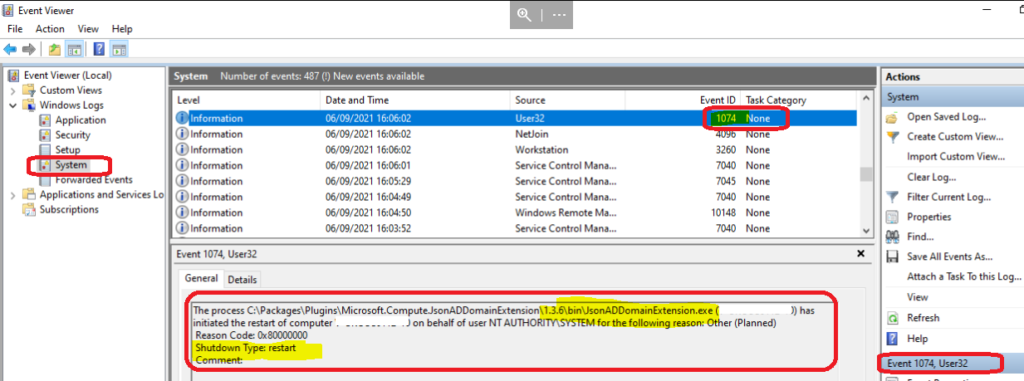
I started using the find option with 1074 from the event logs action menu to get more details. Here you go – I found the restart event, and again, there was a reason code 0x80000000 that doesn’t make any sense until I read the description.
What is Reason Code 0x80000000
I assume the reason code is the same as the error code 0x80000000. I didn’t find any details about error messages corresponding to 0x80000000.
The description gives a better idea about the event and restart. The JsonADDomainExtension.exe helped me to guess this is a restart that is very normal because it’s part of the Domain Join process. We all know you will have to restart the device to complete the domain join process.
- The process C:\Packages\Plugins\Microsoft.Compute.JsonADDomainExtension\1.3.6\bin\JsonADDomainExtension.exe (HTMDVM01-01) has initiated the restart of computer HTMDVM01-01 on behalf of user NT AUTHORITY\SYSTEM for the following reason: Other (Planned)
- Reason Code: 0x80000000
- Shutdown Type: restart
How to Confirm AVD VM is Hybrid Azure AD Joined or not?
You can confirm whether AVD VM is Hybrid Azure AD joined or not from the Azure AD portal. You can follow the steps mentioned below to confirm the date and time of the Hybrid AAD join. Also, this helps confirm whether the force restart/logoff script deployed from Intune is not causing the trouble here.
- Login to portal.azure.com.
- Search for Azure AD.
- Navigate to Azure AD -> Devices node.
- Search for the VM HTMDVM01-01.
- Check the Registered column to understand when is the Azure AD registration happened. It happened almost 25 minutes after domain join restart.
Intune enrollment (via group policy) of AVD VMs happens only after the Azure AD registration process. Hence, there is no possibility of Intune interference in the first restart you see for AVD VM in the Azure Resource health tab. That restart is part of the Domain join process!





Discussion