


Skip to content
AVD VM RD Client Connection Error 0x83886181

AVD VM RD Client Connection Error 0x83886181

Written By Anoop C Nair
Last Updated November 10, 2021
Posted In AVD
SHARE

Let’s have a quick look at the AVD VM RD client connection error 0x83886181. I hope this quick post might help to get some idea about the cause of the error 0x83886181. This error code is related to the RD client; hence you won’t find any references in Windows error documentation.

Hopefully, this would be helpful for helpdesk support to find out one of the causes for this error quickly. The RD client error code comes with an extended error code that is not useful. You can get more details about AVD VM connectivity errors by checking the activity ID. But I don’t think that is needed in this particular scenario.

I have been using AVD VM as the main work PC for many months now. Hence I know sometimes the errors are quite annoying as an end-user. I have shared another post, Fix WVD Refreshing Your Token Error | Couldn’t Connect to Session Desktop.

Error code: 0x83886181

I have been using the AVD VM, and the session got disconnected with the following error. The main challenge with this kind of disconnection is bad Teams meeting experience. If you are in the middle of a Teams meeting, it will get disconnected, and you will need to rejoin the meeting once the connection is back.

Patch My PC

The RD client error message below is technical, and I don’t think it benefits end-users. I think the RD client error messages should be less technical because end-users (non-IT users) often see these kinds of messages.
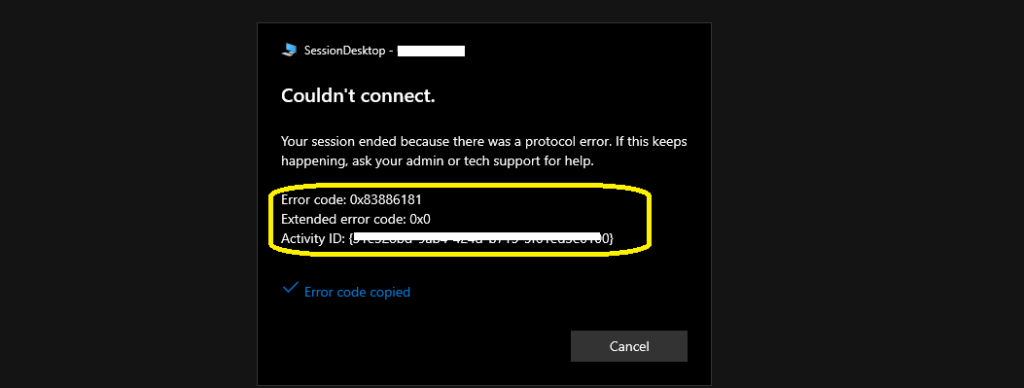
AVD VM RD Client Connection Error 0x83886181

Couldn’t connect – Your session ended because there was a protocol error. If this keeps happening, ask your admin or tech support for help.

Error code: 0x83886181
Extended error code: 0x0
Activity ID: {31e458bd-9ab4-324g-b715-5r61ed5h0345}

AVD VM RD Client Connection Error

The AVD VM RD Client Connection Error was caused because of internet connectivity issues. So this is nothing to do with AVD setup or RD client. Also, there could be other scenarios that can also cause the same error code. If you are already aware, try to comment below so that it will be helpful to the Virtual Desktop community.

The end-user needs to make sure that the internet connection is stable. Once the internet and WiFi connection is stable, reconnect to your AVD session host or remote desktop.


Resources

MSIX Registrations Limit Improvements | Windows 10 Multi-Session Increase Number of Concurrent Logins | Azure VDI | AVD

Author

Written by

Anoop C Nair is Workplace Technology solution architect with 25+ years of experience in global enterprise organizations such as JP Morgan, Capgemini, etc. Microsoft Certified Trainer. Microsoft MVP from 2015 onwards for consecutive 11+ years! He also conducts Intune and modern workplace tech training for enterprise organizations. He is Blogger, Speaker, and Founder of HTMD Community and HTMD Conference. His main focus is on Device Management technologies like Intune, Windows, Cloud PC. He writes about technologies like Intune, SCCM, Windows, Cloud PC, Windows, Entra, Microsoft Security.

Discussion

Join the discussion

Your email address will not be published. Required fields are marked *

Related guides

AVD

Windows 365 Frontline is Now Windows 365 Flex with No Change to Features or Licensing

Key Takeaways Windows 365 Frontline is Now Windows 365 Flex with No Change to Features or Licensing! Hey, let’s discuss about Windows 365 and Azure Virtual Desktop Expanding Access to Cloud Windows for Every Workstyle. The way people work is evolving, and so are cloud-delivered Windows solutions. From small businesses to enterprises and shift workers, […]

AC Anoop C Nair 4 min read
AVD

How RDP Multipath Improves Azure Virtual Desktop Connectivity Using Dynamic UDP Path Selection

Key Takeaways How RDP Multipath Improves Azure Virtual Desktop Connectivity Using Dynamic UDP Path Selection! RDP Multipath creates multiple connection paths between your device and the remote desktop instead of relying on just one. It continuously checks which path is performing best and automatically switches if one becomes slow or drops. This ensures a smoother […]

AC Anoop C Nair 4 min read
AVD

Resilient Connectivity Architecture with Multiple Service Instances in Azure

Key Takeaways Resilient Connectivity Architecture with Multiple Service Instances in Azure! This architecture helps IT administrators by providing a more reliable and scalable connectivity platform for cloud services. Because multiple service instances run independently within each region, the platform can continue operating even if one component fails. This reduces service disruptions and ensures that users […]

AC Anoop C Nair 3 min read

