






FIX: AVD Azure AD Joined VM Login Issue with Error Code 0x9735
Let’s find out how to fix the AVD Azure AD joined VM login issue with an error code 0x9735. I have mentioned the issue in the post How To Add Azure Virtual Desktop Session Host To Azure AD Join Guide. I think I did find out the reason for the login error. Microsoft announced the General Availability of Azure AD-joined VMs on 15th Sept 2021.
I also cover one other issue with AVD Azure AD joined VMs in this post. The status health check of the session host is failed with SessionHost unhealthy: SessionHost is not joined to a domain message. Let’s check how to fix this status error as well. Another two connectivity issues covered are Error 0x83886181 and reason code 0x80000000.
You have to ensure all the prerequisites are in place to test the Azure AD join scenario. The AVD host pool VMs must be Windows 10 single-session or multi-session, version 2004 or later. It’s a piece of good news that Azure AD join supported for Windows 10 multi-session.
Azure AD joined Session Host Login Issue
When I tried to connect to the session host from RD cline, it gave me the following error during the second logon. The following steps give you an idea about the login process:

Error 0x9735 translates to SSL_ERR_INVALID_UPN_NAME which originates from SEC_E_INVALID_UPN_NAME.- User opens a remote app or desktop on the client.
- RD Client establishes RDP connection with the RDGW
- RDGW passes info on the app/ desktop and user to the RD Broker.
- RD Broker identifies the host for the new user session to be established.
- RD Broker passes the UPN and the Gateway info (including port) to RD Agent on the host, which is handed over to the RD Stack on the host.
- RD Stack on the endpoint host, establishes reverse connect with RDGW.
- Just before the second login prompt, I’m getting the following errror.
Error code: 0x9735
Extended error code: 0x0
Activity ID: {e194ae11-b2ed-4d33-9520-c1d5ed140000}

Troubleshooting
I tried to use different combinations of user names and passwords (AzureAD\anoop@htmd.com) while trying login to the Azure AD joined session host. It didn’t help to connect to the AVD session host. I got another error after using this method. I also confirmed that the following points are covered:
- Verify that the AADLoginForWindows extension was not uninstalled after the Azure AD join finished.
- Security policy “Network security: Allow PKU2U authentication requests to this computer to use online identities” is enabled.
- All the other basic prerequisites are already explained in the previous blog post like:
- RBAC access – Virtual Machine User Login
- RDP Settings – targetisaadjoined:i:1
Error code: 0x3
Extended error code: 0x0
Activity ID: {f3418907-18f0-406f-925f-50a1ee610000}
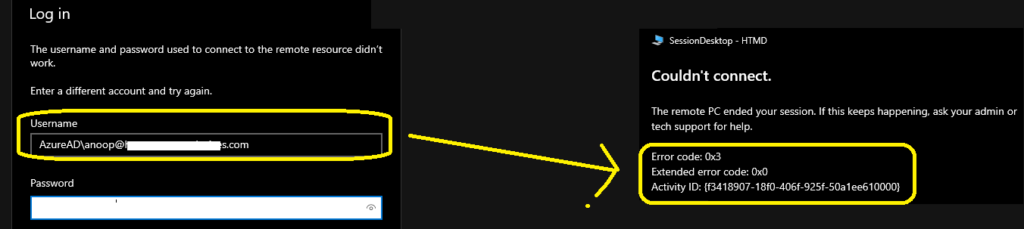
Fix AVD Azure AD Joined VM Login Issue
This is the solution that I found by mistake, and then I realized that this could be the reason. Because I had had similar issues when I tried to take RDP of Azure AD joined VM using Azure bastion. The following blog posts give you a better idea about this issue and its resolution.
- How to Take RDP Of Azure AD Joined Device
- RDP Of Azure AD Joined Device MS-Organization-P2P-Access Certificate
I tried to login to AVD Azure AD joined VM from Cloud PC, which is Hybrid Azure AD joined, and it started working. So, if you have to connect to Azure AD joined session host, then your base client or the device where you have installed RD client should satisfy any one of the following conditions.
- Windows device should be Azure AD Joined.
- Windows device should be Hybrid Azure AD joined.
NOTE! – I tried to register a Windows 10 device to Azure AD to connect to the AAD joined session host. But it didn’t work!

Azure AD Joined SessionHost unhealthy
I have seen the unhealthy status for Azure AD joined session hosts. I wondered what the issue could be because the error didn’t make any sense when I checked the details from the View Details hyperlink. The error message SessionHost is not joined to a domain doesn’t make any sense for AAD joined VM.
[ { "healthCheckName": "DomainJoinedCheck", "healthCheckResult": "HealthCheckFailed", "additionalFailureDetails": { "message": "SessionHost unhealthy: SessionHost is not joined to a domain", "errorCode": -2147467259, "lastHealthCheckDateTime": "2021-09-14T15:11:01.8851876Z" } }, { "healthCheckName": "SxSStackListenerCheck", "healthCheckResult": "HealthCheckSucceeded", "additionalFailureDetails": { "message": "SessionHost healthy: SessionHost healthy: SxS stack listener is ready", "errorCode": 0, "lastHealthCheckDateTime": "2021-09-14T15:11:02.0570662Z" } }, { "healthCheckName": "MetaDataServiceCheck", "healthCheckResult": "HealthCheckSucceeded", "additionalFailureDetails": { "message": "IMDS call succeeded", "errorCode": 0, "lastHealthCheckDateTime": "2021-09-14T15:11:02.8695643Z" } }, { "healthCheckName": "AppAttachHealthCheck", "healthCheckResult": "HealthCheckSucceeded", "additionalFailureDetails": { "message": "SessionHost healthy: MSIX packages have been properly staged", "errorCode": 0, "lastHealthCheckDateTime": "2021-09-14T15:11:02.8695643Z" } }]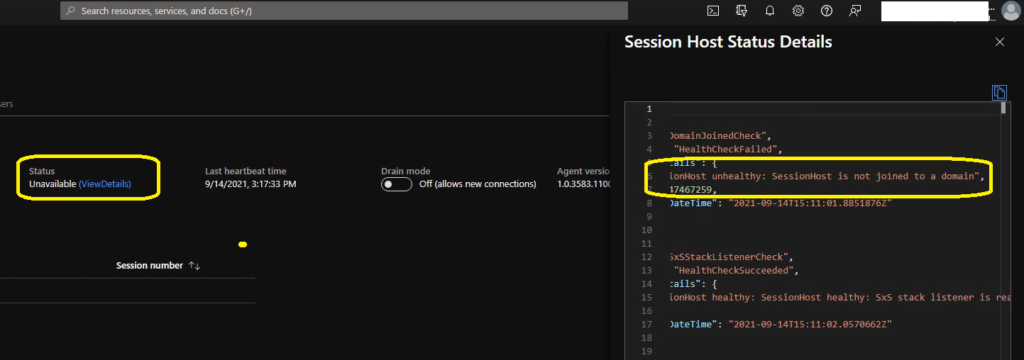
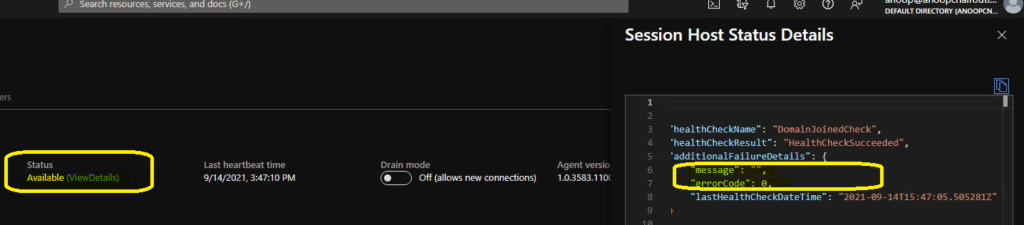
The issue or error status got fixed by itself, and the session host status shows as green after some time. So, don’t get panic with Session host status as unhealthy for Azure AD joined VMs. It will rectify itself.
[ { "healthCheckName": "DomainJoinedCheck", "healthCheckResult": "HealthCheckSucceeded", "additionalFailureDetails": { "message": "", "errorCode": 0, "lastHealthCheckDateTime": "2021-09-14T15:47:05.505281Z" } }, { "healthCheckName": "SxSStackListenerCheck", "healthCheckResult": "HealthCheckSucceeded", "additionalFailureDetails": { "message": "SessionHost healthy: SessionHost healthy: SxS stack listener is ready", "errorCode": 0, "lastHealthCheckDateTime": "2021-09-14T15:47:05.5845606Z" } }, { "healthCheckName": "MetaDataServiceCheck", "healthCheckResult": "HealthCheckSucceeded", "additionalFailureDetails": { "message": "IMDS pressumed available", "errorCode": 0, "lastHealthCheckDateTime": "2021-09-14T15:47:06.0134324Z" } }, { "healthCheckName": "AppAttachHealthCheck", "healthCheckResult": "HealthCheckSucceeded", "additionalFailureDetails": { "message": "SessionHost healthy: MSIX packages have been properly staged", "errorCode": 0, "lastHealthCheckDateTime": "2021-09-14T15:47:06.0134324Z" } }]
Additional RD Client Connectivity Errors for WVD and Cloud PC
Additional Errors that I have received more than ones and most of these errors are temporary issues or connectivity issues. You can just try to close the RD client or RD web client and relaunch the session host.
Error code: 0x83886181
Extended error code: 0x0
Activity ID: {46bb535d-d757-4e9a-9df5-b354d7130100}
Error code: 0x50331669
Extended error code: 0x0
Activity ID: {13a15afc-3712-4843-812d-800a1ed60000}




“So, if you have to connect to Azure AD joined session host, then your base client or the device where you have installed RD client should satisfy any one of the following conditions.
Windows device should be Azure AD Joined.
Windows device should be Hybrid Azure AD joined.”
Is not entirely true. The RDP property targetisaadjoined:i:1 helps mitigate this limitation and allows non-AAD joined client devices launch AVD sessions.
I have tested this in both test and client situations.