






How to Fix WebView Authentication Failure in Intune Connector v6.2505.2001.2 on Windows Server 2016 or 2019
Let’s discuss How to Fix WebView Authentication Failure in Intune Connector v6.2505.2001.2 on Windows Server 2016 or 2019. Microsoft Intune users are affected by an issue when trying to sign in after installing version 6.2505.2001.2 of the Intune Connector from the Intune portal.
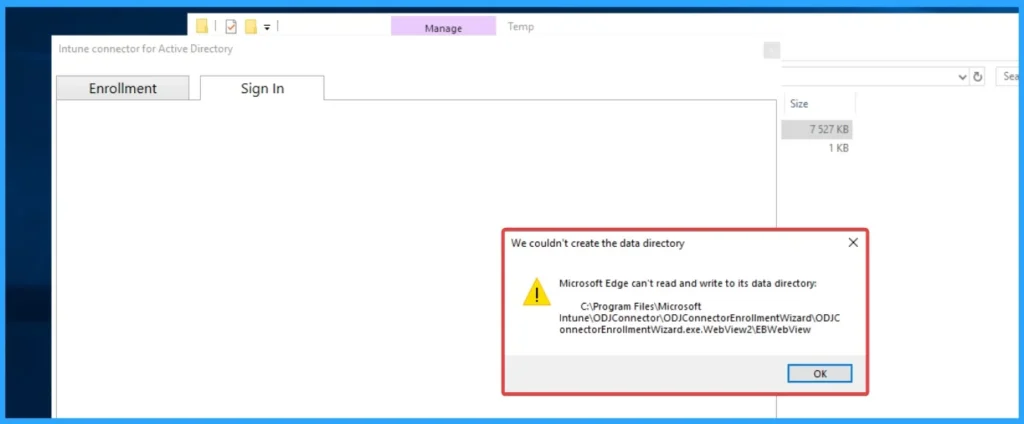
The user completed the installation of Intune Connector, but when trying to clicking “Sign In” leads to a WebView issue on Windows Server 2016 and 2019. Due to this issue, users face many potential issues. Security risks and enrollment failure will trigger.
As you know that, Intune Connector is a tool that helps to enable Microsoft Entra hybrid join during Windows Autopilot deployments. It is very secure tool that connect Microsoft Intune and and on-premises Active Directory environments.
The affected users are seeking for help to resolve the issue. They already try to resolve the issue by reinstalling, running as Administrator, and rebooting the Intune connector. In this blog post, I would like to steps and more information about this issue.

Table of Contents
How to Fix WebView Authentication Failure in Intune Connector v6.2505.2001.2 on Windows Server 2016 or 2019
The issue occurred on WebView. It is a component dedicated to displaying the Microsoft sign-in interface inside the Intune Connector for Active Directory. The table below shows the WebView issue on Servers.
| On Server 2016 | On Server 2019 |
|---|---|
| Tried installing new Edge/WebView. | WebView is already installed. |
- How to Use Microsoft Intune Connector with Multiple Domains Security Update Insights
- Troubleshooting Entra ID Connect Sync Issue Authentication Failure with Entra ID
- How to Allow or Block Web Authentication Requests on Sites with Broken TLS Certificates in Edge Browser using M365 Admin Center
Reasons for the Issue
There are many reasons behind the issue with the Intune Connector. The issue occurring on the Intune Connector is very common. WebView issue has occurred in this case. The following are the reasons.
- Authentication Prompt Rendering Failure
- Misconfiguration of WebView Installation
- GPO or Security Restrictions
Workarounds
To resolve this issue, you can follow many steps. The affected user has already tried troubleshooting steps like reinstalling, running as Administrator, and rebooting the Intune connector. Always try this method before going to other methods.
Verification of WebView2 Runtime Installation
To verify the WebView2 Runtime Installation, go to Programs and Features and confirm Microsoft Edge WebView2 Runtime is installed.
Group Policy Checking
To resolve the issue, you can check the GPOs that may restrict UWP apps, scripts, or embedded web content (some may block WebView usage).
Enable TLS 1.2
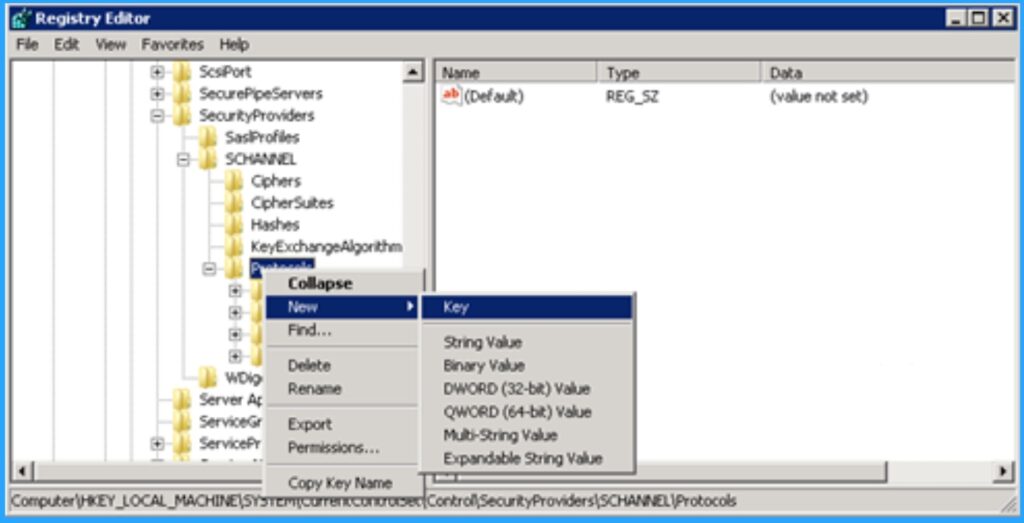
You should ensure TLS 1.2 is enabled via registry or server settings, as older TLS versions may block secure authentication.
Need Further Assistance or Have Technical Questions?
Join the LinkedIn Page and Telegram group to get the latest step-by-step guides and news updates. Join our Meetup Page to participate in User group meetings. Also, Join the WhatsApp Community to get the latest news on Microsoft Technologies. We are there on Reddit as well.
Author
Anoop C Nair has been Microsoft MVP for 10 consecutive years from 2015 onwards. He is a Workplace Solution Architect with more than 22+ years of experience in Workplace technologies. He is a Blogger, Speaker, and Local User Group Community leader. His primary focus is on Device Management technologies like SCCM and Intune. He writes about technologies like Intune, SCCM, Windows, Cloud PC, Windows, Entra, Microsoft Security, Career, etc.


Discussion