






AVD Intune Support is Available for Windows 10 or Windows 11 Multi-Session
The Microsoft docs page recently received an update announcing that AVD Intune Support is available for Windows 10 or Windows 11 Multi-Session. It’s great news that Microsoft Endpoint Manager (MEM) Intune officially supports Windows 10 or Windows 11 multi-session VMs. This support is in public preview while writing this post.
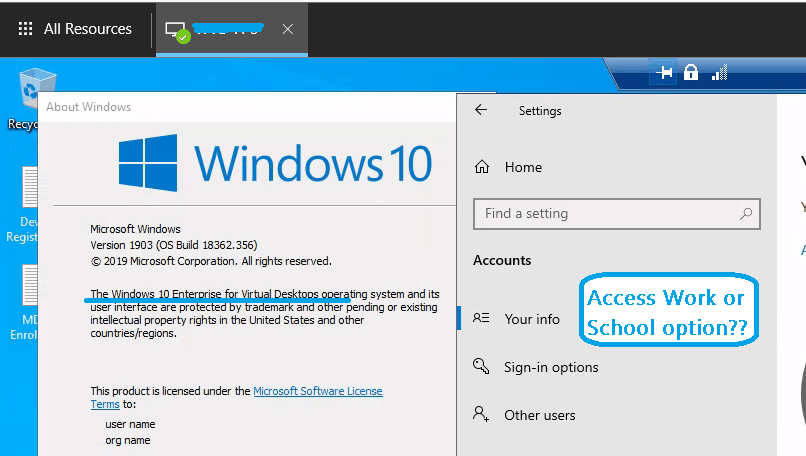
I have tested Windows 11 or 10 multi-session operating systems with Intune, and my experience is shared in the previous post, AVD Windows 10 Multi-Session Intune Hybrid Azure AD Support. As you can see in that post, the Access Work or School option is missing from the settings app on Windows 10 Multi-session.
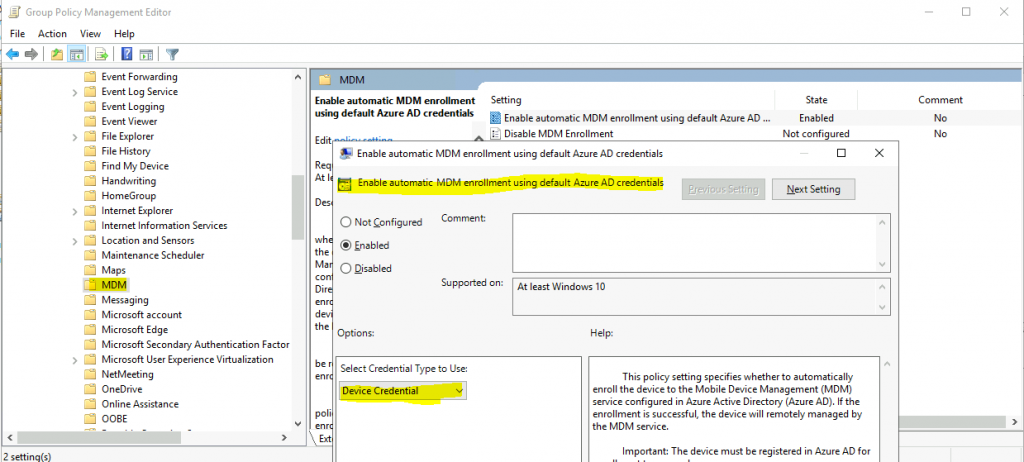
The only option to enroll Windows 10 multi-session VMs into Intune is using the Intune Group policy. You have more details about Windows 10 Intune Enrollment Using Group Policy | Automatic Enrollment | AVD | Azure Virtual Desktop. Let’s also understand what is Microsoft Endpoint Manager (#MEM).
Windows 10 multi-session support is already in place for Configuration Manager (a.k.a SCCM). You can read more about ConfigMgr Windows 10 Multi-Session Support For AVD | SCCM. Also, you can read about Windows 10 multi-session patching options with ConfigMgr.

Table of Contents
Prerequisites – AVD Intune Support is Available for Windows 10 Multi-Session
The following are the prerequisites and limited support available for Windows 10 Multi-Session VMs using Endpoint Manager Intune. Yes, AVD Intune Support has been announced for Windows 10 Multi-Session, but this is in public preview (generally available now) while writing this post. Things can change sooner after the public preview release.
- Windows 10 multi-session, version 1903 or later.
- Hybrid Azure AD-joined (Domain Join + Azure AD Registered).
- Set up host pool as pooled for Windows 10 multi-session VMs.
- Enrolled in Intune using any of the following options:
- Use Active Directory group policy, set to use Device credentials, and set to enroll devices that are Hybrid Azure AD-joined automatically.
- Configuration Manager/SCCM co-management to enrol in Endpoint Manager Intune (MEM).
- Intune Support For Multi-Session Windows Server OS Version | AVD Workloads.
- Enable Do Not Allow Video Capture Redirection in AVD using Microsoft Intune.
- AVD Enable Audio and Video Playback Redirection and Limit Audio Playback Quality using Intune
Limited Support with Intune (MEM)
The following is the limited support available with MEM Intune. I think we will soon have more support announcements from Microsoft.
- Only Intune Device-based policy configurations are supported. You cannot deploy the User scope policies at this time.
- All Windows 10 multi-session configurations must be targeted to Azure AD device groups.
- Existing Intune device configuration profile policies are not supported for Windows 10 Enterprise multi-session VMs.
- Only support device certificates at this point.
Intune Configuration Policies for Windows 10 Multi-Session
Let’s check how to create Intune policies for AVD Windows 10 multi-session VMs. Before configuring Intune policies, ensure you have reviewed the limited support with Intune (MEM) points and prerequisites.
- Sign in to https://endpoint.microsoft.com/ portal with admin access
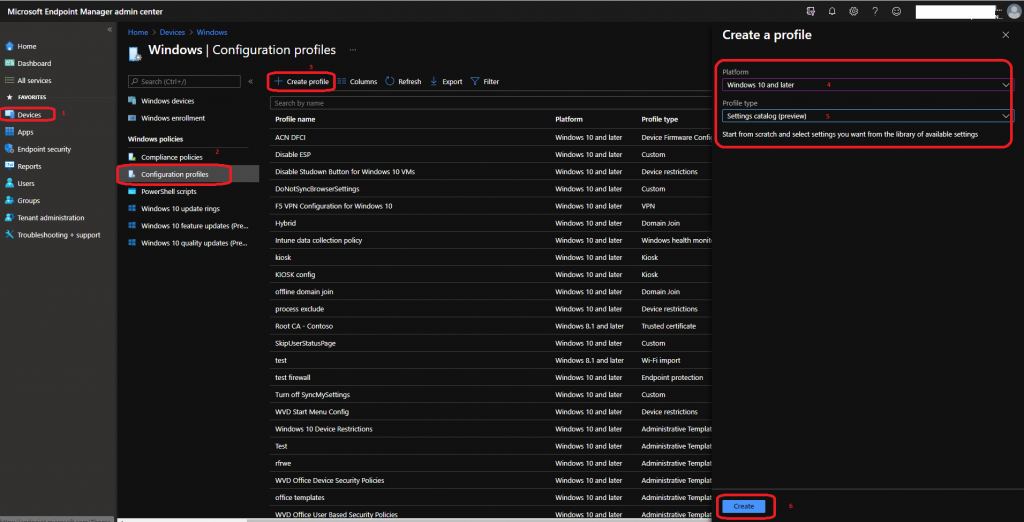
- Select Devices > Windows > Configuration profiles > Create Profile.
- Select Windows 10 and later from the Platform options.
- Select Settings Catalog (Preview) for the Profile type.
- Click on the Create button.
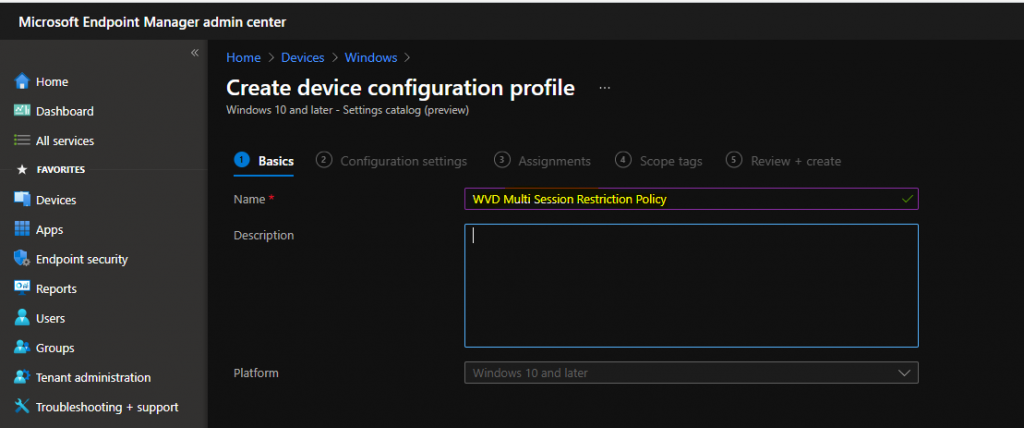
Enter the profile name and Description of the profile and click on the Next button.
Intune Filters for Multi-Session
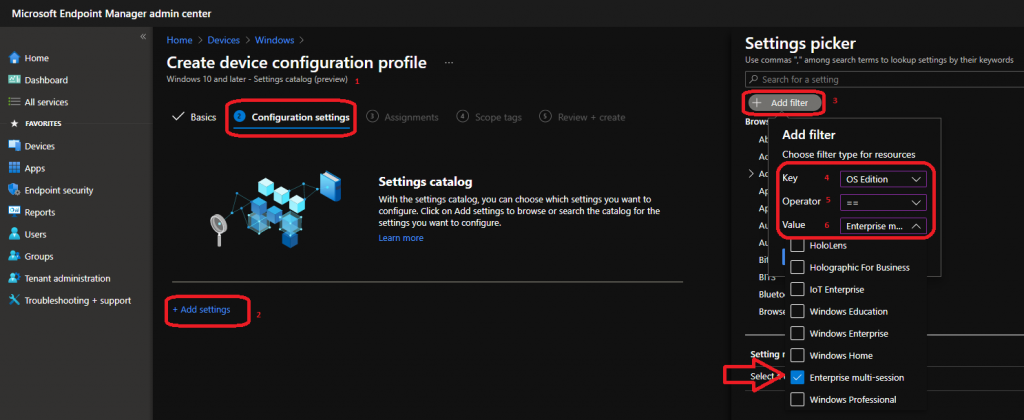
From the Configuration settings page, select the Add settings hyperlink.
Under the Settings selector, select the Add filter button to show only Windows 10 multi-session supported policies from the Intune settings catalog. To filter, select the following options:
- Key: OS edition
- Operator: ==
- Value: Enterprise multi-session
- Select the Apply button to show the relevant policies
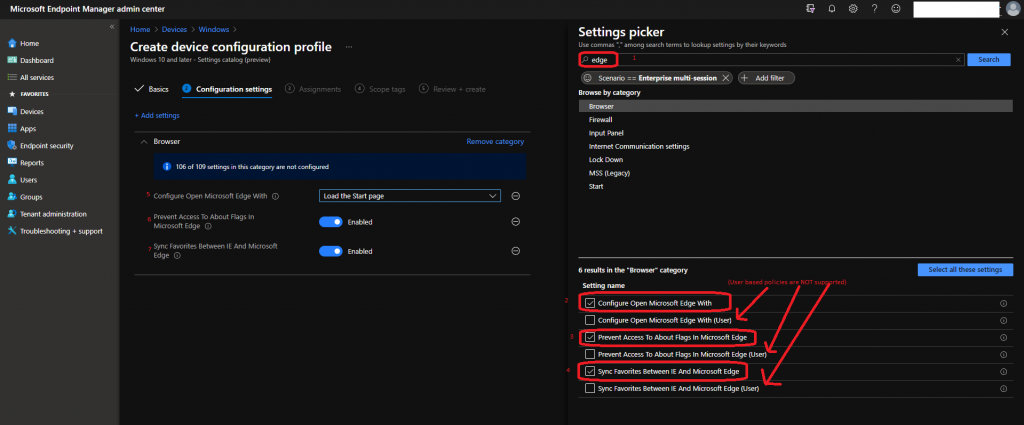
For example, I want to deploy some Microsoft Edge-related configuration policies. On the search bar, type in Edge and click the search button to show the relevant policies.
Now, as shown in the screenshot below, you must select only device-based policies. After choosing each policy, try to configure it.
Click on the NEXT button to continue to the next page.
NOTE! The policy’s scope is shown in parentheses (Device or User). Currently, only device settings are supported for multisession.
The rest of the configurations are similar to the post How To Set Time Zone For AVD VMs With Endpoint Manager | Intune Policies | Settings Catalog. Only ensure you assign Windows 10 multi-session device-based configuration policies only to Azure AD device groups.
Troubleshooting Options for AVD
The following posts might help you troubleshoot issues related to the Intune Settings catalog (and, in general, Intune troubleshooting).
- Free Intune Training Videos
- How to Start Troubleshooting Intune Issues
- Windows 10 MDM Log Checklist
- MDM Diagnostics Tool – Tips & Tricks
- Learn How to Collect Windows 10 Diagnostics Information from Intune Portal | Endpoint Manager
We are on WhatsApp. To get the latest step-by-step guides and news updates, Join our Channel. Click here –HTMD WhatsApp.
Author
Anoop C Nair has been Microsoft MVP for 10 consecutive years from 2015 onwards. He is a Workplace Solution Architect with more than 22+ years of experience in Workplace technologies. He is a Blogger, Speaker, and Local User Group Community leader. His primary focus is on Device Management technologies like SCCM and Intune. He writes about technologies like Intune, SCCM, Windows, Cloud PC, Windows, Entra, Microsoft Security, Career, etc.




Hey, did you some testing with AVD Personal Host and ESP? It seems like dynamic groups are not supported/working. Do you have made any experiences with this? Thanks in advance