






AVD Web Client URL Details Azure Virtual Desktop
Let’s document the AVD Web client URL for v1 and ARM (v2). I mentioned the URL details in the previous post. However, I wasted 10 minutes searching for them, so I decided to post this as a note to myself.
Azure Virtual Desktop is designed for organizations that are proficient in implementing and managing virtual desktop infrastructure (VDI) solutions. It is intended to provide employees with a secure, remote Windows desktop experience suitable for various use cases.
You will find your workspaces when logging into the Remote Desktop Web client. These workspaces combine all the desktops and applications your administrator has made available to you.
In this post, you will see the client-side connectivity option for Azure Virtual Desktop using a web URL. The same web URL can connect to the Windows 365 Cloud PC offer.

| Index |
|---|
| Latest AVD Web Client URL Changes |
| V2 – ARM – AVD Web Client URL |
| V1 – Non-ARM – AVD Web Client Access URLs |
Latest AVD Web Client URL Changes
Microsoft is changing AVD Web Client URLs yet again. I assume this is to introduce improvements with new platforms.
Microsoft announced that beginning 18 April 2022, the Azure Virtual Desktop web client will be moved to a new URL. The new URL is available now and ready for use.
Azure Virtual Desktop Web Client:
Old: https://rdweb.wvd.microsoft.com/arm/webclient/index.html
Old: https://www.wvd.microsoft.com/arm/webclient/index.html
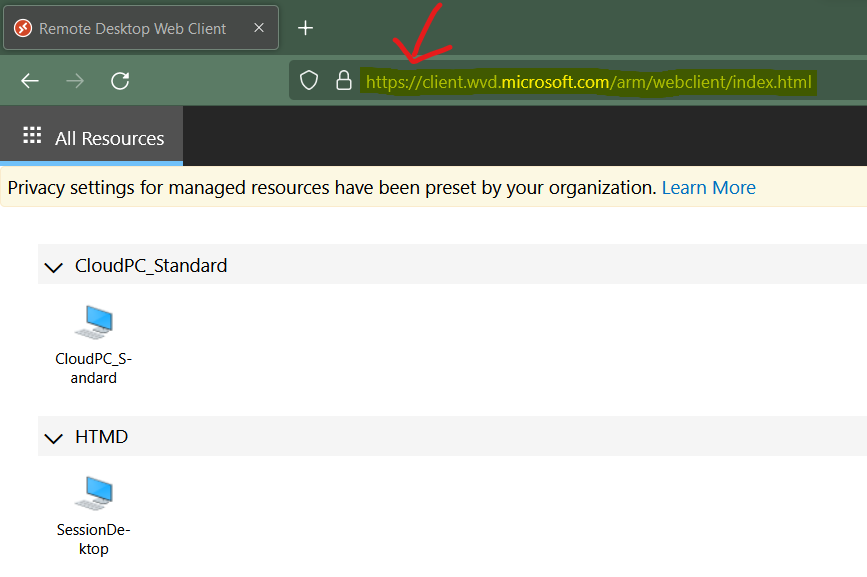
New: https://client.wvd.microsoft.com/arm/webclient/index.html
Azure Virtual Desktop Classic Web Client (V1 version – NON ARM):
Old: https://rdweb.wvd.microsoft.com/webclient/index.html
Old: https://www.wvd.microsoft.com/webclient/index.html
New: https://client.wvd.microsoft.com/webclient/index.html
V2 – ARM – AVD Web Client URL
You must log on to https://client.wvd.microsoft.com/arm/webclient/index.html with an Azure AD username and password.
Click the Remote Desktop Session host available.
Log in to Remote Desktop using the same Azure username and password as above.
TIP – It’s easy to remember that ARM must be in between. Try to open the above link from the New Private Window. https://aka.ms/wvdARMweb – https://client.wvd.microsoft.com/arm/webclient/index.html

V1 – Non-ARM – AVD Web Client Access URLs
Log on to https://client.wvd.microsoft.com/webclient/index.html with your Azure AD username and password (try opening the above link from a New Private Window).
Click the Remote Desktop Session host available.
Log in to Remote Desktop using the same Azure username and password as above.
TIP – Try to open the above link from the New Private Window. https://aka.ms/wvdweb – https://client.wvd.microsoft.com/webclient/index.html

Resources
- Install Subscribe Windows RD Client for WVD End User Step-by-Step Guide
- Microsoft VDI Story AVD Concept Setup Guide Myths Known Issues
We are on WhatsApp. To get the latest step-by-step guides and news updates, Join our
Channel. Click here –HTMD WhatsApp.
Author
Anoop C Nair is Microsoft MVP! He is a Device Management Admin with more than 20 years of experience (calculation done in 2021) in IT. He is a Blogger, Speaker, and Local User Group HTMD Community leader. His primary focus is Device Management technologies like SCCM 2012, Current Branch, and Intune. He writes about ConfigMgr, Windows 11, Windows 10, Azure AD, Microsoft Intune, Windows 365, AVD, etc.




Discussion