






Let’s learn about the Best AVD Cloud PC Migration Principles. It is good to see how much automation is available for Azure Virtual Desktop. Now, let’s talk about migration principles.
If you are new to virtualization or VDI and don’t have any existing setup, the easiest start is with Windows 365. It offers a familiar Windows experience on Windows 11; users can access it from any device.
If you are already using VDI on-premises, with a partner, or in another cloud, or if you use traditional Windows-based RDS (Remote Desktop Service), you will need to consider whether to stick with Windows 365, move to Azure Virtual Desktop or even use both for their strengths in your organization.
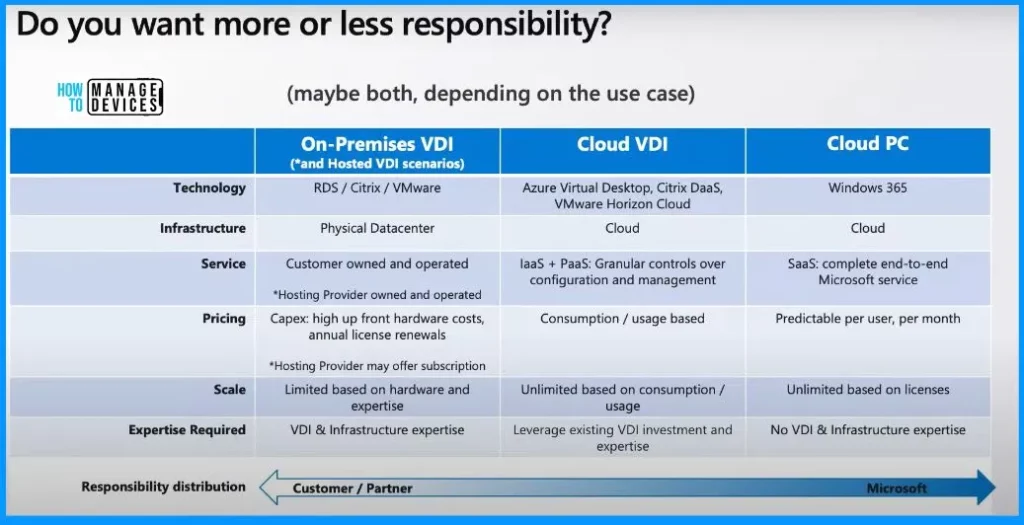
One of our articles helps you understand the differences between Windows 365 Cloud PC and Azure Virtual Desktop (AVD) Cloud VDI. Microsoft provides 3 main ways for users to access Windows: the traditional PC experience, Cloud VDI with AVD, and Cloud PC through Windows 365.

- New Azure Virtual Desktop App in the Microsoft Store Winget and Intune
- Windows 365 Cloud PC Power On and Power Off
- New Features Windows 365 Cloud PC 2311 November Service Release
- Windows 365 AI-based Cloud PC Resize Recommendations
- How to Connect AVD Remote Desktop Resources Client or Browser?
- How to Deploy Remote Desktop Client using ConfigMgr | SCCM | WVD
What is the Significance of Automation in Azure Virtual Desktop?
Automation in Azure Virtual Desktop processes makes managing and customising virtual desktop environments easier.
Best AVD Cloud PC Migration Principles
The End-users can access Windows through Cloud PC and Azure Virtual Desktop from any device. It provides flexibility and accessibility across various platforms. Consider a few essential questions before making decisions.
If you aim to provide individual, personalized desktops for each user, establishing a dedicated one-to-one relationship, then Windows 365 is your top and initial choice. Assess whether you have skilled in-house resources to manage a VDI (virtual desktop infrastructure).
Additionally, consider whether you desire flexibility and maximum control over how you set up the Infrastructure, including networking and underlying components. Making these considerations will guide you towards the best-suited solution for your needs.
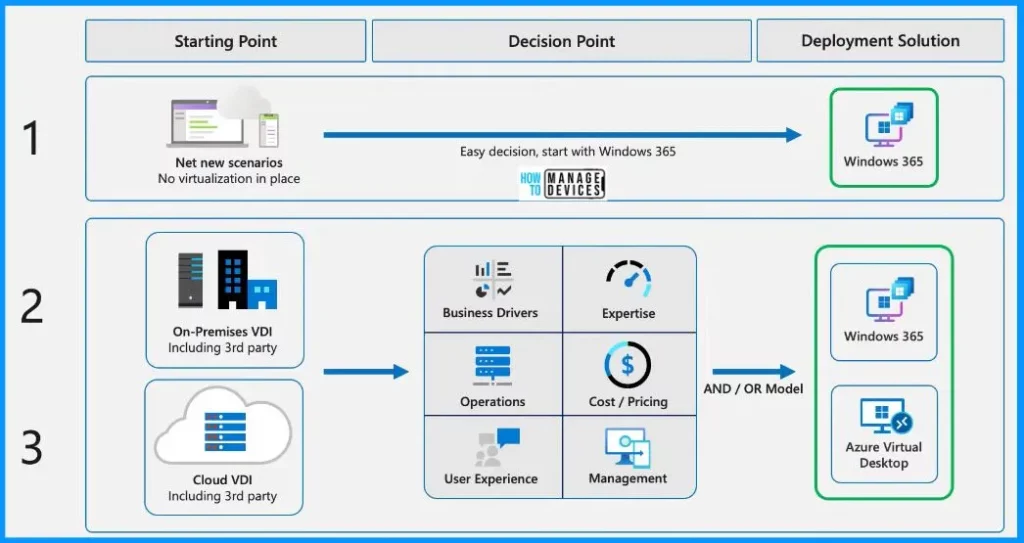
Windows 365 and Azure Virtual Desktop (AVD) bring unique values. In the middle of this, Cloud VDI includes AVD and partner solutions like Citrix and VMware. With AVD and these partners, you can create your virtual desktop solution in the cloud.
- This means you get the power to build your setup while also leveraging the infrastructure support from Microsoft, Citrix, or VMware.
- They handle tasks like brokering, secure connectivity, and managing the underlying Infrastructure.
- This gives you a middle ground between doing everything independently in a data center and the straightforward simplicity of SaaS solutions like Windows 365.
| Details | On-premises VDI | Cloud VDI | Cloud PC |
|---|---|---|---|
| Technology | RDS / Citrix / VMware | Azure Virtual Desktop, Citrix DaaS, VMware Horizon Cloud | Windows 365 |
| Infrastructure | Physical Datacenter | Cloud | Cloud |
| Service | Customer-owned and operated | laaS + PaaS: Granular controls over configuration and management | SaaS: complete end-to-end Microsoft service |
| Pricing | High upfront hardware costs, annual license renewals | Consumption/usage-based | Predictable per user, per month |
| Scale | Limited based on hardware and expertise | Unlimited based on consumption / usage | Unlimited based on licenses |
| Expertise Required | VDI & Infrastructure expertise | Leverage existing VDI investment and expertise | No VDI and infrastructure expertise |
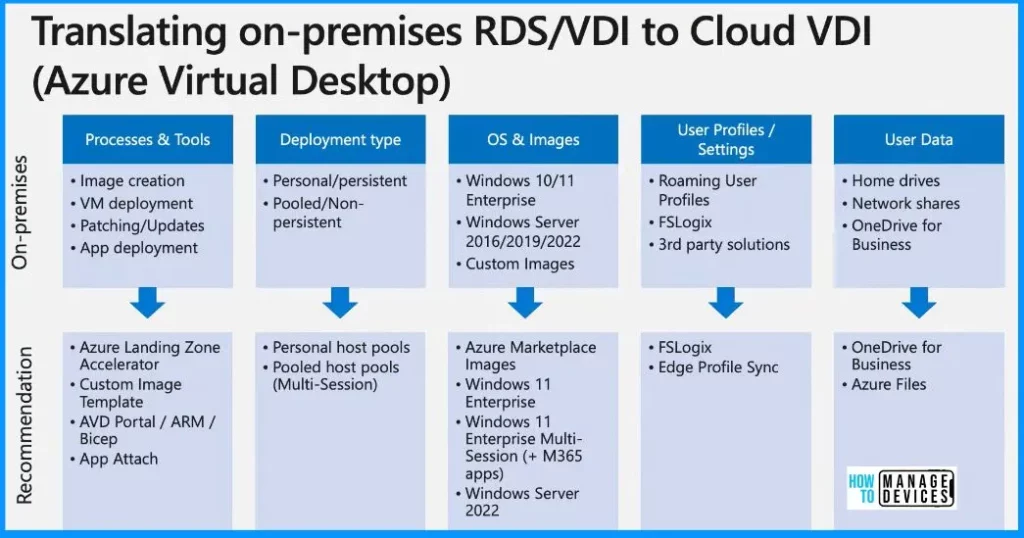
Translating On-premises RDS/VDI to Cloud VDI
Azure Virtual Desktop has solutions that cover various aspects of your needs. The Azure Landing Zone Accelerator, along with scripts available through ARM and Bicep templates, is there to assist you in automating and deploying tasks.
Additionally, there’s the custom image template feature for managing images and creating templates specific to your organization. This feature is now seamlessly integrated directly into the Azure portal and the AVD experience, making handling image customization and deployment easier.
| Processes & Tools | Deployment type | OS & Images | User Profiles / Settings | User Data | |
|---|---|---|---|---|---|
| On-premises | · Image creation · VM deployment · Patching/Updates · App deployment | ·Personal/persistent · Pooled/Non- persistent | . Windows 10/11 Enterprise . Windows Server 2016/2019/2022 · Custom Images | · Roaming User Profiles · FSLogix · 3rd party solutions | · Home drives . Network shares · OneDrive for Business |
| Recommendation | · Azure Landing Zone Accelerator · Custom Image Template · AVD Portal / ARM /Bicep · App Attach | .Personal host pools .Pooled host pools (Multi-Session) | · Azure Marketplace Images . Windows 11 Enterprise . Windows 11 Enterprise Multi-Session (+ M365 apps) · Windows Server 2022 | · FSLogix · Edge Profile Sync | . OneDrive for Business · Azure Files |
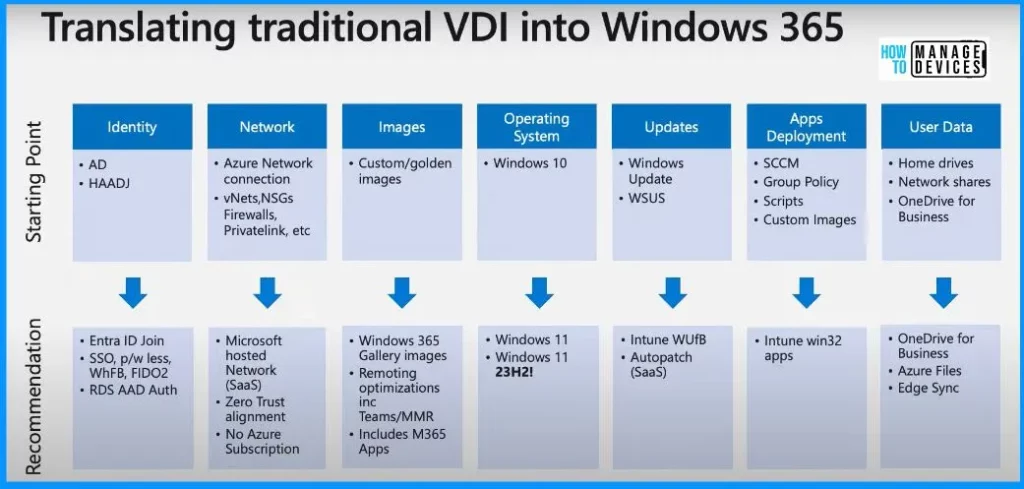
Translating Traditional VDI into Windows 365
You have versatile tools when shifting to the Cloud, precisely Azure Virtual Desktop and Windows 365. One of the essential tools is OneDrive for Business. It is handy for storing user data using the known folder move feature.
This feature helps redirect desktops, documents, and pictures of users into OneDrive for Business. The important thing is that whatever you store there is easily accessible in both AVD and Windows 365. For users, having access to their data and apps is crucial, and OneDrive for Business makes that happen simple.
| Identity | Network | Images | Operating System | Updates | Apps Deployment | User Data | |
|---|---|---|---|---|---|---|---|
| Starting Point | · AD · HAADJ | · Azure Network connection · vNets, NSGs Firewalls, Privatelink, etc | · Custom/golden images | Windows 10 | . Windows Update · WSUS | · SCCM · Group Policy · Scripts · Custom Images | . Home drives . Network shares · OneDrive for Business |
| Recommendation | . Entra ID Join · SSO, p/w less, WhFB, FIDO2 · RDS AAD Auth | · Microsoft hosted Network (SaaS) · Zero Trust alignment · No Azure Subscription | · Windows 365 Gallery images · Remoting optimizations inc Teams/MMR . Includes M365 Apps | . Windows 11 . Windows 11 23H2! | · Intune WUfB · Autopatch (SaaS) | . Intune win32 apps | · OneDrive for Business · Azure Files · Edge Sync |
Tools for Transitioning to Azure Virtual Desktop and Windows 365
The window below helps you show all the tools that can help you move into Azure Virtual Desktop and Windows 365. Enable OneDrive for Business to store user data (Known Folder move). Enable Edge Settings Sync to move favourites/bookmarks to the cloud.
- Enable Enterprise State Roaming to retain app preferences
- Use Azure File Sync to move SMB network shares into Azure Files
- New Custom Image Template feature to build your images directly in Azure if you need customized OS images
- IntuneWinAppUtil.exe – Convert Win32 apps to .intunewin
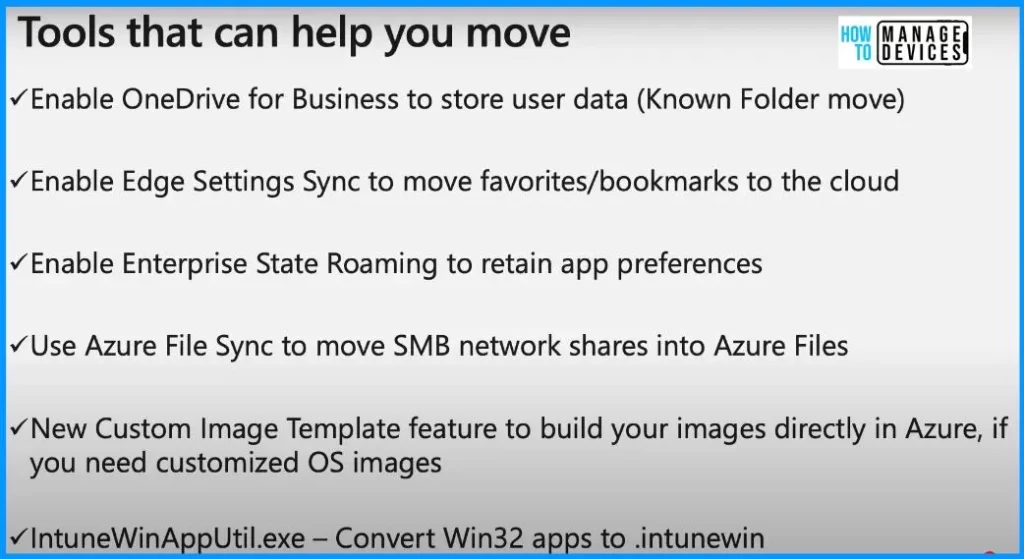
Accelerate your migration to Windows 365 and Azure Virtual Desktop (youtube.com) – NOTE! – Microsoft shared detailed information on Best AVD Cloud PC Migration Principles with the latest Technical Takeoff session by Claus Emrich.
We are on WhatsApp. To get the latest step-by-step guides and news updates, Join our Channel. Click here – HTMD WhatsApp.
Author
About the Author – Vidya is a computer enthusiast. She is here to share quick tips and tricks with Windows 11 or Windows 10 users. She loves writing on Windows 11 and related technologies. She is also keen to find solutions and write about day-to-day tech problems.




Discussion