






Configure Azure Bastion Developer SKU for Low Cost Secure Connections
In this post, we will explore Azure Bastion Developer and why you use this solution for developers. This service is designed to simplify and enhance the process of accessing Azure Virtual Machines by eliminating the complexities, high costs, and security concerns often associated with alternative methods.
The Bastion Developer SKU is a new, lower-cost, lightweight SKU. This SKU is ideal for Dev/Test users who want to connect to their VMs securely and who don’t need additional features or scaling. You can connect to one Azure VM at a time directly through the Virtual Machine Connect page.
The Azure Bastion Developer SKU represents a novel, cost-effective, and streamlined version of the Bastion service. Bastion Developer allows users to establish secure connections to a single VM at a time without the necessity of additional network configurations or exposing public IPs on VMs.
Users can directly access their VMs through the connect experience on the VM blade in the portal, with RDP/SSH access already available. Bastion Developer caters to Dev/Test users seeking secure VM connections without the need for additional features or scalability.

During Preview, Bastion Developer SKU is free of charge. Pricing details will be released at GA for a usage-based pricing model. After Bastion is deployed, you can connect to virtual machines (VM) in the virtual network via Bastion using the private IP address of the VM.
- Enable Hibernation For Azure Virtual Machines
- Azure VM Inspector Tool For Troubleshooting Issues Of Virtual Machines
How to Get Started with Azure Bastion Developer
When you create Azure Bastion using default settings, the settings are configured for you. You can’t modify or specify values for a default deployment. You can leverage preview Azure Bastion Developer in your environment, For detailed deployment steps, refer to Deploy Bastion automatically – Developer SKU.
- Sign in to the Azure portal https://portal.azure.com
- In the portal, go to the VM to which you want to connect. The values from the virtual network in which this VM resides will be used to create the Bastion deployment.
- On the page for your VM, in the Operations section on the left menu, select Bastion. You can also get to this page via your Virtual Network/Bastion in the portal.
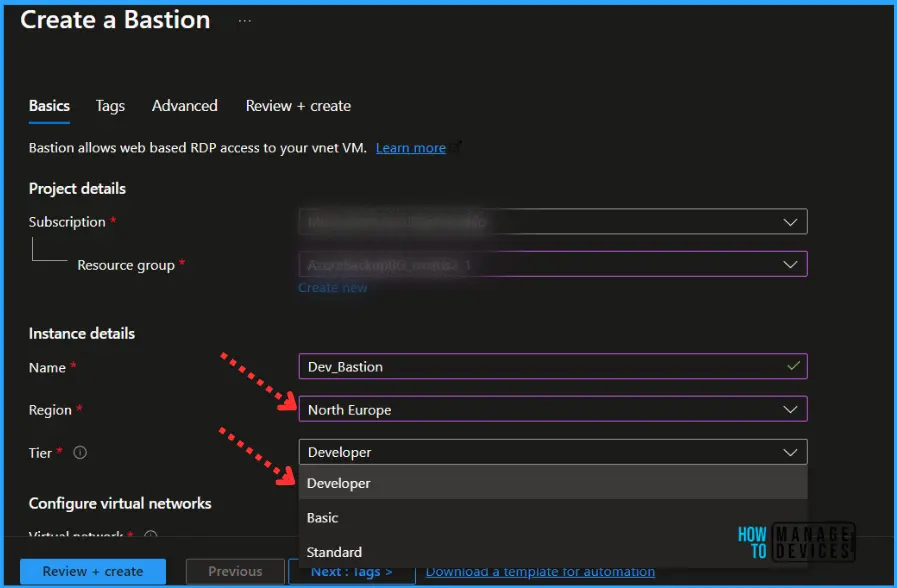
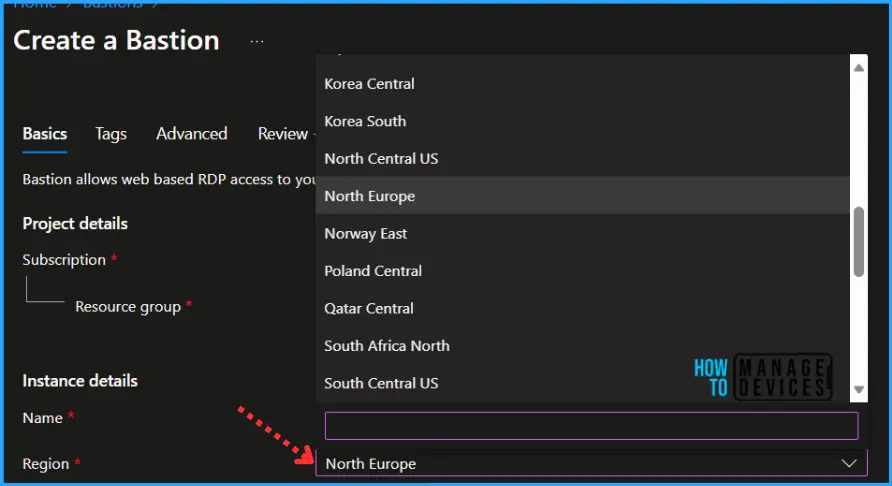
The Developer SKU has different requirements and limitations than the other SKU tiers. The Azure Bastion Developer SKU (Preview) is currently available in the following regions:
- Central US EUAP
- East US 2 EUAP
- West Central US
- North Central US
- West US
- North Europe
SKU Feature Comparision of Azure Bastion Offerings
The 3 SKU tiers are basic, Standard, and Developer. Each SKU is catered towards a specific scenario and has differences in features. A SKU is also known as a Tier. Azure Bastion supports multiple SKU tiers. When you configure Bastion, you select the SKU tier.
You decide the SKU tier based on the features that you want to use. The following table shows the availability of features per corresponding SKU.
| Feature | Developer SKU | Basic SKU | Standard SKU |
|---|---|---|---|
| Connect to target VMs in same virtual network | Yes | Yes | Yes |
| Connect to target VMs in peered virtual networks | No | Yes | Yes |
| Support for concurrent connections | No | Yes | Yes |
| Access Linux VM Private Keys in Azure Key Vault (AKV) | No | Yes | Yes |
| Connect to Linux VM using SSH | Yes | Yes | Yes |
| Connect to Windows VM using RDP | Yes | Yes | Yes |
| Connect to Linux VM using RDP | No | No | Yes |
| Connect to Windows VM using SSH | No | No | Yes |
| Specify custom inbound port | No | No | Yes |
| Connect to VMs using Azure CLI | No | No | Yes |
| Host scaling | No | No | Yes |
| Upload or download files | No | No | Yes |
| Kerberos authentication | No | Yes | Yes |
| Shareable link | No | No | Yes |
| Connect to VMs via IP address | No | No | Yes |
| VM audio output | Yes | Yes | Yes |
| Disable copy/paste (web-based clients) | No | No | Yes |
Connectivity Options with Azure Bastion Developer
Azure Bastion is a service in Microsoft Azure that allows secure and seamless Remote Desktop Protocol (RDP) and Secure Shell (SSH) connectivity to virtual machines (VMs) directly from the Azure portal. When working with Azure Bastion as a developer, you have several connectivity options to consider:
- Portal-based access (public preview). Bastion Developer will offer support for RDP connections for Windows Virtual Machines and SSH connections for Linux Virtual Machines in the Azure portal.
- Native client-based access for SSH (roadmap). Bastion Developer will offer support for SSH connections for Linux Virtual Machines via Azure Command Line Interface (CLI) in the coming months.
We are on WhatsApp. To get the latest step-by-step guides and news updates, Join our Channel. Click here –HTMD WhatsApp.
Author
About Author – Jitesh, Microsoft MVP, has over six years of working experience in the IT Industry. He writes and shares his experiences related to Microsoft device management technologies and IT Infrastructure management. His primary focus is Windows 10/11 Deployment solution with Configuration Manager, Microsoft Deployment Toolkit (MDT), and Microsoft Intune.


Discussion