






Watermarking and Advanced AI Security in Edge for Business Available for Fully Managed and MAM Only BYOD Devices
Hey, let’s discuss about Watermarking and Advanced AI Security in Edge for Business Available for Fully Managed and MAM Only BYOD Devices. IT admins need strong tools to keep data safe. At the same time, users must be able to work without delays. Watermarking in Edge for Business helps achieve this balance. It gives protection without slowing anyone down. This makes daily work safer and smoother.
Watermarking adds a clear visual mark on sensitive files and sites. Edge for Business AI + security features are available for both fully managed and MAM scenarios. This mark stays on the screen while users work. It helps people quickly see that the content is confidential. It also reminds them to be careful with the data. This reduces mistakes while sharing.
Admins can turn on watermarking with just one toggle. This makes setup very simple. The watermark style follows the DLP rules already created by the organization. Admins do not need to configure anything extra. This saves time and keeps everything consistent.
When watermarking is enabled, users stay more aware of the data they handle. They can easily understand when information is sensitive. This helps prevent accidental sharing with the wrong people. It also supports better control over important data. Organizations stay safer with less effort.

Watermarking in Edge for Business Enhances Data Protection
Watermarking is now available in preview. This means organizations can try it early. They can test how it fits into their workflow. It helps improve data protection without slowing down work. It provides a helpful, simple layer of security.
| Feature | Explanation |
|---|---|
| Persistent visual watermark | Shows a clear mark on sensitive files and sites |
| Easy one-toggle setup | Admins enable it with a single switch in Edge management |
| Follows DLP policies automatically | Watermark appearance is based on existing DLP rules |
- Restrict Windows App Access to Read or Send Messages for Data Protection using Intune
- Native Data Protection for Unmanaged Devices and AI App Security with Microsoft Edge for Business
- Enhanced Data Protection Available for Windows 11 Pro and Enterprise Editions
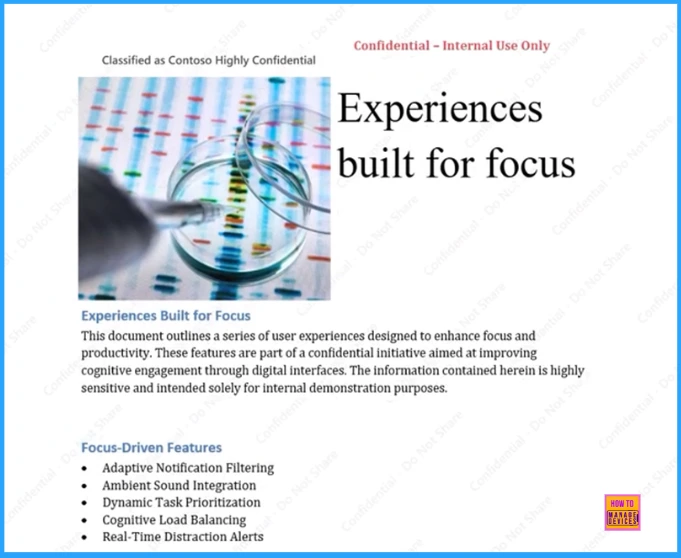
The given screenshot shows that the slide about tools designed to help people stay focused while working. It explain that these tools reduce distractions and make easier to stay productive. The features listed include smart notification, sound control.
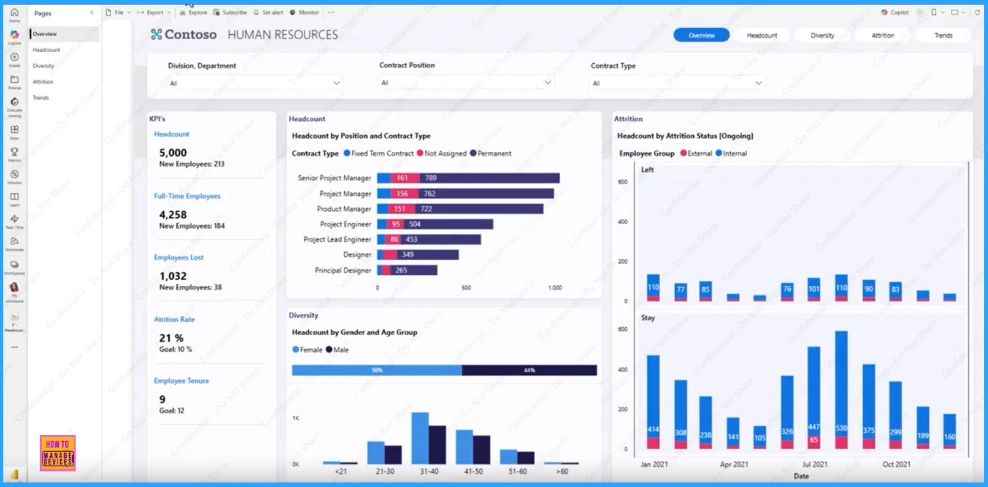
It shows a human resources dashboard with different charts. These charts display important information about employees such as how many employees work in each job role, the number of employees in different gender and age groups.
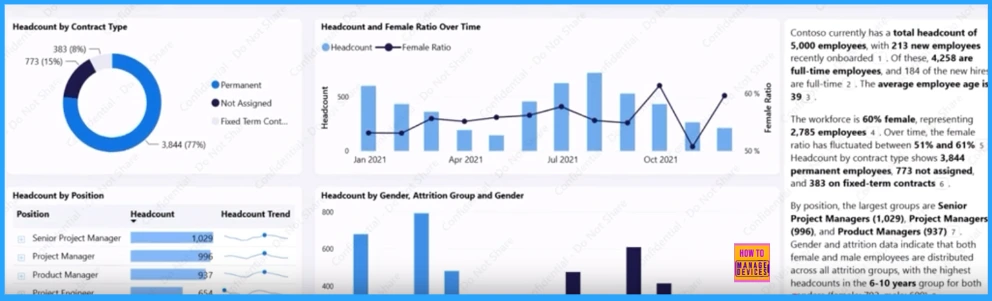
The screenshot shows an HR dashboard with charts that display headcount by contract type, headcount by position, headcount and female ration over time, and headcount by gender. It gives a quick view of workforce distribution.
Need Further Assistance or Have Technical Questions?
Join the LinkedIn Page and Telegram group to get the latest step-by-step guides and news updates. Join our Meetup Page to participate in User group meetings. Also, Join the WhatsApp Community to get the latest news on Microsoft Technologies. We are there on Reddit as well.
Author
Anoop C Nair has been Microsoft MVP from 2015 onwards for 10 consecutive years! He is a Workplace Solution Architect with more than 22+ years of experience in Workplace technologies. He is also a Blogger, Speaker, and Local User Group Community leader. His primary focus is on Device Management technologies like SCCM and Intune. He writes about technologies like Intune, SCCM, Windows, Cloud PC, Windows, Entra, Microsoft Security, Career, etc

Discussion