






Intune Issue Custom Settings Not Getting Saved After the Latest Security Baseline Policy Update
Today we can discuss How to Fix Custom Settings Not Getting Saved After the Latest Security Baseline Policy Update. As we all know that Microsoft Intune is the power tool to manage devices in the organizations and the one of the features is the baseline updates.
A baseline update in Microsoft Intune refers to the process of moving from one version of a security baseline to a newer one such as upgrading from version 23H2 to 24H2. This very important feature for devices so the admins can always organizations keep their devices safe.
Microsoft often updates these baselines by releasing new versions like 23H2 or 24H2. These updates improve security and support new features. Keeping your baselines up to date is a good way to stay protected. Recently many IT admins were raising concern about the Customizations not saved with security baseline policy update.
There is an issue in Microsoft Intune when you update a security baseline to a newer version. If you made any changes to the settings, those changes are not saved after the update. Microsoft aware of this issue and they suggest some workarounds for this. So, in this post let’s look how it works.

Table of Contents
Custom Settings Not Saved After Baseline Update in Intune
Above we discussed a lot things about the issue of Custom Settings Not Saved After Baseline Update in Intune. That means any changes made by IT admins are lost when the baseline is updated. Microsoft knows about the problem and is fixing it. For now, they say IT admins should manually add their settings again after each update.
There are chatters in social media about this issue by Anthony H and others” BREAKING: Intune’s biggest face-palm since MDM v1 – custom security baseline settings are being wiped during the 23H2→24H2 upgrade, and sources say the war room in Building 92 is running 24/7.”
Microsoft’s Intune director Lior Bela responded to the above community chatter about the settings issue – ” Let me make it clear, people who suggesting that the freak out and worry are incorrect. We have done a deep dive on the situation and can confirm that when you update a baseline, for your customizations to carry over to the updated baseline, you need to add them in the customization wizard.”
- Intune Security Baselines Policies for Windows 10 or Windows 11 Deployment Guide
- Intune Security Baseline Microsoft Defender Policy Troubleshooting Tips for Cloud PCs
- Update Security Baselines for Microsoft 365 Apps from Intune
Workaround
When the Setting is not save after the update its very complicated to keep things safe. So the Microsoft give as a workaround for this issue. For that they suggesting after the updation of baseline the IT admins have to add custom settings again manually.
- First you have to sign in to the MS Intune admin center then open current baseline
- Then update the baseline profile you want to update.
| Navigation Path for Security Baseline |
|---|
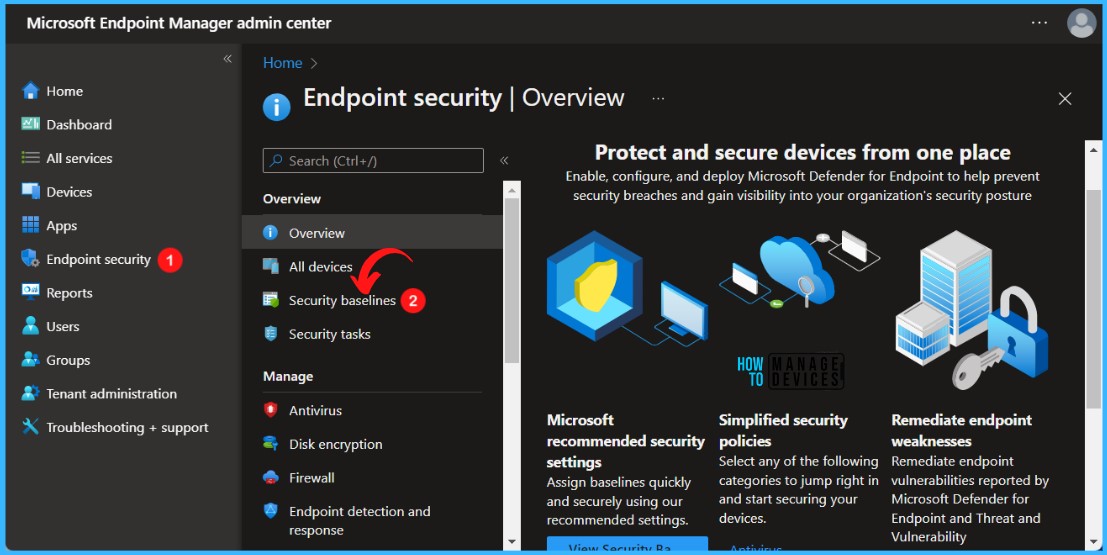
| Select Endpoint security > Security baselines to view the list of available baselines. |
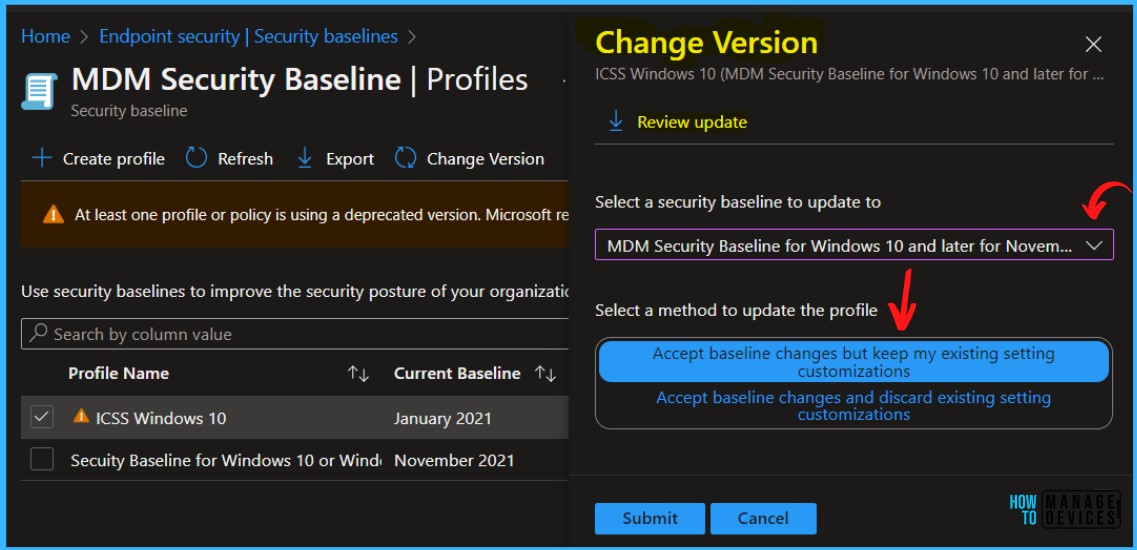
After selecting Update profile, choose the new version of the security baseline, such as going from 23H2 to 24H2. Once the update is complete, review the settings in the updated profile. Then, go back and manually add all the custom settings. After making the changes, save and deploy the profile to ensure all devices get the correct settings.
- After that, check the devices to make sure the updated policy is applied and your custom settings are working or not.
We have a Post related Baseline Update for more info you can refer : Update Intune Security Baselines Version in Intune Admin Portal
Video
Here we have Youtub Video about Intune Security Baseline Decoded Easiest option to setup security policies for your organization. In this video you will get to know about the challenges with Security Baseline Template also. This video is Presented By Mr. Anoop C nair has been Microsoft MVP for 10 consecutive years from 2015 onwards.
Need Further Assistance or Have Technical Questions?
Join the LinkedIn Page and Telegram group to get the latest step-by-step guides and news updates. Join our Meetup Page to participate in User group meetings. Also, join the WhatsApp Community to get the latest news on Microsoft Technologies. We are there on Reddit as well.
Reference
Customizations not saved with security baseline policy update
Author
Anoop C Nair has been Microsoft MVP for 10 consecutive years from 2015 onwards. He is a Workplace Solution Architect with more than 22+ years of experience in Workplace technologies. He is a Blogger, Speaker, and Local User Group Community leader. His primary focus is on Device Management technologies like SCCM and Intune. He writes about technologies like Intune, SCCM, Windows, Cloud PC, Windows, Entra, Microsoft Security, Career, etc.


Discussion