






Let’s discuss Enterprise Applications Security Settings in Entra ID. Microsoft Entra ID, previously known as Azure AD, is the best cloud-based service designed for identity and access management. Entra ID allows organizations to control access to resources and enhance security efficiently.
Entra ID lets you decide who can use specific apps and services within your organization. You can grant or restrict access to different resources. Entra ID helps protect your data and systems, ensuring only authorized people can access sensitive information.
The Enterprise application is an essential factor in Microsoft Entra. This application can access security within your organization and enable users to log in, utilize resources, and work together effectively.
Enterprise applications are integrated with different tools or services that work smoothly with Microsoft Entra ID. They act as Authentication objects used by apps registered within the Entra ID ecosystem.

- What is Microsoft Entra ID?
- Security Enhancement with Named Locations in Entra ID
- Conditional Access Security Settings for Countries Location in Entra ID
Enterprise Applications Security Settings in Entra ID
The Enterprise application doesn’t need typical usernames and passwords. These applications are like special accounts, facilitating seamless integration and allowing users to access resources efficiently.
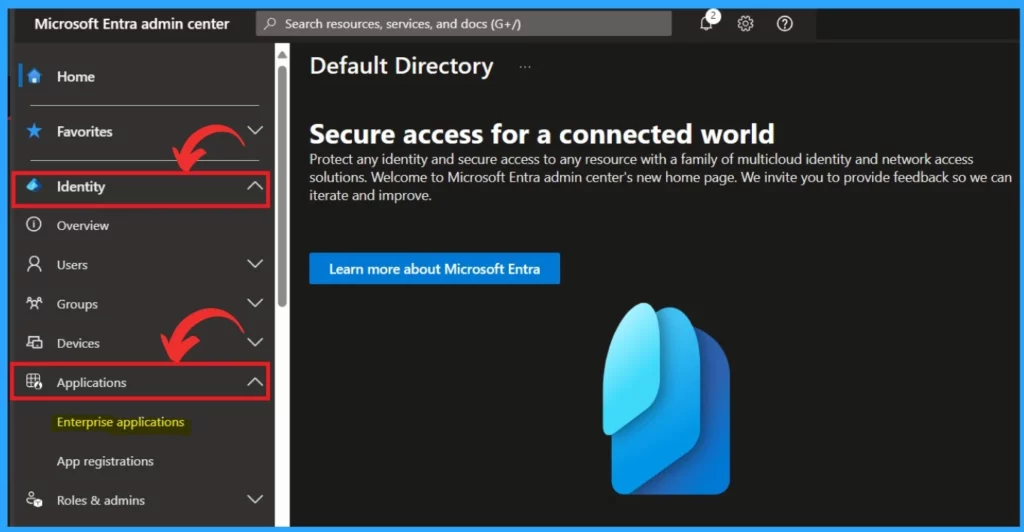
You can review all registered Enterprise Apps and deactivate or delete unfamiliar ones. You can easily access the Enterprise Application through Microsoft Entra ID and follow the steps to do this.
- Sign in to Microsoft Entra Admin Center
- Click on the Identity
- Select Applications
- Click on the Enterprise Application
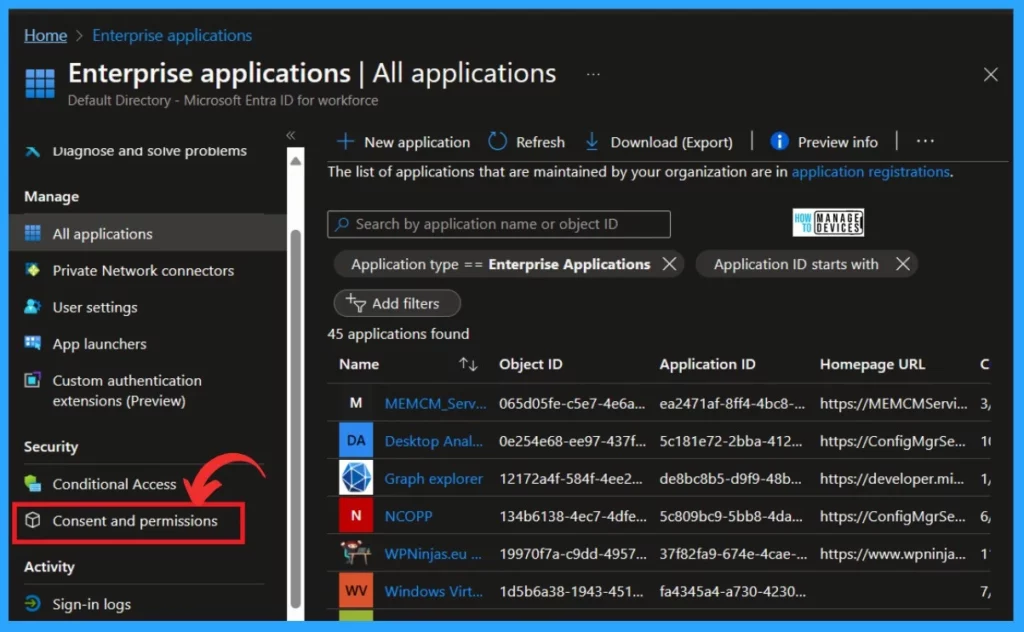
After clicking on the Enterprise Application, you will get another Window. From that window, click on Consent and Permission under Security. Managing consent and Permission is crucial for security and smooth operations.
When users grant permission for an application, it is like permission to proceed so the user can decide if an app can access protected resources on their behalf. In permissions, applications request specific permissions to perform actions.
- Click on the Consent and permission
- Modernize MFA Authentication Policies in Entra ID
- List of Entra ID Ignite 2023 Sessions
- Free Entra Training Videos | Start Learning Entra ID Azure AD
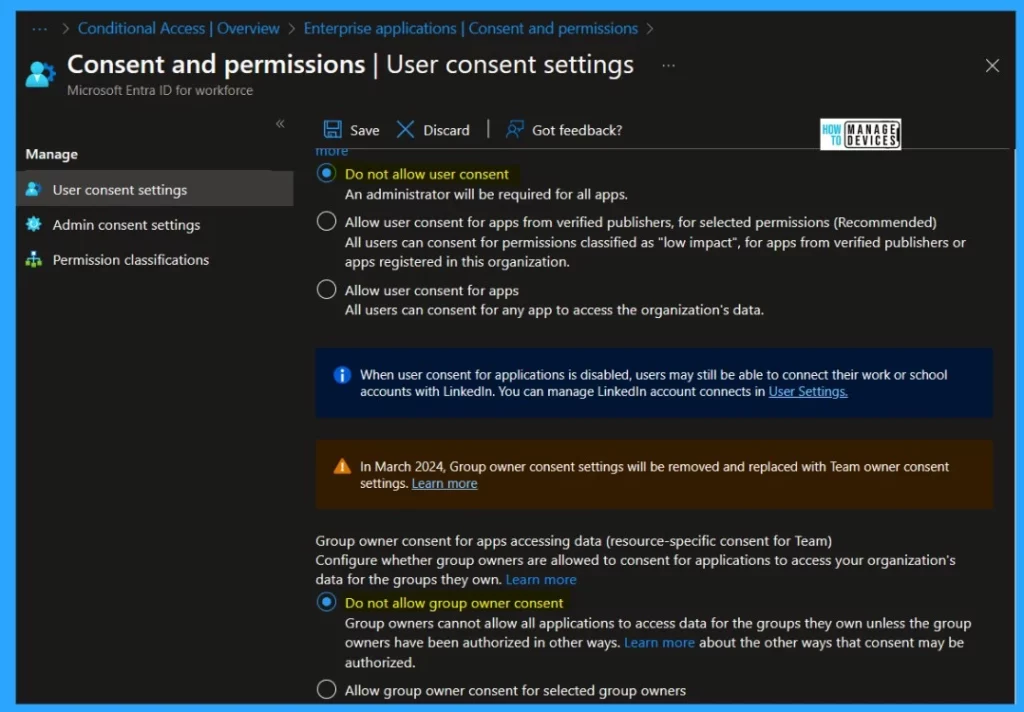
The Consent and Permissions section has essential settings. You can control when end users, and group owners can grant consent to applications and when they are required to request administrator review and approval.
Note: To enhance security, We suggest changing the option to “Do not allow user consent”, and immediately below that, choose the option “Do not allow group owner consent.”
| NUM | User Consent for Applications | Info |
|---|---|---|
| 1 | Do not allow user consent | An administrator will be required for all apps. |
| 2 | Allow user consent for apps from verified publishers for selected permissions (Recommended) | All users can consent for permissions classified as “low impact”, for apps from verified publishers or apps registered in this organization. |
| 3 | Allow user consent for apps | All users can consent for any app to access the organization’s data. |
Note: In March 2024, Group owner consent settings will be removed and replaced with Team owner consent settings.
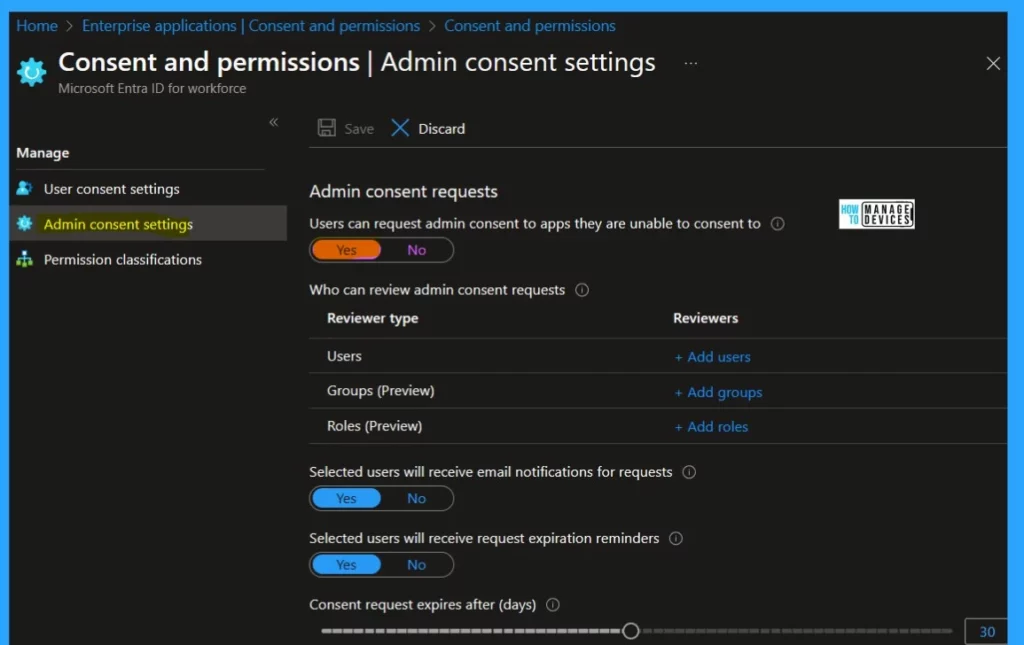
Users can ask the administrator for permission to use an external app or service that has yet to be registered. The admin can decide whether this is acceptable. IT handles app registration in large organisations, and end users can’t directly request approval.
In the Admin Consent settings, Users can request admin consent to apps they are unable to consent to – Yes or No Options;
- If yes, users can directly request admin consent for any app that needs access to data for which they cannot grant permission.
- If it’s No, Users must contact their admin to request consent for using specific apps
- You can select Yes option
Reference
How to secure Microsoft Entra ID tenant
We are on WhatsApp. To get the latest step-by-step guides and news updates, Join our Channel. Click here –HTMD WhatsApp.
Author
Krishna. R is a computer enthusiast. She loves writing about Windows 11 and Intune-related technologies and sharing her knowledge, quick tips, and tricks about Windows 11 or 10 with the community.




Discussion