






Microsoft Classic Teams Reaching to End of Life
Exciting News for Teams users! Microsoft Classic Teams is Reaching the End of Life. Microsoft announced that the Classic Team’s availability has reached the end, and a new Teams client will be rolled out. The new version of Classic Team will be available for users after March 31, 2024.
On April 12, 2023, Microsoft launched a new version of Microsoft Teams Free called Classic Teams. It is a legacy-free Teams app for business, and it is introduced to investing in a single free Teams experience across personal and small businesses.
This new version will be available for users who are still using classic Teams. Installing the new version actually means installing the new Teams client for users who still have the classic Teams client and uninstalling the classic Teams client 14 days after the installation of the new Teams.
The new Teams client will give you a wonderful experience. The new version gives more control to admins. This blog post helps you to know more about the new Teams Client.

- Microsoft Introduces Single Microsoft Teams Desktop App for Personal and Work
- Now Get Microsoft Teams Meetings Shortcut Directly from Start Menu
Microsoft Classic Teams Reaching to End of Life
The new feature will be available for different users. The rollout of Teams clients will differ based on your Teams Admin Center policy controls. Users will get different experiences according to the availability of the new Teams Client.
User has Already Installed the New Teams
After 31st March, 2024, users who haven’t updated to new Teams will begin seeing an informational banner to remind them about the timeline for the Microsoft AutoUpdate. The main Teams client window shows this banner at the top of the page. The following table shows the banner messages you may experience after January 31, 2024.
| Condition for Triggering the Banner | Banner Message |
|---|---|
| Classic Teams is being used, or new Teams is installed | Classic Teams will soon be unavailable for use. You’ll be switched to the new Teams after this date. Learn More. Switch now |
| Classic Teams is being used. new Teams isn’t installed | Classic Teams will soon be unavailable. Learn more Get the new Teams |
| Microsoft can’t update because of policy restrictions (Commercial) | Classic Teams will soon be unavailable for use, and we can’t update to the new Teams due to the org policy. For more info, contact your IT admin. Learn more |
| If your Teams update policy is set to Not Enabled | Classic Teams will soon be unavailable for use. Contact your IT admin to switch to the new Teams. Learn more |

The user is on an Unsupported OS
If users are on an unsupported OS (including Win 10 LTSC), you’ll see slightly different banner messaging. If any problem occurs when moving to new teams, a banner message will appear stating that Classic Teams will soon be unavailable for use. To use the new Teams, update your OS to meet requirements or contact your IT admin. Learn more.
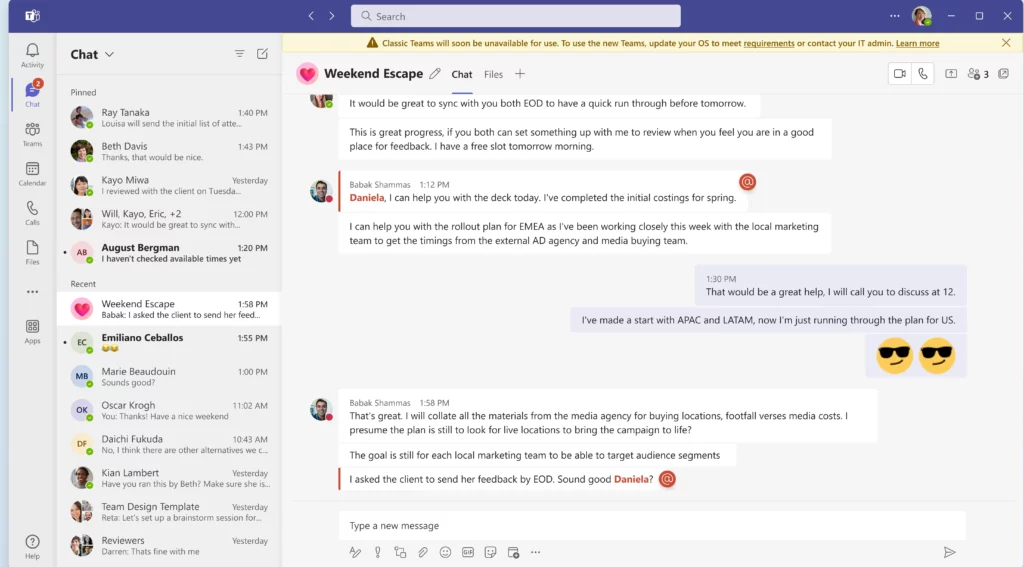
Users Can’t Update to New Teams
Once classic Teams is no longer available, users get a dialog box that shows it won’t work. This occurs when users who have encountered issues moving to new Teams or who don’t meet the prerequisites to upgrade will still have access to the classic Teams client until July 01, 2024, at the earliest.

- Collaborative Notes in Microsoft Teams Meetings
- Ways to Allow an App through Windows Defender Firewall
We are on WhatsApp. To get the latest step-by-step guides and news updates, Join our Channel. Click here –HTMD WhatsApp.
Author
Gopika S Nair is a computer enthusiast. She loves writing on Windows 11 and related technologies. She is here to share quick tips and tricks with Windows 11 or Windows 10 users. She is Post Graduate Diploma Holder in Computer Science.




Discussion