






EntraOps Privileged EAM Automate Tiered Access Model for Conditional Access and Administrative Units
EntraOps Privileged EAM Automate Tiered Access Model for Conditional Access and Administrative Units! Microsoft developed new features aimed at automating the tiered administration of the Enterprise Access Model in Microsoft Entra.
These features are designed to simplify the management of privileged access and security within your organization. After updating to the latest version, you can enable these new capabilities, including automation for managing assignments, maintaining privileged assets, etc.
These enhancements will help you better manage and secure your enterprise access model. This post covers all the details about EntraOps Privileged EAM V0.2. It is now available with new automation features. EntraOps is a free community tool designed to manage and automate privileged access and security within Microsoft Entra.
On May 2nd, 2024, Microsoft announced that its consumer accounts now support Passkey. A passkey is a highly secure way to log in to websites and apps, using the latest technology known as W3C WebAuthN. It replaces traditional passwords with a more advanced method of authentication.

Table of Contents
EntraOps Privileged EAM V0.2 Now Available with New Automation Features
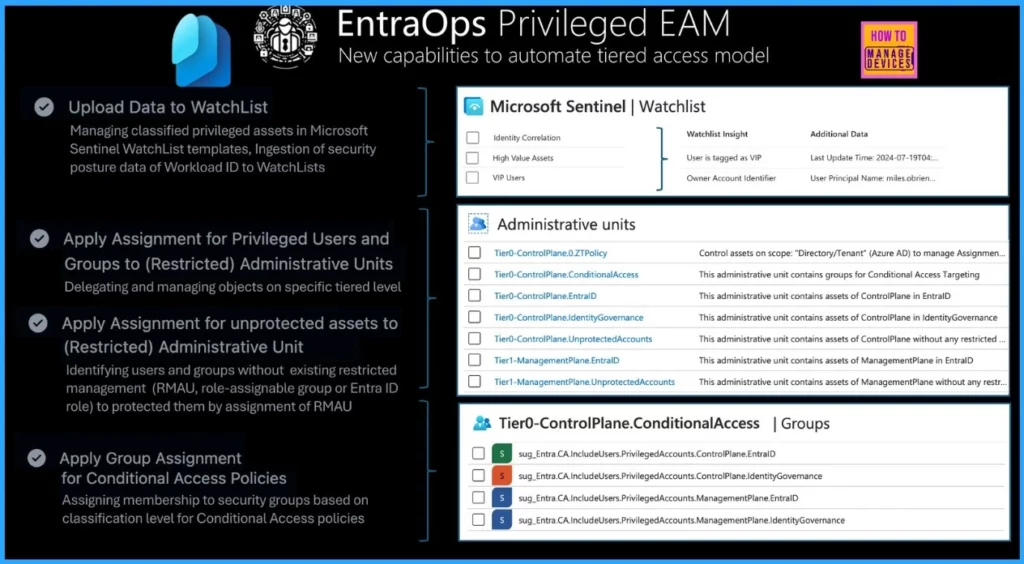
Let’s discuss the new capabilities to automate the tiered access model. The table below helps you to show more details. All credit to Thomas Naunheim.
Upload Data to WatchList – Managing classified privileged assets in Microsoft Sentinel WatchList templates, Ingestion of security posture data of Workload ID to WatchLists.
Apply Assignment for Privileged Users and Groups to (Restricted) Administrative Units: Delegating and managing objects on specific tiered level.
| EntraOps Privileged EAM V0.2 Now Available with New Automation Features |
|---|
| Uploading data to WatchList |
| Assigning privileges for users and groups to restricted administrative units |
| Assigning unprotected assets to restricted administrative units |
| Applying group assignments for conditional access policies |
Apply Assignment for unprotected assets to (Restricted) Administrative Unit – Identifying users and groups without existing restricted management (RMAU, role-assignable group or Entra ID role) to protected them by assignment of RMAU.
Apply Group Assignment for Conditional Access Policies Assigning membership to security groups based on
classification level for Conditional Access policies.
- Free Entra Training Videos | Start Learning Entra ID Azure AD
- New MS Entra PowerShell Module
- High Level Overview of Identity Protection in Microsoft Entra ID
- Modernize MFA Authentication Policies in Entra ID
- What is Microsoft Entra ID?
- Security Enhancement with Named Locations in Entra ID
Automated Management of Conditional Access Target Groups and Administrative Units
The latest update introduces automation for managing assignments related to Conditional Access target groups and Restricted Management Administrative Units. This automation shows classified privileged objects to simplify the assignment process. It ensures that the correct policies and management rules are applied based on classifying privileged assets.
- This feature enhances efficiency and accuracy in managing access and permissions across your organization.
Automatic Maintenance for Privileged Assets in Microsoft Sentinel Watchlists
The new update includes automatic maintenance for privileged assets classified by EntraOps within Microsoft Sentinel watchlists. This feature ensures that VIP users, identity correlations, and high-value assets are consistently monitored and maintained.
By automating this process, you can keep your watchlists up-to-date with the latest classifications, improving the visibility and security of critical assets in your environment.
Deployment of Advanced Watchlists for Tracking Workload Identity Security Posture
Microsoft is rolling out advanced watchlists designed to monitor the security posture of Workload Identities. These watchlists will provide enhanced tracking and insights, helping to ensure that the security of your workload identities is maintained and any potential risks are promptly identified.
Updating EntraOps
It is essential to ensure you are using the latest version of EntraOps. Follow the below steps for more details. There are 3 steps: the first is to Update EntraOps, the second is to Configure New Features, and the third is to Assign New Permissions.
- Use the Update – EntraOps cmdlet in the PowerShell Module or follow the GitHub workflow to update EntraOps to its newest version. This ensures you have access to the latest features and improvements.
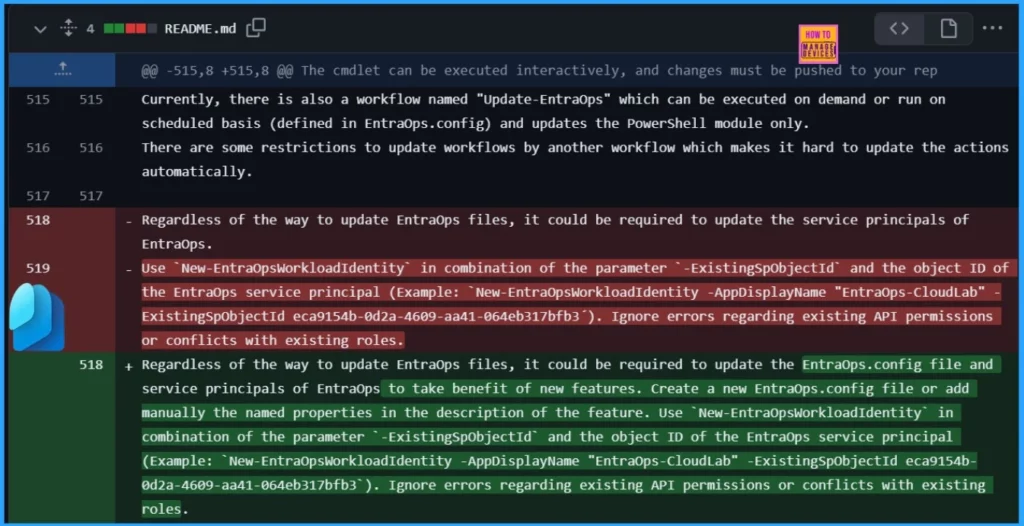
- Configure New Features – After updating, you must configure any new features in the EntraOps.config file. This file holds the configuration settings required for the latest features to function correctly.
- Assign New Permissions – Verify and assign any new permissions needed for EntraOps service principals. These permissions are crucial for the updated features to operate correctly and securely.
We are on WhatsApp now. To get the latest step-by-step guides, news, and updates, Join our Channel. Click here. HTMD WhatsApp.
Author
Anoop C Nair is Microsoft MVP from 2015 onwards for consecutive 10 years! He is a Workplace Solution Architect with more than 22+ years of experience in Workplace technologies. He is a Blogger, Speaker, and Local User Group Community leader. His main focus is on Device Management technologies like SCCM and Intune. He writes about technologies like Intune, SCCM, Windows, Cloud PC, Windows, Entra, Microsoft Security, Career etc…




Discussion