






Latest Updated Windows 365 AVD Redirection in Details
Let’s discuss the Latest Updated Windows 365 AVD Redirection in Detail. Redirection in the Remote Desktop Protocol (RDP) allows users to access and utilize local resources and peripherals within a remote session.
This post provides comprehensive details on configuring various types of redirection over the Remote Desktop Protocol (RDP). It covers audio, video, camera, webcam redirection, clipboard and drive (fixed, removable, and network), and location redirection.
Additionally, it includes instructions for redirecting Media Transfer Protocol (MTP), Picture Transfer Protocol (PTP), printers, serial or COM ports, smart cards, USB devices, and WebAuthn on Windows, all of which aim to optimize the remote desktop experience.
The new redirection architecture in Windows 365 and Azure Virtual Desktop (AVD) helps you enhance the efficiency and reliability of accessing local resources during remote sessions. It enables a smoother and more effective virtual work experience.

Table of Contents
What is Redirection?
Redirection in the context of Remote Desktop Protocol (RDP) is a feature that allows users to access and use local resources and peripherals such as clipboard, printers, USB devices, webcams, etc, from within a remote session.
Latest Updated Windows 365 AVD Redirection in Details
This article demonstrates various redirection methods for different peripheral classes, explores redirection classifications, and outlines the types of resources and peripherals that can be redirected.
- How to Easily Disable Local Drive Redirection with Intune
- AVD Enable Audio and Video Playback Redirection and Limit Audio Playback Quality using Intune
- Manage Location Redirection for Windows 365 Cloud PC
- Intune New Clipboard Transfer Direction Settings Now Available in Windows Settings Catalog
Redirection Methods
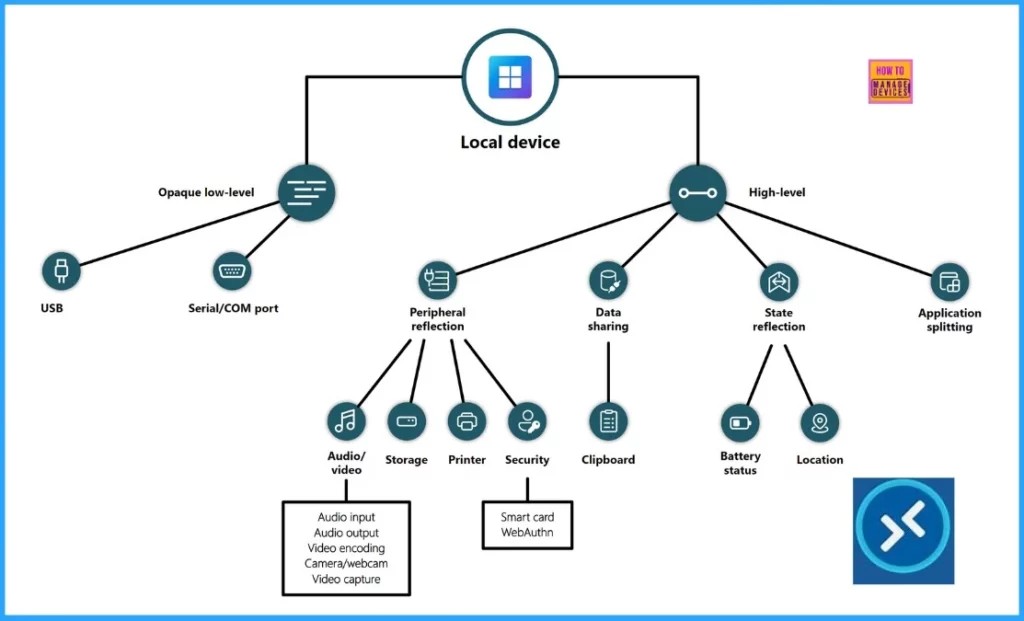
Let’s discuss the Redirection Methods. RDP employs 2 main redirection methods to facilitate resource and peripheral sharing between a local device and a remote session. The table below provides more details.
| Redirection Method | Description | Typical Use Cases |
|---|---|---|
| High-Level Redirection | Optimizes communication for better performance | Printers, clipboards, webcams |
| Opaque Low-Level Redirection | Transfers raw communication without optimization | USB devices, serial/COM ports |
High-Level Redirection Classifications
Let’s discuss the High-Level Redirection Classifications. High-level redirection includes 4 main techniques, each focused on different types of resources or peripherals and how they are redirected. These techniques are shown in detail below.
| High-Level Redirection Classification | Description | Examples |
|---|---|---|
| Peripheral Reflection | Mirrors local input devices to the remote session | Keyboard, mouse, touchpad |
| Data Sharing | Transfers data between the local device and remote session | Clipboard content |
| State Reflection | Reflects local device state attributes into the remote session | Battery status, location |
| Application Splitting | Splits application functionality between local and remote sessions | Microsoft Teams |
Resource and Peripheral Classes Supported by Redirection
Let’s discuss the resource and peripheral classes supported by redirection. The table below shows the various resource and peripheral classes supported by redirection and the recommended redirection method for each.
| Resource or Peripheral Class | Redirection Method | Predominant Data Flow Direction |
|---|---|---|
| Printer or scanner | Opaque low-level redirection | Bidirectional |
| Microphone for audio input, whether USB-connected or integrated | High-level – peripheral reflection | Local to remote |
| Speaker for audio output, whether USB-connected or integrated | High-level – peripheral reflection | Remote to local |
| Battery status is automatic and not configurable | High-level – state reflection | Local to remote |
| The biometric reader is available only within a session and not during the login process | Opaque low-level redirection | Bidirectional |
| Camera or webcam, whether USB-connected or integrated | High-level – peripheral reflection | Local to remote |
| CD/DVD drive with read-only access | High-level – peripheral reflection | Local to remote |
| Clipboard | High-level – data sharing | Bidirectional |
| The Keyboard is either USB-connected or integrated | High-level – peripheral reflection | Local to remote |
| Local hard drive or USB removable storage | High-level – peripheral reflection | Bidirectional |
| Location | High-level – state reflection | Local to remote |
| The Mouse is either USB-connected or integrated | High-level – peripheral reflection | Local to remote |
| MTP Media Player | High-level – peripheral reflection | Local to remote |
| Multimedia redirection | High-level – application splitting | Bidirectional |
| The Pen is either USB-connected or integrated | High-level – peripheral reflection | Local to remote |
| The Printer whether locally attached or connected over the network | High-level – peripheral reflection | Remote to local |
| PTP camera | High-level – peripheral reflection | Local to remote |
| Scanner | Opaque low-level redirection | Bidirectional |
| Serial or COM port | Opaque low-level redirection | Bidirectional |
| Smart card reader | High-level – peripheral reflection | Bidirectional |
| The Touch is either USB-connected or integrated | High-level – peripheral reflection | Local to remote |
| Trackpad (USB or integrated, excluding precision touchpad (PTP) gestures) | High-level – peripheral reflection | Local to remote |
| USB to serial adapter | Opaque low-level redirection | Bidirectional |
| VoIP Telephone/Headset | Opaque low-level redirection | Bidirectional |
| WebAuthN | High-level – peripheral reflection | Bidirectional |
We are on WhatsApp now. To get the latest step-by-step guides, news, and updates, Join our Channel. Click here. HTMD WhatsApp.
Author
Anoop C Nair is Microsoft MVP from 2015 onwards for consecutive 10 years! He is a Workplace Solution Architect with more than 22+ years of experience in Workplace technologies. He is a Blogger, Speaker, and Local User Group Community leader. His primary focus is on Device Management technologies like SCCM and Intune. He writes about technologies like Intune, SCCM, Windows, Cloud PC, Windows, Entra, Microsoft Security, Career, etc…




Discussion