






Fix AVD Remote Desktop Logon Issue Deny Remote Desktop Services Logon
Let’s learn how to Fix the AVD Remote desktop logon issue with a security policy called “Deny Remote Desktop Services Logon.” My colleague Mark Thomas can help us fix this issue.
We are managing AVD VMs with Microsoft Intune. All the security policies are applied using Intune. I have a post explaining one example, “UserRights Policy Deployment Using Intune | Group Policy Replacement.”
The Microsoft Remote Desktop client offers a seamless connection to Azure Virtual Desktop, enabling easy access to your desktops and applications. This article provides constructive guidance on connecting to Azure Virtual Desktop using the Remote Desktop client for Windows.
The Windows App lets you securely connect to Windows devices and applications from Azure Virtual Desktop, Windows 365, Microsoft Dev Box, Remote Desktop Services, and remote PCs. Additionally, you can subscribe to a feed provided by your organization’s administrators, ensuring a streamlined user experience.

Related Article – AVD Windows 10 Multi-Session Intune Hybrid Azure AD Support
| Index |
|---|
| An issue with the AVD HostPool Login |
| Security Policies for AVD |
| FIX – AVD Remote Desktop Logon Issue |
| Resources |
An issue with the AVD HostPool Login
The user got the following error when logging into a Remote Desktop using the assigned AVD host pool.
To sign in remotely, you need the right to sign in through Remote Desktop Services. By default, members of the Remote Desktop Users group have this right. If the group you're in doesn't have this right, or if the right has been removed from the Remote Desktop Desktop Users group, you need to be granted this right manually.

Security Policies for AVD
Most organizations must have standard security policies by CIS. One of the security policy guidelines was to set a policy to Deny Remote Desktop Services Logon for Local Users and Guests.
More details about the DenyRemoteDesktopServicesLogon policy are explained in the following Microsoft document – https://docs.microsoft.com/en-us/windows/security/threat-protection/security-policy-settings/deny-log-on-through-remote-desktop-services
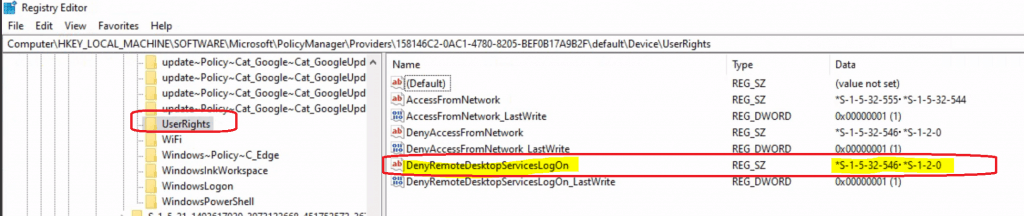
We use SIDs instead of Names in security policies to avoid complexities with different language pack installations of Windows. More details about well-known SID are here.
| SID | Name |
|---|---|
| S-1-5-32-546 | Guests |
| S-1-2-0 | Local |
FIX – AVD Remote Desktop Logon Issue
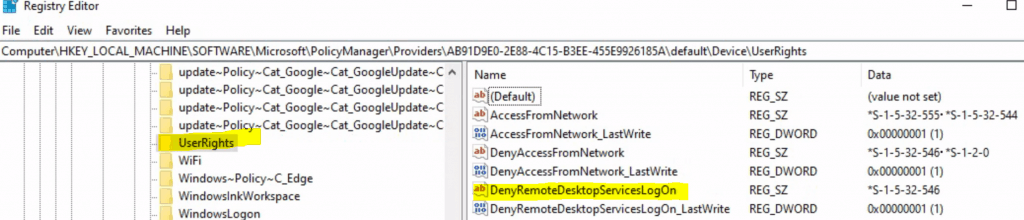
After much trial and error, we removed the SID (S-1-2-0) for local from the policy called DenyRemoteDesktopServicesLogon, which fixed the issue.
Resources
- AVD Life Cycle Management Remove Published Remote Apps with PowerShell
- AVD End User Experience Availability Updates from Ignite
- AVD Windows 10 Multi-Session Intune Hybrid Azure AD Support
We are on WhatsApp. To get the latest step-by-step guides and news updates, Join our Channel. Click here –HTMD WhatsApp.
Author
Anoop C Nair is Microsoft MVP! He is a Device Management Admin with more than 20 years of experience (calculation done in 2021) in IT. He is a Blogger, Speaker, and Local User Group HTMD Community leader. His primary focus is Device Management technologies like SCCM 2012, Current Branch, and Intune. He writes about ConfigMgr, Windows 11, Windows 10, Azure AD, Microsoft Intune, Windows 365, AVD, etc.




I believe CIS intended to use S-1-5-113 (Local account) instead of S-1-2-0 (Local).