






AVD Architecture Changes ARM Based | New Portal Admin Experience
Let’s discuss AVD Architecture Changes ARM Based | New Portal Admin Experience. Well, it’s not officially AVD ARM-based; instead, it’s a new Portal for AVD with a new Admin Experience. However, the AVD architecture for the 2020 spring update has changed significantly with the spring release.
AVD, which stands for Azure Virtual Desktop, is an essential desktop virtualization solution offered within Microsoft Azure. This comprehensive solution seamlessly delivers virtual desktop infrastructure functionality, encompassing pooled desktops, personal desktops, and published applications.
When deploying a virtual desktop infrastructure (VDI), it’s crucial to carefully consider the available applications and overall user experience to guarantee a successful implementation.
The previous Windows Virtual Desktop, known as classic WVD, was non-ARM-based. The new ARM-based version of WVD now features ARM-based service functionality in the Azure portal. Consequently, existing customer deployments will require migration to the new console using tools that Microsoft will soon release.

| Index |
|---|
| AVD New Arm Object Model |
| AVD Tenant = Workspace |
| Simplified AVD Architecture |
| AVD – Non-Regional Service |
| New Admin Experience for AVD v2 |
AVD New Arm Object Model
The following are the main changes in the high-level architecture with the Azure Virtual Desktop spring release (a.k.a AVD v2).
- AVD v1 – non-Arm object model
- AVD v2 – ARM object model
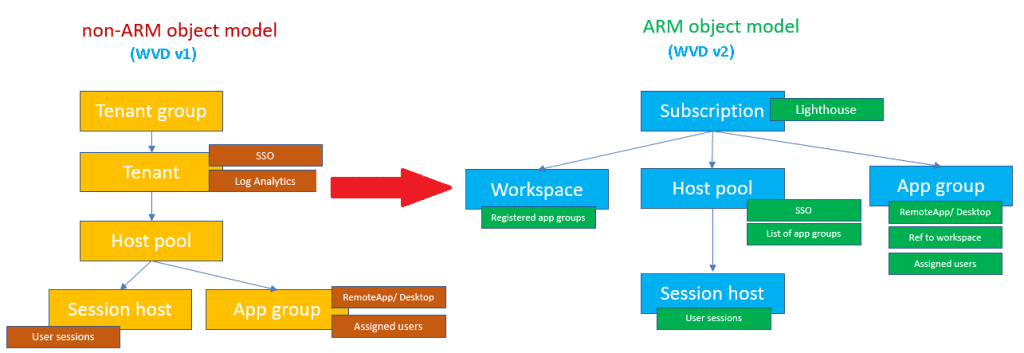
(Original Picture Credit to Microsoft – Christiaan Brinkhoff – AVD Architecture)
AVD Tenant = Workspace
With the spring update for AVD (a.k.a AVD v2), there is no longer a concept of an AVD tenant. Instead, the AVD tenant is now known as the Workspace.
A workspace is a logical grouping of application groups in AVD. Each AVD application group must be associated with a workspace where users can see the remote apps and desktops published to them.
Simplified AVD Architecture
The following are very high-level 4-tiers of AVD architecture.
- Azure Front Door
- AVD Control-Plane (Azure PaaS services, as you can see in the blue box below)
- AVD Service Metadata (More details here)
- Workspace Names
- Host Pool Names
- Application Group Names
- User Principal Names (UPN)
- Virtual Machine and IaaS components
NOTE! – Azure Virtual Desktop stores global metadata information like tenant names, host pool names, app group names, and user principal names in a data centre.
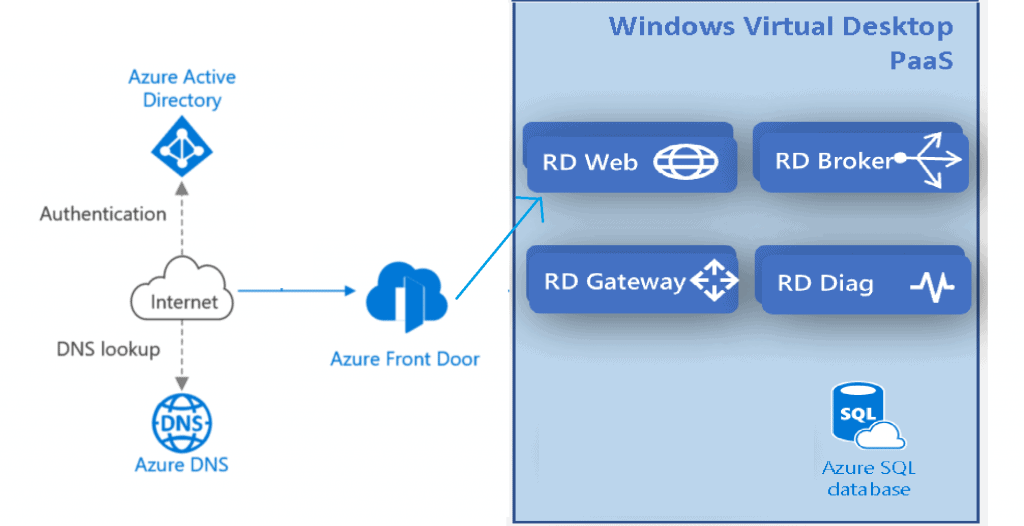
Warning! – This is not an accurate representation of the architecture – Please refer to Microsoft docs for a more accurate representation
AVD – Non-Regional Service
Yes, AVD is a non-regional service, but as you know, some Azure regional dependencies are shown below.
- AVD Control-planes are getting deployed globally soon.
- Microsoft controls the selection of AVD control planes.
- AVD Service Metadata locations are not available globally when I write this post.
- The customer controls the selection of the AVD service metadata service region.
- VMs and other IaaS components are owned by the customer and free to use in the Azure region as per the business requirement.
- The customer controls the selection of the AVD IaaS VMs and other components.
More details Azure Services – AVD – https://azure.microsoft.com/en-us/global-infrastructure/services/?products=virtual-desktop

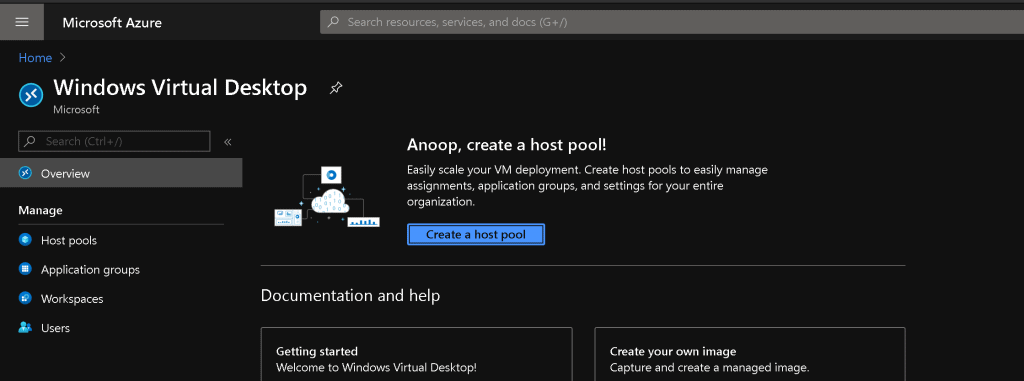
New Admin Experience for AVD v2
Resources
- Windows Virtual Desktop technical deployment (ARM-based model) walkthrough
- WVD Firewall Proxy Policies
- More WVD Guides – https://www.anoopcnair.com/Avd/
We are on WhatsApp. To get the latest step-by-step guides and news updates, Join our Channel. Click here –HTMD WhatsApp.
Author
Anoop C Nair is Microsoft MVP! He is a Device Management Admin with more than 20 years of experience (calculation done in 2021) in IT. He is a Blogger, Speaker, and Local User Group HTMD Community leader. His primary focus is Device Management technologies like SCCM 2012, Current Branch, and Intune. He writes about ConfigMgr, Windows 11, Windows 10, Azure AD, Microsoft Intune, Windows 365, AVD, etc.




Discussion