






Exciting News! New Hide General Channel Feature in Microsoft Teams. You all know about Microsoft Teams, a powerful communication service. Better communication always clarifies our words. Microsoft Teams is an essential part of business, and we can say it’s a game changer in an official meeting.
Microsoft Teams provides a unified experience for the user’s features. Recently, Microsoft Teams introduced many features that increase a user’s productivity. In the April update, teams saw a significant change in their channels. Channels are a crucial part of teams, like a digital room for team members.
The team’s general channel is an essential part of communications. As you know, the General channel is the default feature in teams. You can’t delete this option from teams. With this option, users can share their thoughts and announcements.
Hide the general channel option empowers users to customize their working space, helping them organise and focus on their work. The general channel is always available to all team members. In this blog post, we can discuss the overview of the latest feature of hiding options in general channels.

- Follow Meeting Option New Feature in Case of Meeting Conflicts
- Microsoft Classic Teams Reaching to End of Life
- New Banner Notification on Teams Classic Client

New Hide General Channel Feature in Microsoft Teams
With this new feature, users can easily customize the workspace. However, team owners cannot hide general channels; users have the right to hide or show channels in their workspace. There are 2 types of channels standard channels and private channels.
The general channel is the standard channel. It is visible to all members, and the private channel is specially for some members who have been invited to channels.
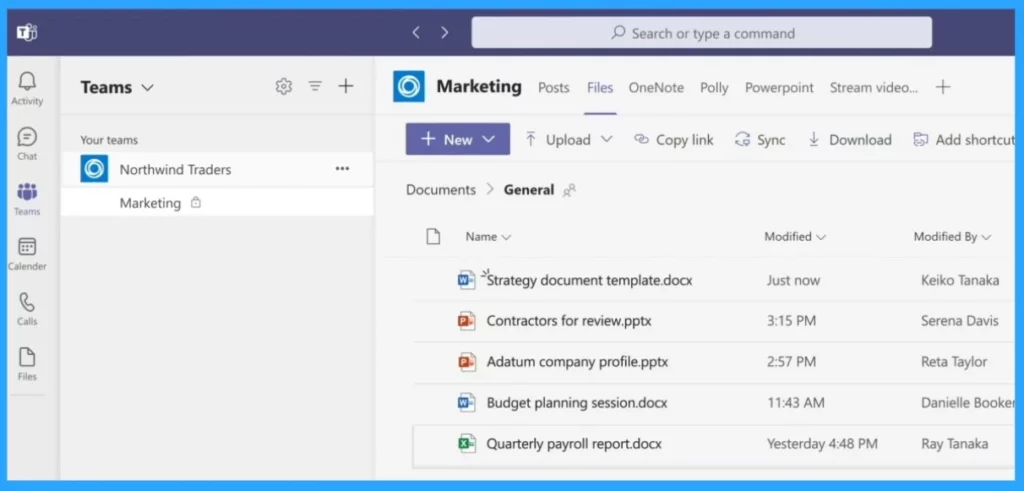
Overview of Team and Channel
Team and channel are essential parts of Microsoft Teams. They allow team members to communicate and organize work; teams must also entertain users. The team is the main head of the channels, which are made up of teams. I will explain how they are connected through a table.
| Team | Channel |
|---|---|
| Teams are like a main group of all members and aiming for a special goal | The channel is made to support the teams, and it acts as a sub-section of teams |
| Teams is the main head of the Members | Channels sit inside of teams, similar to how files sit inside folders |
| It is made by Microsoft 365 groups, and it can be private, the files and data to be only visible to its members | The files in the channels are to be stored in share points. The channels can be standard, private and shared. |

- Microsoft Introduces Single Microsoft Teams Desktop App for Personal and Work
- Call Record Insights for Microsoft Teams
- Microsoft Teams Phone Connects with Millions of PSTN Users
The main topic we discussed was hiding the general channel. First, you have to know that a general channel can’t be hidden by a team owner and can only be hidden by a user. Hiding a channel is a user’s personal choice. When hidden, users can improve their focus on their work by reducing distractions.
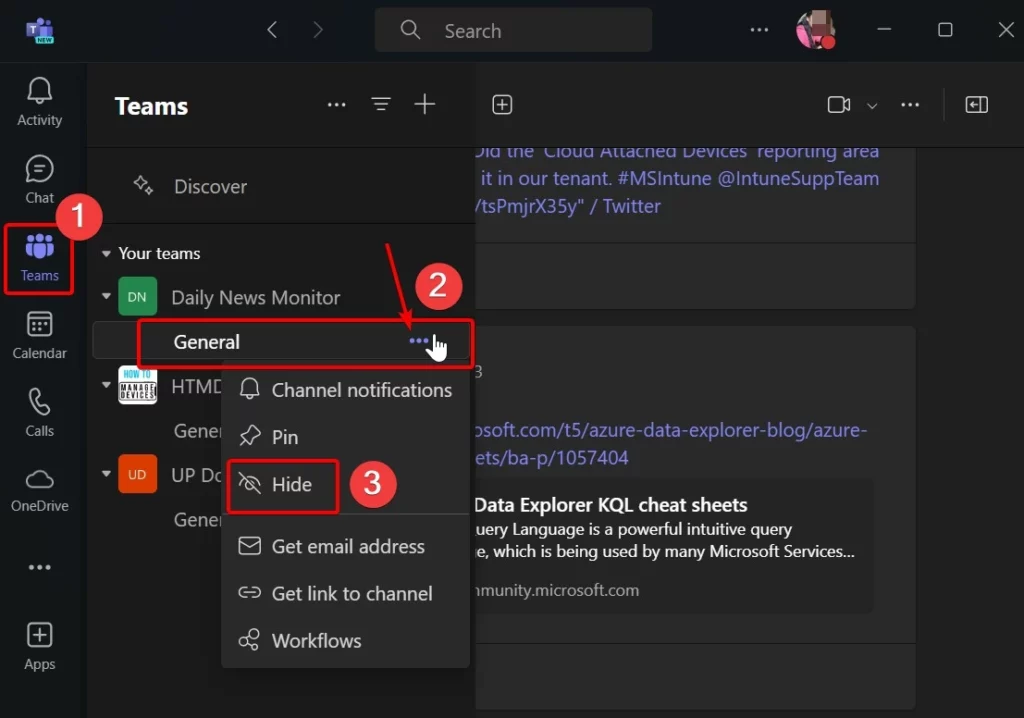
- To hide the General channel, follow the steps
- Select the Teams
- Click on the 3 dot option (…) in the General channel
- Select the hide option from the Context Menu
Referring
What’s New in Microsoft Teams | April 2024
We are on WhatsApp. To get the latest step-by-step guides and news updates, Join our Channel. Click here –HTMD WhatsApp.
Author
Krishna. R is a computer enthusiast. She loves writing about Windows 11 and Intune-related technologies and sharing her knowledge, quick tips, and tricks about Windows 11 or 10 with the community.




Discussion