






Introducing Microsoft Teams in VDI
Exciting News for Microsoft Teams Users! Introducing Microsoft Teams in VDI. You all know that Microsoft Teams is very essential for organizations. It is known for communication and collaboration in the organization.
Everyone knows that the arrival of MS teams changed how we communicate and work together in the office. It is a strong and flexible tool that helps with many business needs. Microsoft Teams will be essential for smooth communication and teamwork in the organization and will increase overall productivity.
The exciting news is that Microsoft Teams improves the user experience in virtual desktops with new features and improved quality, performance, and reliability. Microsoft Teams introduced many new features integrated with AI in the past month.
Microsoft is previewing a new optimization for Teams in virtual desktop infrastructure (VDI) environments. Microsoft announced that the new VDI version of Teams will use SlimCore instead of WebRTC. This blog post can discuss an overview of the latest Microsoft Teams in VDI.

| Index |
|---|
| Introducing Microsoft Teams in VDI |
| What are the Changes in the New Media Engine |
- Enable Disable MS Teams Notify When Available Settings
- MS Teams Copilot in Meetings to Take Notes and Action
- Follow Meeting Option New Feature in Case of Meeting Conflicts
- How to Use Power Automate in Microsoft Teams

What is Virtual Desktop Infrastructure?
Introducing Microsoft Teams in VDI
Above, we discussed the overall details of Microsoft Teams in VDI. This new introduction of VDI Teams lets users access a virtual desktop on a remote server. In June 2024, Microsoft introduced a preview of a new setup for Teams in VDI environments. This new setup uses SlimCore instead of the older WebRTC technology.
SlimCore is the same media engine used in the new Teams app. This change aims to make sure that VDI users get the latest features of Teams faster.
Note: The new Teams VDI is now available in public preview for Azure Virtual Desktops, Windows 365, and Citrix DaaS/CVAD on Windows devices. However, VMware customers are unaware of this news, which may be coming soon.
See More: VMware Workstation Pro is Free now for Personal Use
| New Features for Teams VDI Users |
|---|
| Gallery view 3×3 and 7×7 |
| Custom meeting backgrounds uploaded via Teams admin center |
| 1080p |
| Include computer sound while sharing the screen |
| Hardware acceleration on the endpoint |
| Presenter mode |
| Teams Premium |
- The new Teams version already includes everything for audio, video, and screen sharing with the latest media engine.
- You must understand that the new changes will be done on the client side.
- According to IT admins, Citrix Workspace apps with each new feature are costly for remote desktop clients.
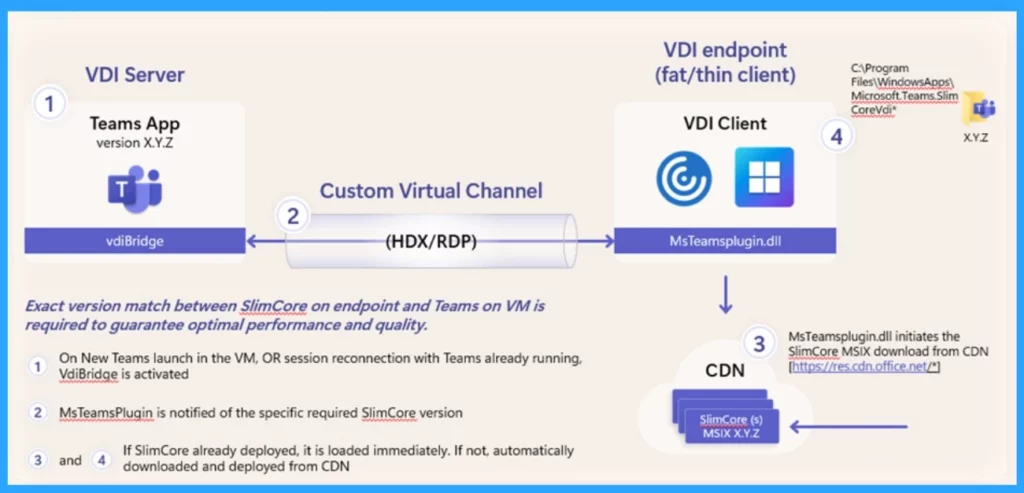
- When the new teams are launched in the VM or session reconnection with teams already running, VdiBridge is activated.
- The MS Teams plugin has been notified of the specific required simple core version.
- If Slimcore has already deployed, it is loaded immediately; if not, it automatically downloads and deploys from CDN.
- Microsoft VDI Story AVD Concept Setup Guide Myths Known Issues
- New Azure Virtual Desktop App in the Microsoft Store Winget and Intune
- Drag Teams Presenter Toolbar during Screen Sharing Frustrating Experience is Going to End Soon
What are the Changes in the New Media Engine
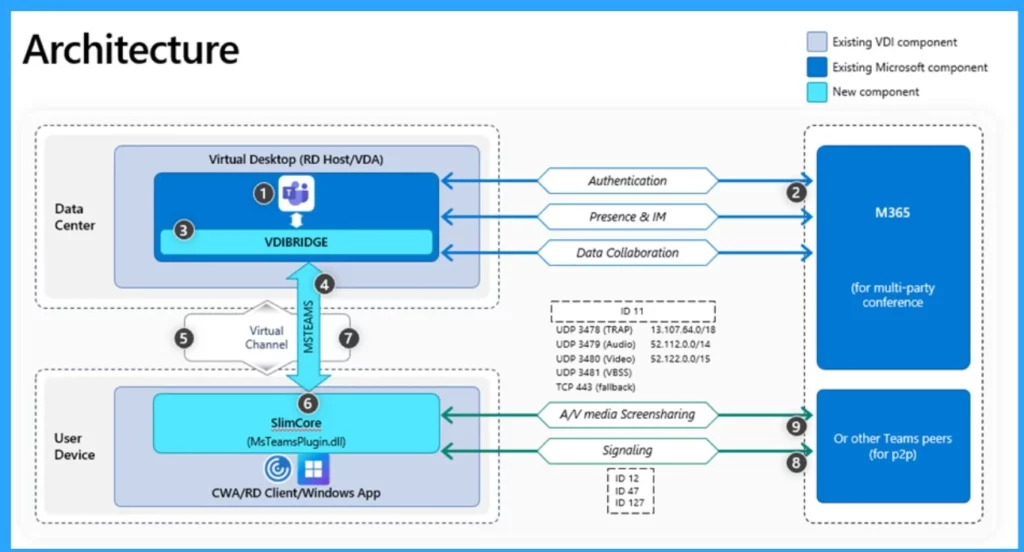
The new media engine in Microsoft Teams handles various types of traffic, including audio, video, and screen sharing. According to the Endpoint Slimcore handle, Interactive Connectivity Establishment (ICE) for STUN and TURN procedures is used. Real-time media like audio, video, and screen sharing uses SRTP over UDP or TCP.
- Media quality optimization for high-fidelity audio, up to 1080p video, and screensharing resolution, with up to 30fps for video and content.
- Also, Signaling using UDP 3478 with fallback to HTTPS.
We are on WhatsApp. To get the latest step-by-step guides and news updates, Join our Channel. Click here –HTMD WhatsApp.
Author
Anoop C Nair is Microsoft MVP! He is a Device Management Admin with more than 20 years of experience (calculation done in 2021) in IT. He is a Blogger, Speaker, and Local User Group HTMD Community leader. His main focus is on Device Management technologies like SCCM 2012, Current Branch, and Intune. He writes about ConfigMgr, Windows 11, Windows 10, Azure AD, Microsoft Intune, Windows 365, AVD, etc.




Discussion