






How to Setup Android Work Support Step by Step Guide Microsoft Intune
Let’s learn how to Setup Android Work Support Step by Step Guide Microsoft Intune. Google’s strategic approach is to support management only via the Android Work channel, and Microsoft Intune’s strategy is to help Android work. This post will show how to set up Android work support in Intune portal.
Latest Post – How To Configure Intune Enrollment Setup For Android Enterprise Device Management – HTMD Blog #2 (howtomanagedevices.com)
I have blogged about enrolling for Android Work Management via Intune: “Intune How to Enroll Android for Work Supported Devices for Management.” The video embedded in the above post explains the process of enabling Android Work support in the Intune Silverlight portal.
As you can see in the embedded video guide attached to this post, we will learn how to unbind or change the Gmail/Google account we used to set up Android work support in the Intune Azure portal. Once the existing Gmail account has been removed, we can use a different Gmail account to configure or set up Android Work support in the Intune Azure console.

- Block Android Work Profile Lock Screen Notifications
- Prepare Android Virtual Device For Intune Deployment Testing
- Prevent One Lock For Android Device And Work Profile Access Using Intune
- Turn off Android Work Profile on Intune Managed Device
- Manually Sync Android Device With Intune
- Intune Company Portal App For Windows 11 Android | Install And Uninstall
Table of Contents
How to Unbind Android Work Account from Intune Azure Portal
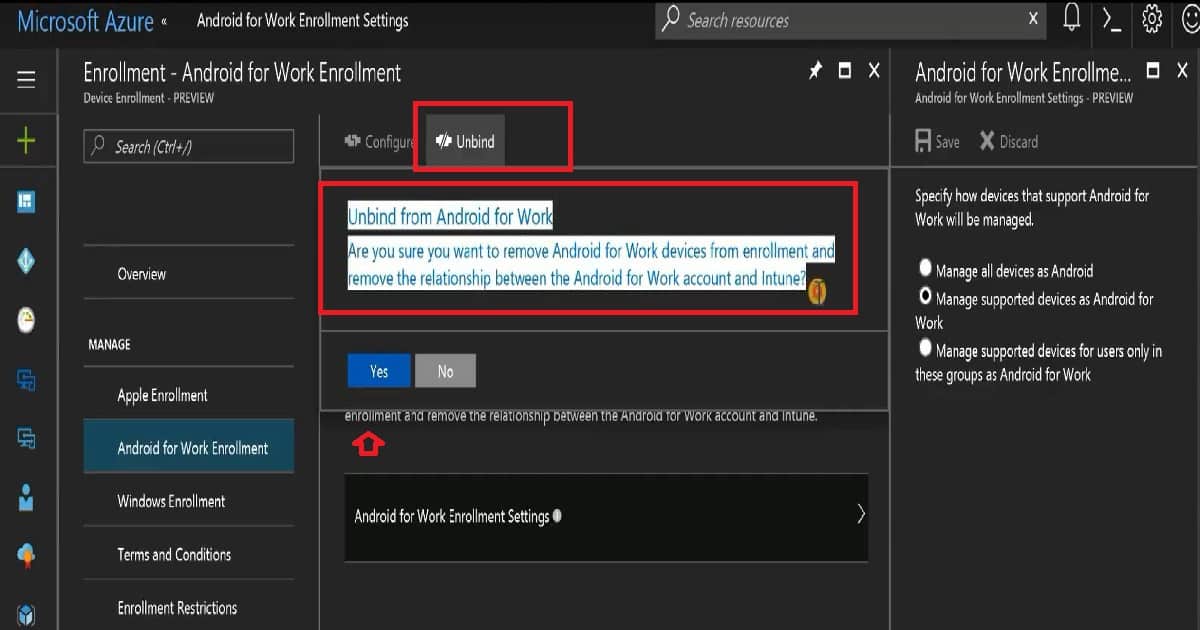
We must unbind the account from the Intune Azure console to change the Setup Android Work Google account. The Unbind button in Intune Azure removes support for Android Work enrollment and eliminates the relationship between the Android work account Gmail and Intune.
I have seen some delay in unbinding the Gmail account from the Intune blade in the Azure portal. As you can see in the video here, I removed the Gmail account from the Android work setting in the Intune blade in the Azure portal, but it took 2 minutes for these changes to reflect. However, the removal of Android Work was immediately reflected on the Intune Silverlight portal.
Setup Android Work Support in Intune Azure Portal
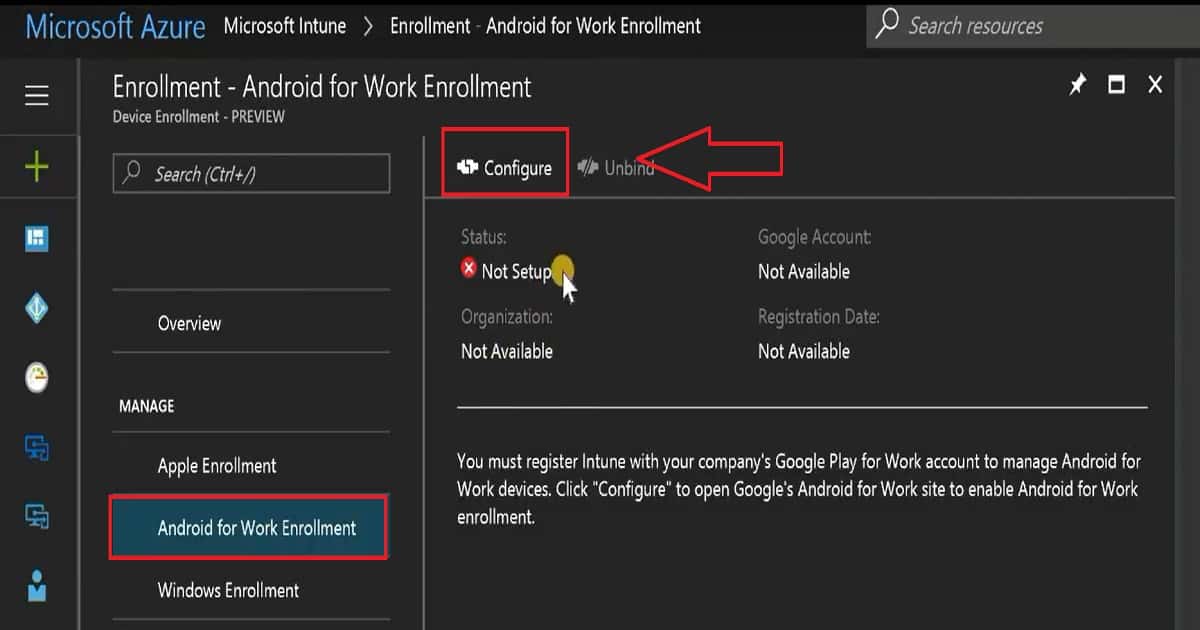
The configuration or setup of Android Work support in the Intune Azure portal is very similar to that in the Silverlight portal. You need to click the Configure button to open a pop-up where you can log in with a new Gmail or Android Work account. The Google configuration wizard will help you set up the connection between Intune and Google APIs like Google Play for Work, Android Work management, etc.
| Microsoft Intune |
|---|
| Enrollment |
| Android for Work Enrollment |
Setting up Android Work Enrollment & Management via Intune
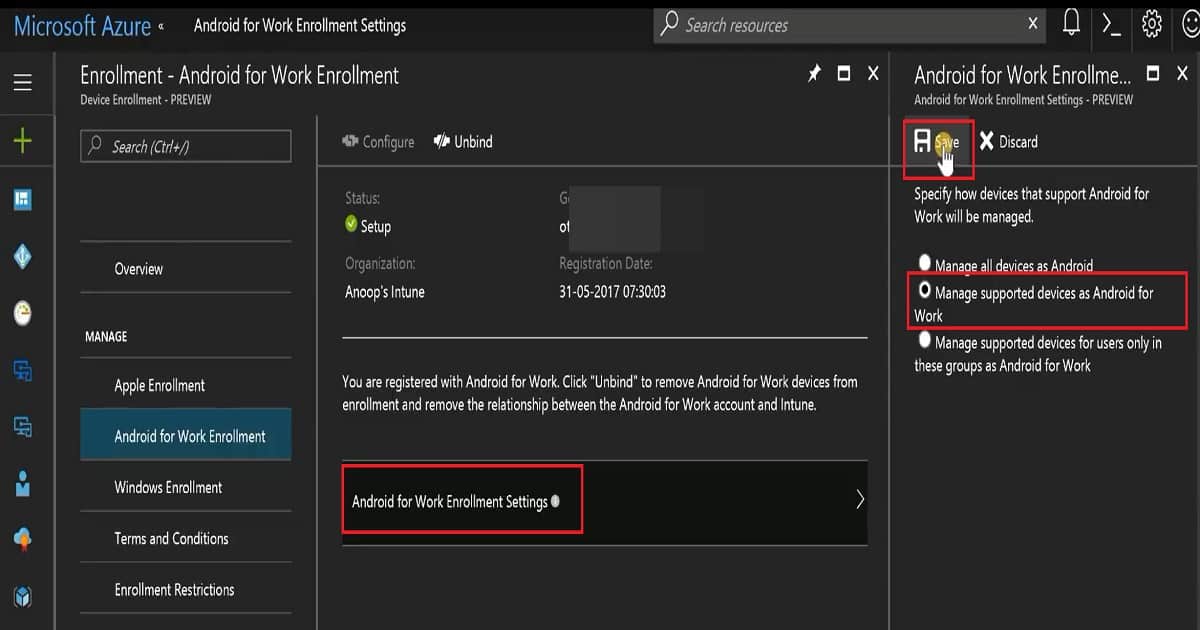
Android for Work enrollment settings are the same as those in the Intune Silverlight console. In the Intune Azure portal, we have three options for setting up Android work enrollment.
1. Manage all devices as Android – This is opposite to Google’s strategic approach regarding managing the Android devices
2. Manage supported devices as Android for Work—As per my testing, all Android 6.0 and above devices are supported for Android work enrollment and management via Intune. I have a blog post that explains A4W supportability, “Intune Entry Level Low-Cost Device Support for Android for Work Enrollment.” Hence, this is my best bet option for enrollment.
3. Manage supported devices for users only in these groups, such as Android Work. This could be used in the testing or pilot process if your organization doesn’t have a test Intune environment.
We are on WhatsApp now. To get the latest step-by-step guides, news, and updates, Join our Channel. Click here. HTMD WhatsApp.
Author
Anoop C Nair is Microsoft MVP! He is a Device Management Admin with more than 20 years of experience (calculation done in 2021) in IT. He is a Blogger, Speaker, and Local User Group HTMD Community leader. His main focus is on Device Management technologies like SCCM 2012, Current Branch, and Intune. He writes about ConfigMgr, Windows 11, Windows 10, Azure AD, Microsoft Intune, Windows 365, AVD, etc.


Discussion