






Latest RDP Connectivity Requirements for Windows 365 and AVD
Hi, let’s discuss Windows 365 and AVD RDP Connectivity Requirement Enhancements. Recently, some improvements were made to the Windows 365 and Azure Virtual Desktop and Remote Desktop Protocol (RDP) connectivity. As you all know, Azure Virtual Desktop is a cloud-based service, and Remote Desktop Protocol is a protocol for users to connect to other devices over a network connection.
Recently, Paul Collinge announced some useful enchancements for the AVD RDP Connectivity Requirements. This new improvemnts are going to be easy to set configurations and a great experiance when they connect to their cloud pc or session host.
That you know that RDP connectivity is very important to a Windows 365 and AVD. These are because of the Lot of traffics. It was previously challenging to optimize traffic due to the frequent changes in IPv4 addresses and their high demand.
Accorting to the Paul Collinge, These enhancements come after significant technical upgrades to our global infrastructure and a successful partnership with Zscaler. Also it announced some enchancement to AVD RDP Connectivity Requirement. So in this post lets look what was that.

Table of Contents
Windows 365 and AVD RDP Connectivity Requirement Enhancements
Above we discussed many things about AVD RDP and Windows 365 Connectivity Requirement Enhancements. Paul Collinge Principal Product Manager – Windows Cloud Networking for End-Users – Windows 365 & AVD shared some enchancemet to the connectivity requirements.
| New Enchancement to the Connectivity Requirements |
|---|
| Instead of 380 individual (RDP) TCP IPv4 subnets, there’s now just one. |
| UDP-based Remote Desktop Protocol (RDP) connections will be moved to a new, dedicated infrastructure called TURN (Traversal Using Relays around NAT). |
| Zscaler has released version 4.3.2 of their client connector portal, which introduces a single-click bypass for RDP connectivity. |
- Most Asked 54 Windows 365 Cloud PC Interview Questions and Answers
- Azure Monitor Agent and Remote Session Lock Configuration Windows 365 Cloud PC August 2024 Update
- RDP Port 3389 is Disabled by Default for All Newly Provisioned Windows 365 Cloud PCs
Zscaler Client Connector
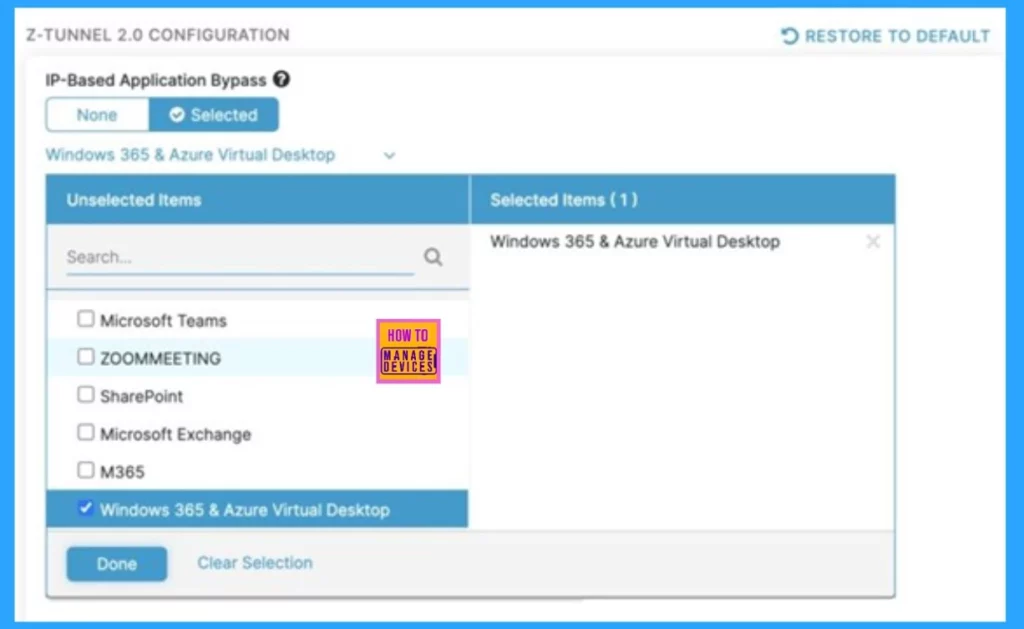
Zscaler is a partner for MS to and they has released version 4.3.2 of their Zscaler Client Connector. This update includes a single-click configuration feature for bypassing RDP traffic, making the setup process much simpler. Users need to ensure they have the latest version of the Client Connector installed on both the Cloud PC and physical devices.
- In the Zscaler Client Connector Portal, users can select the new IP-Based, Predefined Application Bypass for Windows 365 & Azure Virtual Desktop.
- Also it allowing preconfigured bypasses for RDP and KMS traffic.
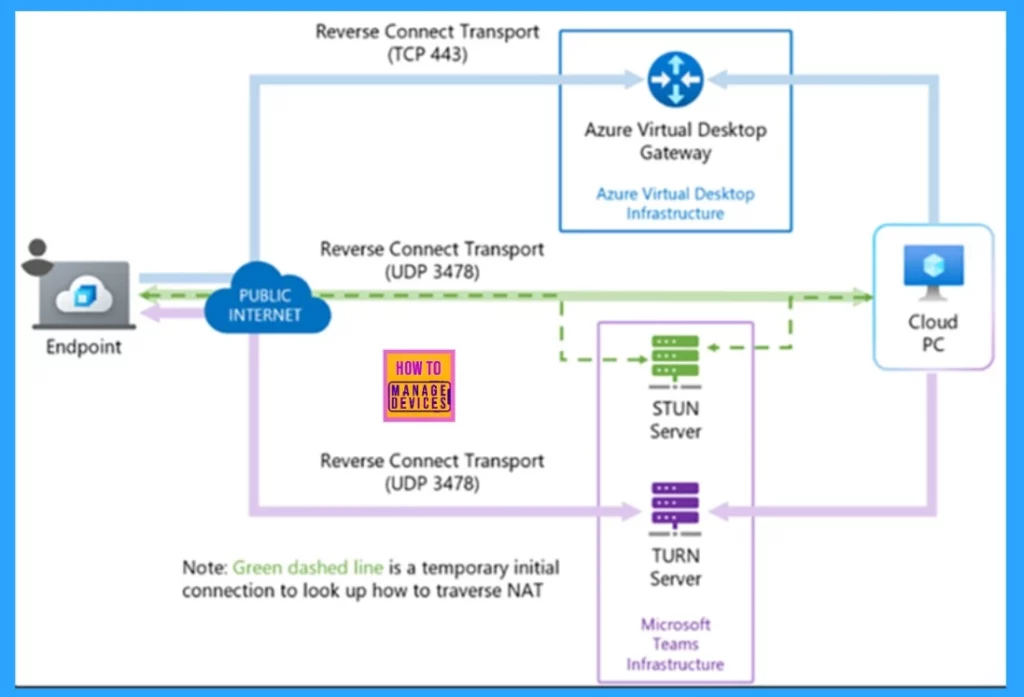
How TURN Enables Indirect Connection
TURN means that Traversal Using Relays around NAT (TURN) protocol. It helps the device to connect through a intermediate when the case of direct connection not possible. Simple Traversal Underneath NAT is providing known Ip address and ports for easy firewall ,management.
- RDP Shortpath with STUN allows direct UDP connections between devices.
- If UDP traffic is blocked, the connection smoothly transitions to TCP-based reverse connect transport, ensuring continued connectivity.
See More: HEVC Video Coding and Symmetric NAT with RDP Shortpath Support with Windows 365 Cloud PC 2409
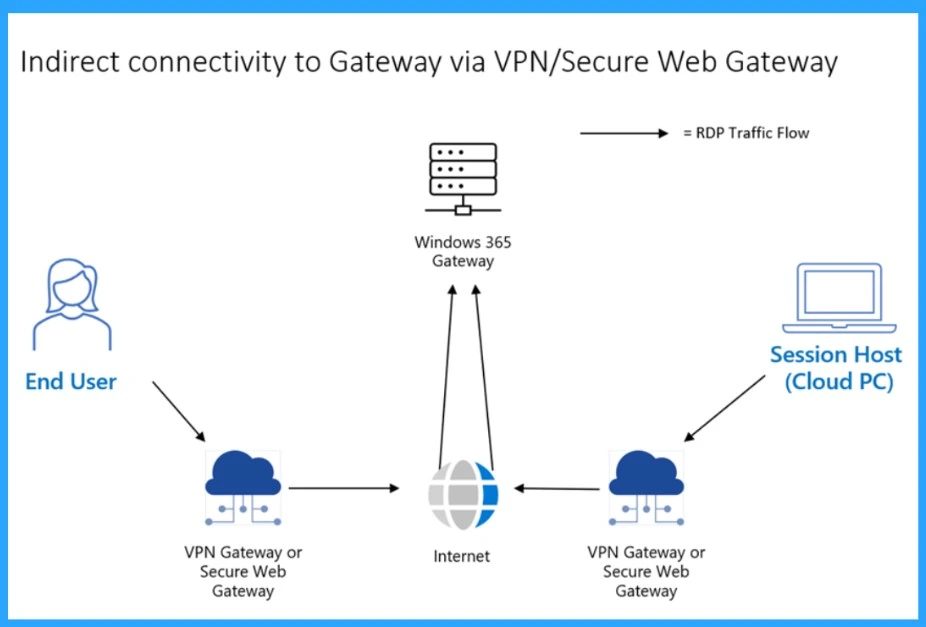
Indirect Connectivity to Gateway via VPN/Secure Web Gateway
The use of VPN (Virtual Private Network) or Secure Web Gateway (SWG) client software to provide secure, tunneled access to on-premises resources is that are commonly in in Windows 365 and Azure Virtual Desktop deployments.
- VPN/SWG solutions create user-specific tunnels when a user logs in.
- On physical devices, these tunnels quickly become active, ensuring smooth work.
- The virtual devices need Remote connections face some challenges.
Reference
Need Further Assistance or Have Technical Questions?
Join the LinkedIn Page and Telegram group to get the latest step-by-step guides and news updates. Join our Meetup Page to participate in User group meetings. Also, Join the WhatsApp Community to get the latest news on Microsoft Technologies. We are there on Reddit as well.
Author
Anoop C Nair has been Microsoft MVP from 2015 onwards for 10 consecutive years! He is a Workplace Solution Architect with more than 22+ years of experience in Workplace technologies. He is also a Blogger, Speaker, and Local User Group Community leader. His primary focus is on Device Management technologies like SCCM and Intune. He writes about technologies like Intune, SCCM, Windows, Cloud PC, Windows, Entra, Microsoft Security, Career, etc.




Discussion