






Hi, Let’s discuss Enable Disable Let Copilot Use Content from Microsoft Edge in Windows 11. Copilot is the best companion for users nowadays; it gives the best results for users. We know our technology is constantly improving, and using Artificial Intelligence (AI) in common apps is the key to making things easier for users.
Microsoft’s Copilot in the Edge browser on Windows 11 is an excellent example. It’s an intelligent tool that helps users handle online tasks more smoothly. Copilot is an AI-powered assistant that integrates smoothly into various applications, including web browsers like Microsoft Edge.
With Copilot, you can quickly access all kinds of information, such as quick answers or detailed summaries. This feature was introduced to provide users with an AI companion to assist in various tasks directly within the browser.
Copilot can use content from your Microsoft Edge tab to provide relevant responses in Windows 11. One of Copilot’s key features in Windows 11 is its ability to access content from the active Microsoft Edge tab. In this post, you can find a guide for Enabling or Disabling Copilot’s Access to Microsoft Edge Content in Windows 11.

- Add or Remove the Copilot Toolbar Icon in Microsoft Edge
- Copilot with Commercial Data Protection in Microsoft Edge for Business
- Create AI Images from Microsoft Edge
What are the Features of Copilot Using Content from Microsoft Edge in Windows 11?
1. Copilot is a browser assistant that assists you in difficult browser situations.
2. Copilot is capable of summarizing documents, including PDFs and longer website content
3. Copilot works with the clipboard and can take screenshots in Edge for more help.
4. It can organize your tabs, import passwords from other browsers
Enable Disable Let Copilot use Content from Microsoft Edge in Windows 11
A key feature of Copilot in Windows 11 is that it can use the content of your current Edge browser tab. That means you can ask Copilot to summarize a webpage you’re viewing, interact with the content without switching tabs, and easily copy the text. You can easily enable or disable Let Copilot to use Content from Microsoft Edge in Windows 11.
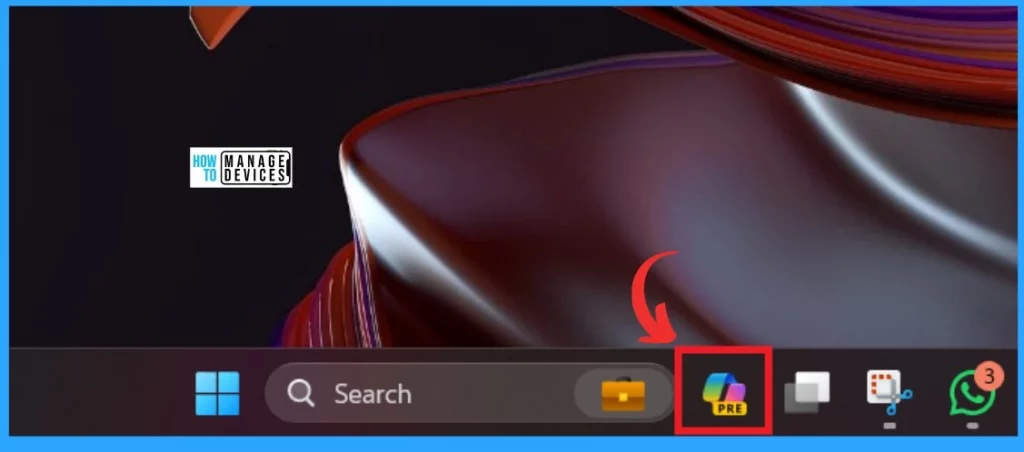
- Click on the Copilot option in the Taskbar of your device
- New Error Detecting Feature in Edge Browser using Copilot
- New Capabilities in Microsoft Copilot for Security
- New Copilot Feature in Windows 11 to Connect Plugin
You will get the Copilot window after clicking on the Copilot from the Taskbar. You must open the setting option in the copilot window by clicking the 3 dot menu.
- Click on the Settings
Note: Copilot is designed to enhance your productivity by allowing Copilot to interact with the content you’re browsing directly within Windows 11.
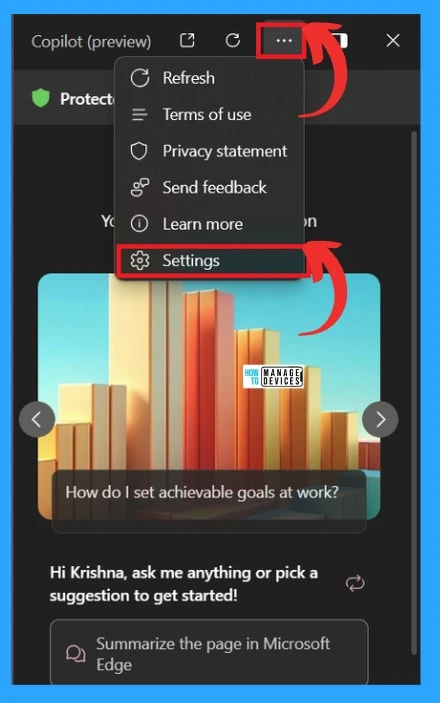
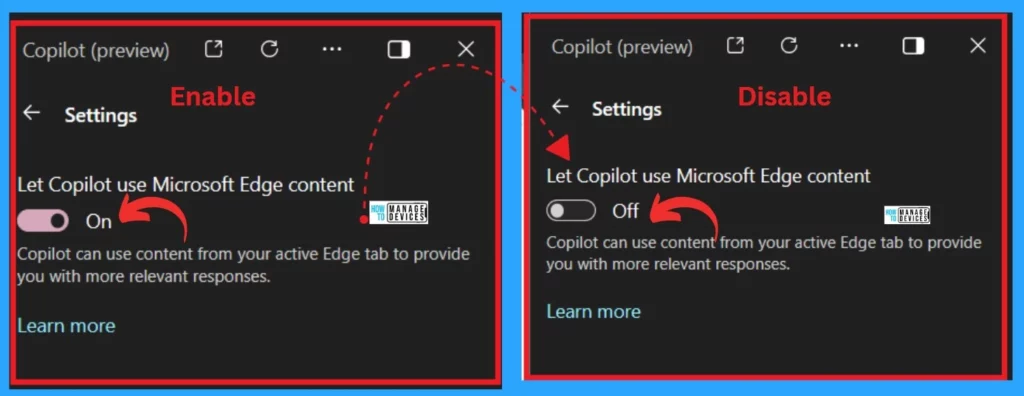
In the setting option, you can see the Let Copilot use Microsoft Edge content is Enabled by default. If you don’t want to access the content from the Edge, you can easily Turn it off by toggling the pane from right to left.
| Enabling | Disabling |
|---|---|
| For Enabling Toggle the pane to the Left to the Right | For Disabling, Toggle the pane to the Right to the Left |
We are on WhatsApp. To get the latest step-by-step guides and news updates, Join our Channel. Click here –HTMD WhatsApp.
Author
Krishna. R is a computer enthusiast. She loves writing about Windows 11 and Intune-related technologies and sharing her knowledge, quick tips, and tricks about Windows 11 or 10 with the community.


Discussion