






Easiest Method to Manage Active Sessions of AVD Users
Let’s have a quick look at the options to manage active sessions of AVD users. This is one of the easiest methods available as out of the box in the Azure Virtual Desktop portal itself. I have used this option for the initial troubleshooting of AVD session hosts.
Recently Microsoft started supporting Azure AD joined scenario as well. The method to manage active sessions using the AVD portal is available for Hybrid Azure AD joined, and Azure AD joined scenarios.
There are many ways to perform AVD troubleshooting. I’m going to share my experience in this blog post. One of the best ways to start troubleshooting from Active Sessions for a particular user. The following posts provide some other topics of AVD troubleshooting.
- AVD VM RD Client Connection Error 0x83886181
- AVD VM Force Restart Issue with reason code 0x80000000
- FIX: AVD Azure AD Joined VM Login Issue with Error Code 0x9735
How to Quickly Manage Active Sessions of AVD Users
You can quickly check and manage active sessions of AVD users from the Azure Virtual Desktop portal itself. You will need to navigate to the Azure Virtual Desktop section from the Azure portal. You can just search Azure Virtual Desktop from the Azure portal to reach the AVD portal.

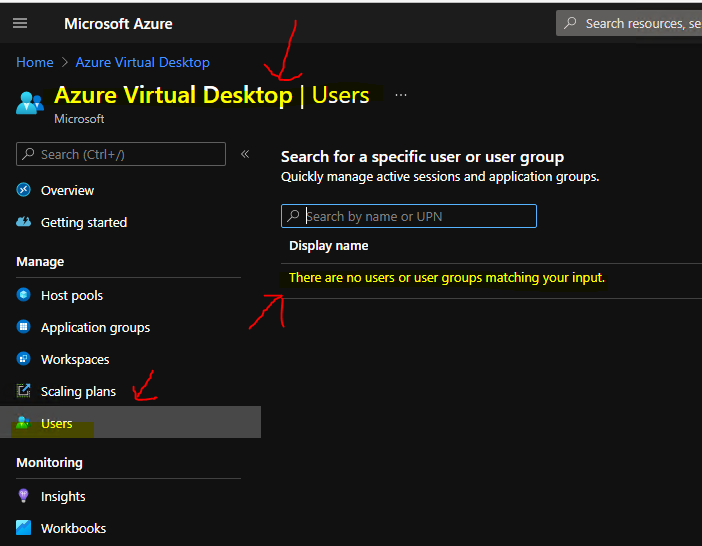
Click on the Users tab below the Scaling plans tab in the portal. You can search for a specific user or user group and quickly manage active sessions and application groups. But you will see a message “There are no users or user groups matching your input.“
This message was a bit confusing message for me as an admin when I looked at AVD active sessions of a user for the first time. You will need to type in either group name or user name to get the details of Active sessions.
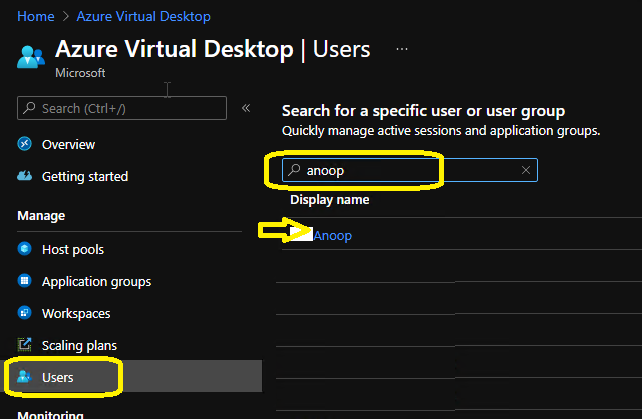
Now, let’s type in the user name or group name to get the details of AVD active sessions of a particular user or a group of users.
This search will look into Azure Active Directory and start populating all the users from your Azure Active Directory. It doesn’t matter whether you have assigned a session host or host pool to that user or not. You will need to select the correct user to proceed further to manage the active sessions of that user.
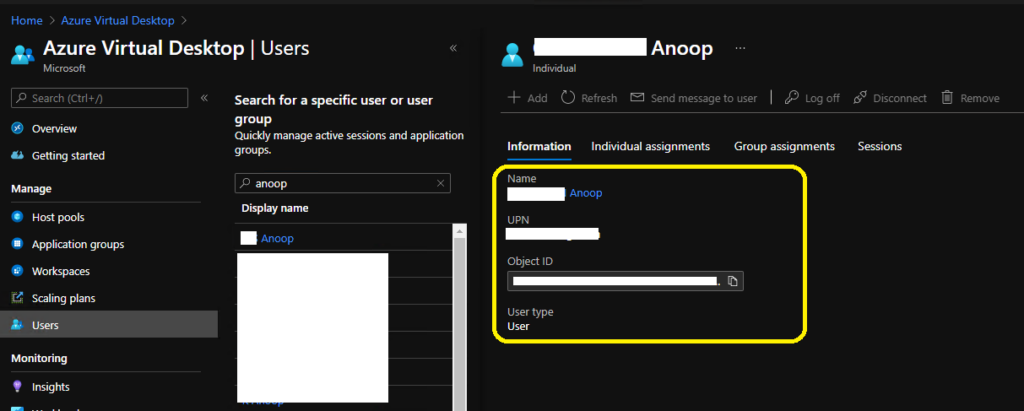
You will get further details from the below screen, general information about the user application group. The application group details will be displayed if you search with the application group name.
There are different sections or tabs available for individual users. I normally search with user names if I want to troubleshoot a user-related issue.
- Information – This provides user name, UPN of the user, and User Type details.
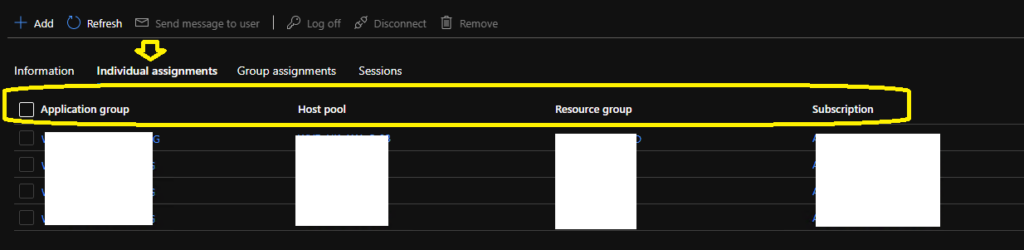
AVD Session Host Individual Assignment Details for a user
You will get AVD Session Host Individual Assignment Details for a particular user here. Individual Assignment – This provides the details about the individual assignment of a specific user to an application group. I don’t think assigning a user directly to an AVD application group associated with a host pool is not a best practice, in my opinion.
I would rather assign an Azure AD group to the AVD application group so that the user management will be easy and you will have better options to automate the host pool assignments. The individual assignments tab will help you will the following details.
- Application Group (This is NOT Azure AD application group) – AVD Application groups associated to Workspaces.
- Host Pool – Asscoated Host Pool details. You will be able navigate directly to this host pool from here.
- Resource Group – You will get all the resource group related information from here.
- Subscription – Subscription details associated with indivitual host pool assignment will be available in this column.
AVD Session Host Group Assignment for a User
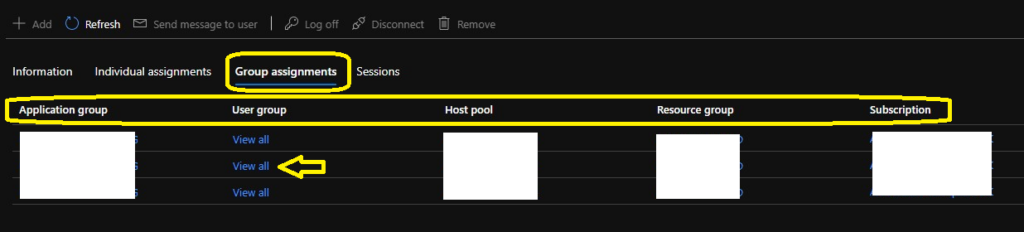
You will get all the details about AVD Session Host Group Assignment for a user from this tab of the active session section. The group assignment tab will have all the details related to the Azure AD user group assigned to each AVD Application group.
I think Azure AD user group and Host pool details associated with each AAD user group are very useful for troubleshooting complex AVD deployment scenarios.
The only difference between individual assignment and Group Assignment of host pools is User Group (Azure AD User Group). If you click on the View All link, you will see the list of AAD user groups associated with that particular host pool.
Manage Active Sessions of AVD Users
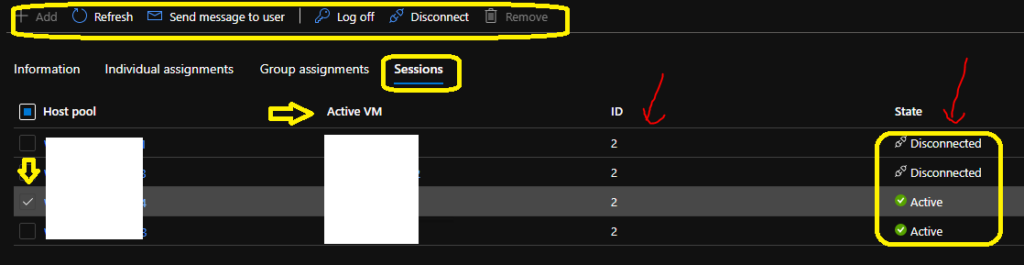
You can manage Active Sessions of AVD Users from this section of the AVD portal for a particular user. There are many rich options to manage AVD sessions for users.
The Sessions tab provides a list of active or disconnected sessions for that particular user. It also provides Active VM. Also, you will get options for the following functions when you select a specific host pool or VM from the list.
- Add – disabled for Active or Disconnected sessions.
- Refresh – Refersh and check the state of the session whether it’s active of disconnected?
- Send Message to User – Option to send message to active users.
- Logoff – Forcefully logoff the users.
- Disconnect – Disconnect the sessions.
- Remove – disabled for Active or Disconnected sessions.
Author
Anoop is Microsoft MVP! He is a Solution Architect in enterprise client management with over 17 years of experience (calculation done in 2018). He is Blogger, Speaker, and Local User Group HTMD Community leader. His main focus is on Device Management technologies like SCCM 2012, Current Branch, and Intune. He writes about ConfigMgr, Windows 11, Windows 10, Azure AD, Microsoft Intune, Windows 365, AVD, etc…..…




Discussion