






Microsoft 365 E5 Security Add-on Now Available to Enhanced Cybersecurity for SMBs
Today, I will explore the Microsoft 365 E5 Security Add-on, now available to enhance Cybersecurity for SMBs. Microsoft has launched a new security option, Microsoft 365 E5 Security, for small and medium-sized businesses (SMBs) that subscribe to Business Premium.
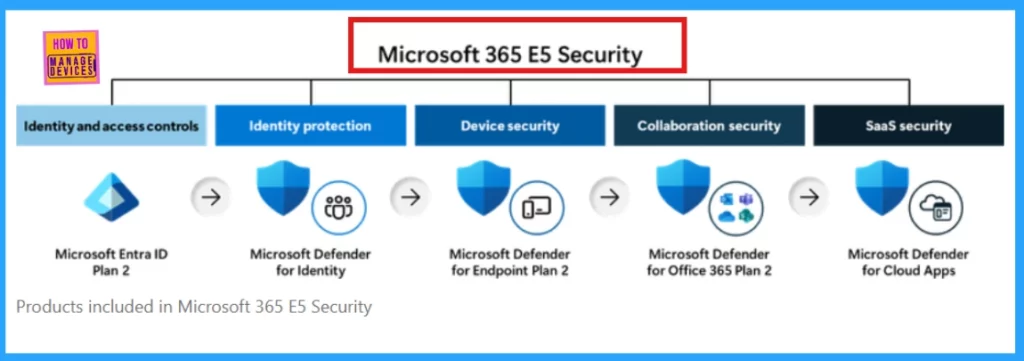
Microsoft 365 E5 Security upgrade provides enhanced protection through advanced features like Microsoft Entra ID Plan 2, Defender for Identity, Endpoint Plan 2, Office 365 Plan 2, and Cloud Apps. These enhancements allow businesses to significantly strengthen their security posture beyond the core offerings of Business Premium.
Business Premium offers identity and access controls with Entra ID P1. Adding Entra ID P2 enhances security and governance with features like Entra ID Protection and Governance. Entra ID Protection enhances security with real-time risk-based access control. It uses analytics to detect threats like password spray attacks and provides reports and alerts for quick risk remediation.
Entra ID Governance simplifies user access management by automating onboarding, access requests, and account management. This reduces slow manual steps and speeds up onboarding for new employees. Let’s delve into the Microsoft 365 E5 Security, now available for Business Premium.

Table of Contents
What are the Key Benefits of Implementing XDR for Enhanced Cybersecurity?
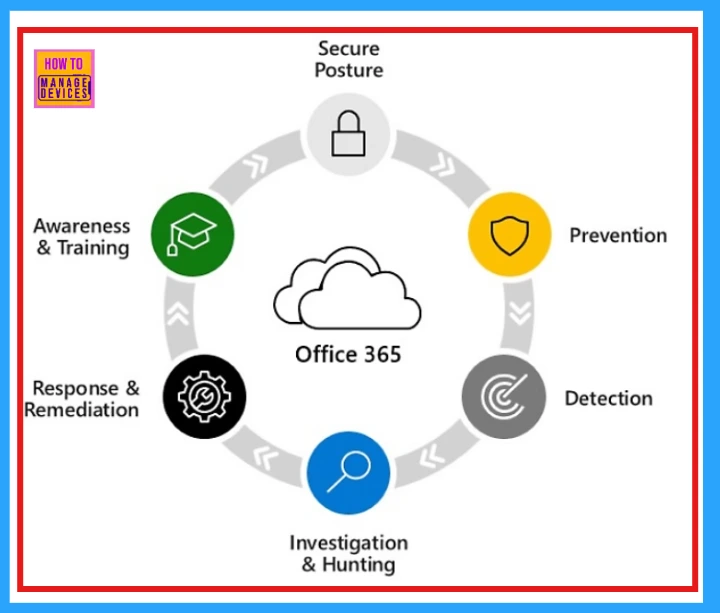
Microsoft Defender XDR helps you see and respond to security incidents throughout the attack process. It combines XDR and exposure management (XSPM) to integrate various security tools. This approach protects identities, endpoints, applications, and email strongly.
Can I use Different Licenses for Device Security with Microsoft 365 Business Premium and Microsoft 365 E5 Security?
Microsoft Defender for Business and Defender for Endpoint Plan 2 cannot be used together in the same tenant; Defender for Business takes priority.
This means all users will use Defender for Business, even if some have the E5 Security license with Plan 2. To use Defender for Endpoint Plan 2 for everyone, all users must be licensed for it, and you need to contact Microsoft Support to change the default setting.
What are the Differences Between Microsoft Defender for Business and Microsoft Defender for Endpoint P2?
For small and medium-sized businesses (SMBs) with up to 300 users, Microsoft Defender for Business offers core security, next-gen protection, attack surface reduction, EDR, and automated remediation. It simplifies setup with easy configuration and onboarding.
Defender for Endpoint is an enterprise-grade platform for advanced threat protection. Plan 1 offers basic protection, while Plan 2 adds vulnerability management, extended detection and response, threat hunting, and longer data retention.
How to Build MDR Services with MDB?
For setup instructions, refer to the Microsoft 365 Streaming API Guide, which helps with advanced hunting and attack detection.
Microsoft 365 E5 Security Add-on for Business Premium
Microsoft 365 E5 provides strong security features to protect identities and detect threats. It helps stop attacks before they can cause serious damage. Microsoft 365 E5 also combines tools to protect information and ensure compliance, making managing and securing data easier.
E5 Security offers advanced security features beyond Business Premium, including Microsoft Entra ID Plan 2, Microsoft Defender for Identity, Defender for Endpoint Plan 2, Defender for Office 365 Plan 2, and Defender for Cloud Apps.
| Feature Category | Microsoft 365 E5 Security |
|---|---|
| Identity & Access Management | Microsoft Entra ID Plan 2 (formerly Azure AD Premium P2) |
| Identity Threat Detection | Microsoft Defender for Identity |
| Enhanced Device Security Measures (Endpoint Security) | Microsoft Defender for Endpoint Plan 2 |
| Email & Collaboration Security | Microsoft Defender for Office 365 Plan 2 |
| Cloud App Security | Microsoft Defender for Cloud Apps |
- New GhostLock Technique Exploits Windows API To Block File Access
- Microsoft Announces Major Microsoft 365 Pricing And Packaging Changes Coming In Mid-2026
- What Is Microsoft Entra ID?
- Enhanced Security With Windows 365 Customer Lockbox
- Entra Conditional Access Is Central To Secure Microsoft 365 – A Brief Analysis
Key Components of Identity Threat Detection and Response
Cyberattacks often target identities, so it’s important to protect them. Microsoft Defender for Identity helps with this by using special sensors and connectors for different parts of your identity system. This tool provides a clear view of your identity landscape and offers specific security advice, strong threat detection, and effective response actions.
It also connects and combines threat information with data from other areas in Defender XDR, giving you a complete view of possible threats.
Enhanced Device Security Measures
Microsoft Defender for Business protects Business Premium users on various devices. It includes vulnerability management, advanced antivirus, AI-based threat detection, and automatic incident response.
For users needing more analysis, Microsoft Defender for Endpoint P2 offers advanced hunting tools, longer data retention, and security for IoT devices. This allows for better investigation and management of threats.
Strengthened Email and Collaboration Protection
Defender for Office 365 P1 offers strong protection for email and collaboration tools. It includes features like SafeLinks, safe attachments, and threat detection driven by AI. Upgrading to Defender for Office 365 P2 provides important training to help employees recognize security threats through cyberattack simulations.
- It also includes automated responses to fix breaches quickly and detailed reports to understand employee behavior and possible weaknesses.
Enhanced SaaS Security
Microsoft Defender for Cloud Apps offers strong SaaS security using AI. It helps IT teams manage shadow IT, protect against attacks, and oversee using Generative AI apps. Combining app discovery, security management, and threat protection provides full visibility and control over SaaS applications and helps fix misconfigurations to reduce vulnerabilities.
Microsoft 365 E5 Security Add-on: A Cost-Effective Solution for SMBs
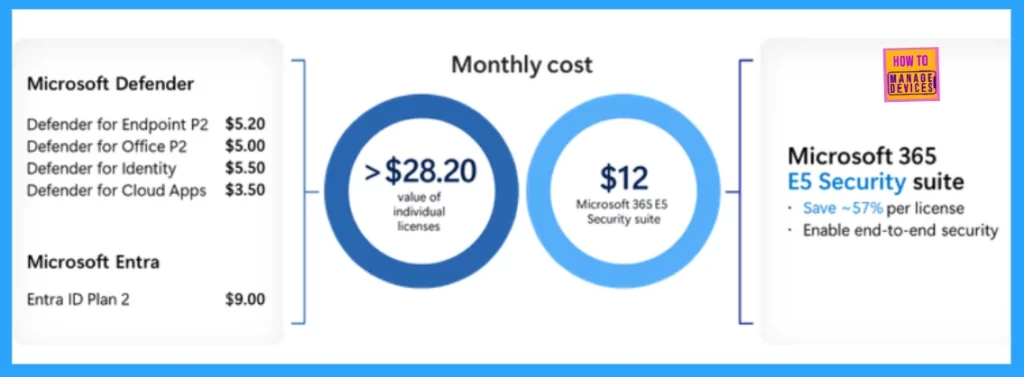
Small and medium businesses need strong cybersecurity solutions. Microsoft 365 E5 Security offers a cost–effective way to meet these needs. Bundling key security tools saves 57% compared to buying each tool separately. This makes it easier and cheaper to access enterprise-grade protection.
Resources
Need Further Assistance or Have Technical Questions?
Join the LinkedIn Page and Telegram group to get the latest step-by-step guides and news updates. Join our Meetup Page to participate in User group meetings. Also, Join the WhatsApp Community to get the latest news on Microsoft Technologies. We are there on Reddit as well.
Author
Anoop C Nair has been Microsoft MVP for 10 consecutive years from 2015 onwards. He is a Workplace Solution Architect with more than 22+ years of experience in Workplace technologies. He is a Blogger, Speaker, and Local User Group Community leader. His primary focus is on Device Management technologies like SCCM and Intune. He writes about technologies like Intune, SCCM, Windows, Cloud PC, Windows, Entra, Microsoft Security, Career, etc.




Discussion