





How to Fix SCCM CU1 Installation Rename Operations Pending Error ConfigMgr
How to Fix SCCM CU1 Installation Rename Operations Pending Error ConfigMgr. I encountered the following errors while installing CU1: configmgr2012adminui-rtm-kb2717295-i386.msp.
Installing SCCM cumulative updates is very important for your infrastructure. It fixes many issues, some of which are essential.
This applies to all systems with CM 2012 Admin Console. Whenever you get a warning in the prerequisite checker like the one below, it’s better to restart the server and then install the CU fix.
- Beginners Guide Step By Step SCCM Console Nodes Overview
- ConfigMgr Admin Console Silent Install Application Using SCCM
Table of Contents
How to Fix SCCM CU1 Installation Rename Operations Pending Error ConfigMgr

An earlier software installation still has outstanding file rename operations pending. Before continuing with setup, you should restart the computer to allow operations to complete.

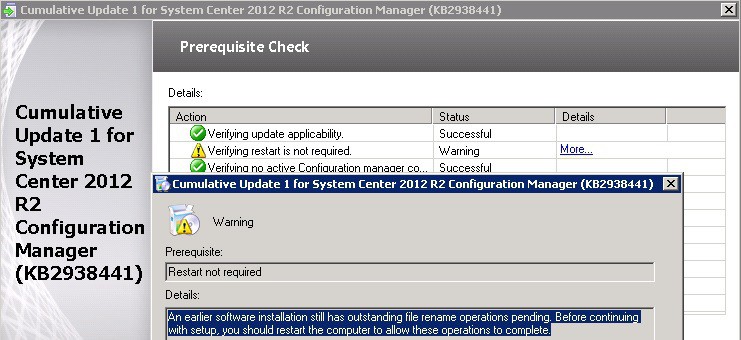
Error One
(Not sure, how come there is a spelling mistake in ConfigMgr Log file)
Fatal error 0x87d01101 encountered for program Cumulative update 1 – console update install. This program will not retry.
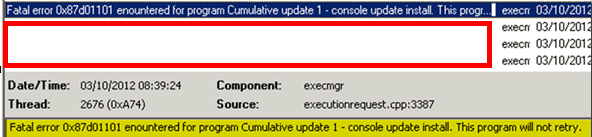
The first error, 0x87d01101, was encountered during the CU1 CM 2012 Admin console update installation through the Software Deployment method.
The deployment failed probably because the console was open on the site server. I closed the console and reran the deployment, resolving this issue.
Error Two
MSI (s) (FC:F0) [13:59:04:648]: SOURCEMGMT: Failed to resolve the source.
MSI (s) (FC:F0) [13:59:04:648]: Product: Microsoft System Center 2012 Configuration Manager Console — Error 1706. An installation package for the product Microsoft System Center 2012 Configuration Manager Console cannot be found. Try the installation again using a valid copy of the installation package ‘Adminconsole.msi’.
Error 1706. An installation package for the product Microsoft System Center 2012 Configuration Manager Console cannot be found. Try the installation again using a valid copy of the installation package ‘Adminconsole.msi’.

The Second error occurred when I tried manually installing the same update on a different site server. I used the command line given in the package program. It failed with the most common MSI error, 1603. Now? I looked at the log file in more detail, and once again, “Return value 3” helped me reach the actual error: “SOURCEMGMT: Failed to resolve source.”
Command Line
msiexec.exe /p configmgr2012adminui-rtm-kb2717295-i386.msp /L*v %TEMP%\configmgr2012adminui-rtm-kb2717295-i386.msp.LOG /q REINSTALL=ALL REINSTALLMODE=mous
Now the things are much clear. The installer is not able to find the ‘Adminconsole.msi’ file in the temp folder of the user who installed the site server and or admin console. Is there any logic? I’m not that BIG. Maybe, big people must have some knowledge about the logic behind this.
My goal is to solve this issue. What do I do? Removed the silent switch (/q) from the above command line and tried again. The installation stopped with the following error.
Setup is searching for installed applications.
Click OK to try again, or enter an alternate path to a folder containing the installation package “Adminconsole.msi” in the box below
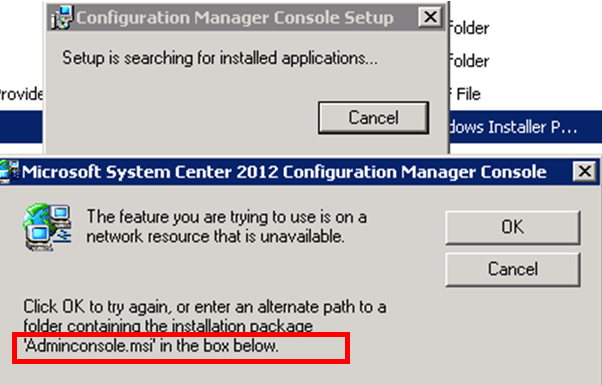
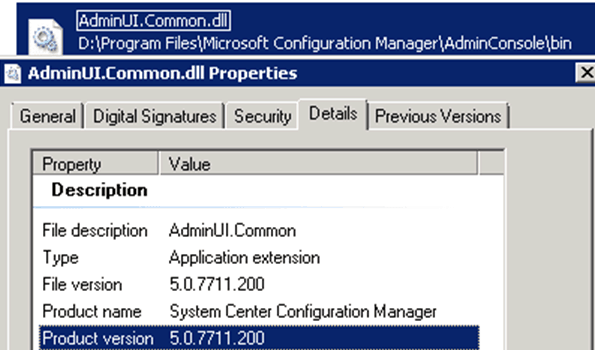
Now, it’s pretty easy to guide the wizard to a location where we have “AdminConsole.MSI” and click OK. Now what? The update got installed successfully with the latest “AdminUI.Common.dll” file version “5.0.7711.200.”
We are on WhatsApp. To get the latest step-by-step guides and news updates, Join our Channel. Click here –HTMD WhatsApp.
Author
Anoop C Nair has been Microsoft MVP from 2015 onwards for 10 consecutive years! He is a Workplace Solution Architect with more than 22+ years of experience in Workplace technologies. He is also a Blogger, Speaker, and leader of the Local User Group Community. His main focus is on Device Management technologies like SCCM and Intune. He writes about technologies like Intune, SCCM, Windows, Cloud PC, Windows, Entra, Microsoft Security, Career, etc..




Had the same problem installing CU2. Thank you!
Nice info bro!!!!
_____________________________
For Excel Automation
visit http://www.excelautomate.blogspot.in