






New Entra RBAC Role People Administrator Details
New Entra RBAC Role People Administrator Details!! Yes, Microsoft is launching a new People Administrator role in Microsoft Entra ID to simplify management tasks in Microsoft 365. Let’s discuss how this new feature helps administrators.
Based on customer feedback, the New People Administrator Role allows administrators to manage people-related settings and profile photos without requiring high-level access like Global Admin or User Admin roles.
Microsoft Entra ID roles let you manage resources within Microsoft Entra. Key roles include User Administrator, Application Administrator, and Group Administrator, each granting permissions to manage resources in Entra ID.
The worldwide rollout of this feature, including GCC, GCC High, and DoD environments, is scheduled to begin in early February 2025 and is expected to be completed by late February 2025. After this rollout, administrators can assign the new People admin role to users through the Microsoft Entra Admin Center and Microsoft 365 Admin Center.

Table of Contents
What are the Abilities of the New People Administrator Role in Microsoft Entra ID?
The New People Administrator Role can update profile photos for all users, including admins. It can also improve settings for pronouns, name pronunciation, and profile cards for all users.
New Entra RBAC Role People Administrator Details
The New People Administrator Role offers a more secure and efficient way to manage people-related tasks. It allows organizations to delegate specific administrative duties without granting excessive privileges, improving security and reducing security risks. This role complements existing roles and increases satisfaction with Microsoft tools.
| People Administrator Role Supports Organizations by: |
|---|
| Delegating tasks without excessive permissions for other administrators |
| Simplifying access to new features in the People domain |
| Enhancing security by avoiding privileged roles for routine tasks. |
- AZ-104 Exam Prep Guide for Azure Administrator Associate Specialist Certification
- 11 New Identity Secure Score Recommendations in Microsoft Entra
- Complete Guide to Install the New Microsoft Entra PowerShell Module
Preparations to Access the New People Administrator Role in Microsoft Entra ID
Admins are recommended to prepare the following details to access the New People Administrator Role in Microsoft Entra ID.
- Review the People admin role documentation.
- Assess how the new role fits with existing roles.
- Communicate changes to staff as needed.
- Evaluate the current configuration’s impact.
- The rollout will occur automatically, with no action needed from admins.
- The People admin role will be available by default.
Availability Checking of New People Administrator Role in Microsoft Entra ID
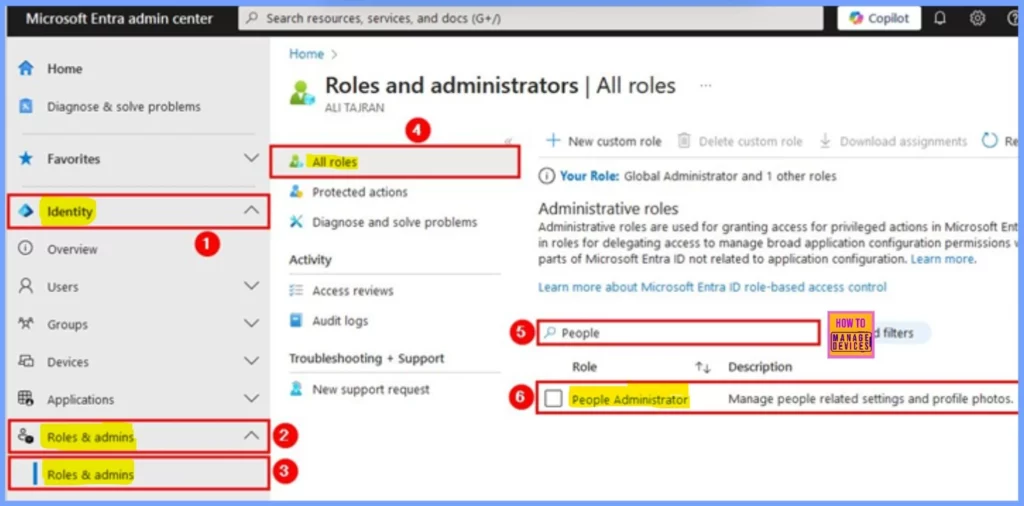
It is very straightforward to check whether the New People Administrator Role in Microsoft Entra ID is available on your device. To do so first you should login your Microsoft Entra Admin Center.
- Then click in Identity > Role & Admin > Select Role & Admin > Select All Roles.
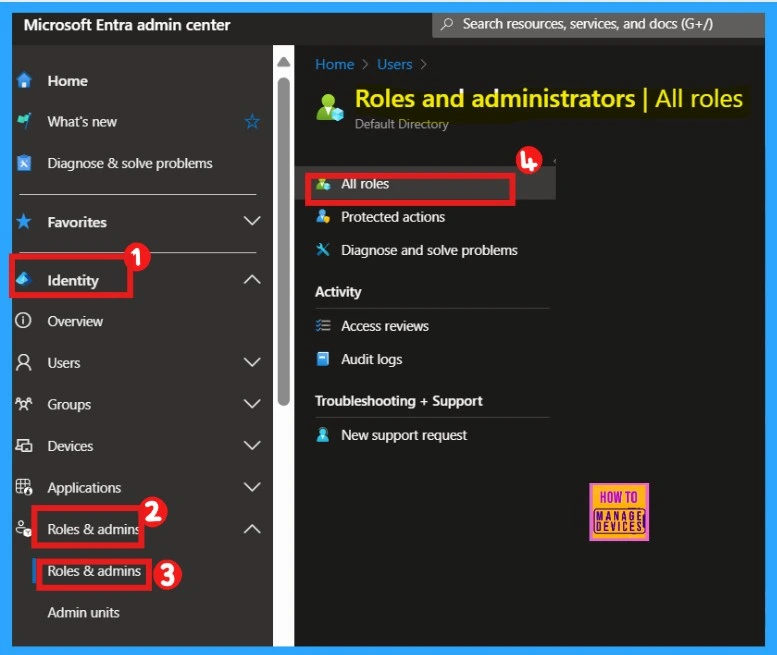
After clicking All Roles, you will see a search bar on the left pane where you can search for the People Administrator Role. Now, you can see the People Administrator and its description. The screenshot below shows a detailed version of the above-mentioned text.
Resources
Need Further Assistance or Have Technical Questions?
Join the LinkedIn Page and Telegram group to get the latest step-by-step guides and news updates. Join our Meetup Page to participate in User group meetings. Also, Join the WhatsApp Community to get the latest news on Microsoft Technologies. We are there on Reddit as well.
Author
Anoop C Nair has been Microsoft MVP for 10 consecutive years from 2015 onwards. He is a Workplace Solution Architect with more than 22+ years of experience in Workplace technologies. He is a Blogger, Speaker, and Local User Group Community leader. His primary focus is on Device Management technologies like SCCM and Intune. He writes about technologies like Intune, SCCM, Windows, Cloud PC, Windows, Entra, Microsoft Security, Career, etc.




Discussion