






Microsoft Warns Stop using PowerShell Scripts for Intune Endpoint IPs and FQDNs
Microsoft Warns Stop using PowerShell Scripts for Intune Endpoint IPs and FQDNs. Many IT admins use PowerShell scripts to get Microsoft Intune IP addresses and FQDNs so they can set up firewalls and proxies. These scripts usually came from the Office 365 Endpoint service and made network setup easier.
But recently, Microsoft made changes that make these scripts unreliable. IP Addresses (IPs) are numerical addresses assigned to servers in Microsoft’s network. Devices use these to communicate with Intune. FQDNs are human readable names like endpoint.microsoft.com, that point to those servers.
If IT teams keep using PowerShell scripts to get Intune IP addresses and FQDNs, devices may stop connecting properly to Intune. This can prevent them from receiving updates, apps, and security policies, which can cause disruptions for employees and slow down work.
Using outdated IPs and FQDNs can also lead to wrong firewall or proxy settings. IT admins may spend extra time fixing connection problems, and devices might miss important updates, creating security risks for the organization.

Table of Contents
Microsoft Warns Stop using PowerShell Scripts for Intune Endpoint IPs and FQDNs
Microsoft has updated their documentation with a critical warning that the old PowerShell scripts no longer return accurate data for Intune endpoints. The IP addresses and FQDNs provided by these scripts may be outdated, incomplete, or even incorrect.
- Continuing to use these old scripts or endpoint lists can cause problems for modern Intune deployments:
- Devices may fail to connect to Intune services.
- Updates and apps may not reach the devices.
- Remote management tasks could stop working.
- Firewall and proxy rules may be applied incorrectly.
- Best Guide to use PowerShell Scripts in Intune Enterprise Catalog App
- Step-by-Step Guide to Export Intune Platform PowerShell Scripts via Graph API
- Intune Automation Collection Community Solution Helps to Build Workflows with PowerShell Scripts and More
Use Official Intune Service Endpoints Guidance
Instead of using old PowerShell scripts, Microsoft recommends using the official Intune service endpoints guidance. Always check the latest documentation or endpoint URLs provided by Microsoft and update your network configurations.
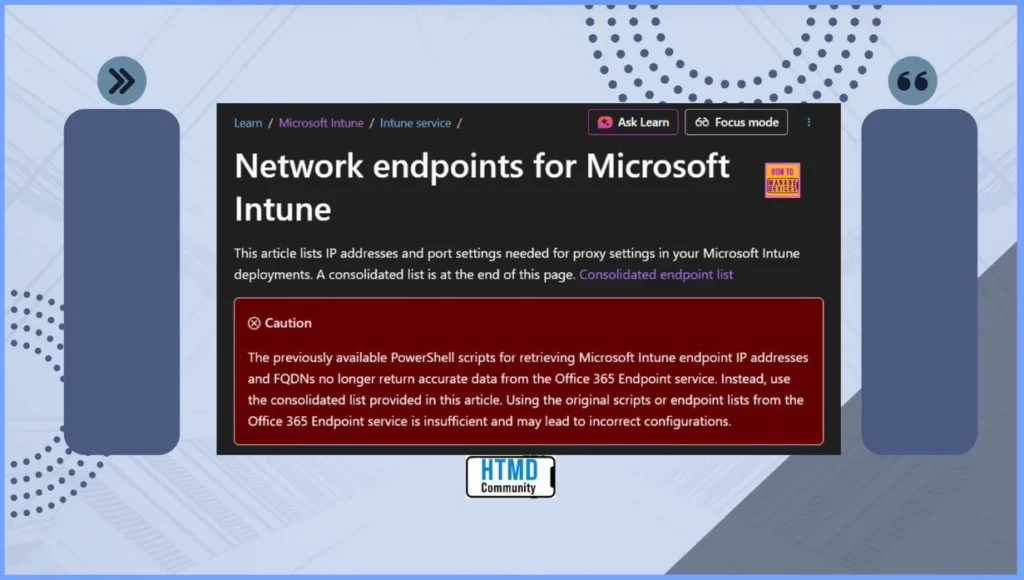
Warning Message from MS – The previously available PowerShell scripts for retrieving Microsoft Intune endpoint IP addresses and FQDNs no longer return accurate data from the Office 365 Endpoint service. Instead, use the consolidated list provided in the MS article. Using the original scripts or endpoint lists from the Office 365 Endpoint service is insufficient and may lead to incorrect configurations.
| Recommendation | Details | Benefit |
|---|---|---|
| Use official Intune endpoints | Follow Microsoft’s latest documentation and URLs | Ensures devices connect properly to Intune services |
| Update firewall & proxy rules | Apply rules based on the official endpoints | Prevents blocked connections and misconfigurations |
| Avoid old scripts | Do not use outdated PowerShell scripts for IPs/FQDNs | Helps you to Reduces errors and security risks |
| Regularly check updates | Microsoft may change endpoints over time | Keeps network configuration accurate and reliable |
Microsoft Docs with warning – https://lnkd.in/g2CzjQyy
Need Further Assistance or Have Technical Questions?
Join the LinkedIn Page and Telegram group to get the latest step-by-step guides and news updates. Join our Meetup Page to participate in User group meetings. Also, Join the WhatsApp Community to get the latest news on Microsoft Technologies. We are there on Reddit as well.
Author
Anoop C Nair has been Microsoft MVP from 2015 onwards for 10 consecutive years! He is a Workplace Solution Architect with more than 22+ years of experience in Workplace technologies. He is also a Blogger, Speaker, and Local User Group Community leader. His primary focus is on Device Management technologies like SCCM and Intune. He writes about technologies like Intune, SCCM, Windows, Cloud PC, Windows, Entra, Microsoft Security, Career, etc.


Discussion