





Windows Insider Channel Names changed to Experimental Beta and Release Preview
Key Takeaways
- Two main channels: Experimental and Beta
- Beta gets all features after the update, and Experimental can toggle features
- Easier to switch channels or leave without a clean install
- Advanced options and a faster, simpler settings page
Hey, let’s discuss the Windows Insider Channel Names changed to Experimental Beta and Release Preview. Microsoft says it wants to improve Windows quality by focusing on performance, reliability, and overall user experience, while also making the Windows Insider Program easier to understand and more transparent. These changes come after gathering feedback from the Insider community through meetups, Feedback Hub, social media, and direct conversations.
Table of Contents
Windows Insider Channel Names changed to Experimental Beta and Release Preview
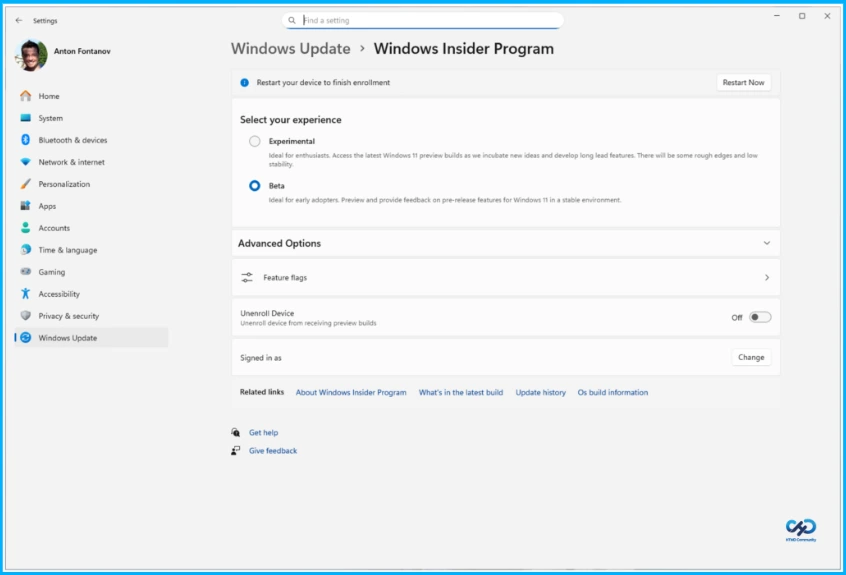
Microsoft is simplifying the Windows Insider Program by introducing two main channels: Experimental and Beta. The Experimental channel replaces the old Dev and Canary channels, giving users early access to features still in development, which may change or never be released.
The Beta channel, on the other hand, focuses on features that are closer to launch and offers a more stable experience. A key improvement is that Beta will no longer have gradual rollouts when a feature is announced, and you update, you’ll get it. If you want to try the newest ideas and influence development, Experimental is the better choice, while Beta is ideal for those who prefer stability and more finalised features.
| Channel | Description |
|---|---|
| Experimental | Early access to features in active development, may change or not release |
| Beta | More stable builds with features close to release, no gradual rollouts |
- Windows 11 File Explorer Improvements Faster Launch Background Preloading and Performance Boost
- Microsoft Starts Removing Copilot from Windows 11 Apps like Notepad and Snipping Tool
- 6 Core Security Pillars of Windows 11 Chip-to-Cloud Protection
Advanced Options and Insider Channels
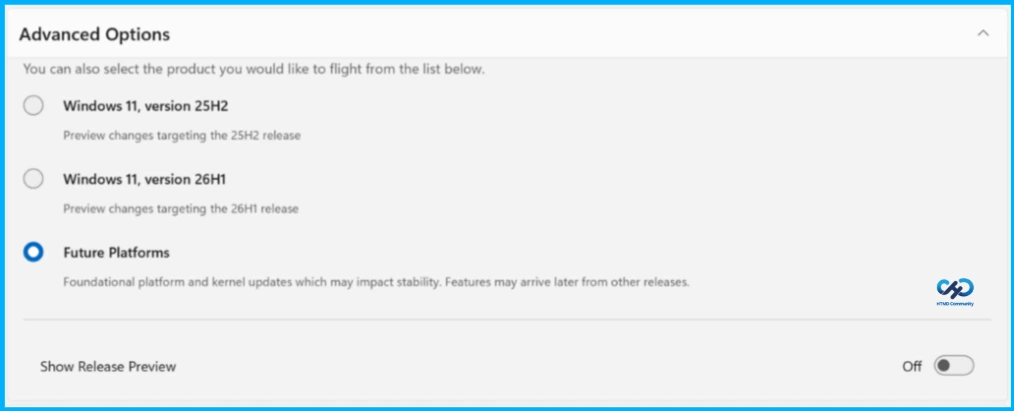
For most Insiders, choosing either the Beta or Experimental channel is enough, but there is also an advanced option to select a Windows core version compatible with your hardware, usually shown as 25H2 or 26H1 builds. Experimental also includes a Future Platforms option, which provides the earliest preview builds not aligned to any retail version of Windows for those focused on platform development.

Release Preview remains an advanced option for commercial users and those wanting early access to production-ready builds before public release. It must be enabled in Advanced Options, and Microsoft is continuing to gather feedback to improve it.
Providing More Control Over Gradual Rollouts
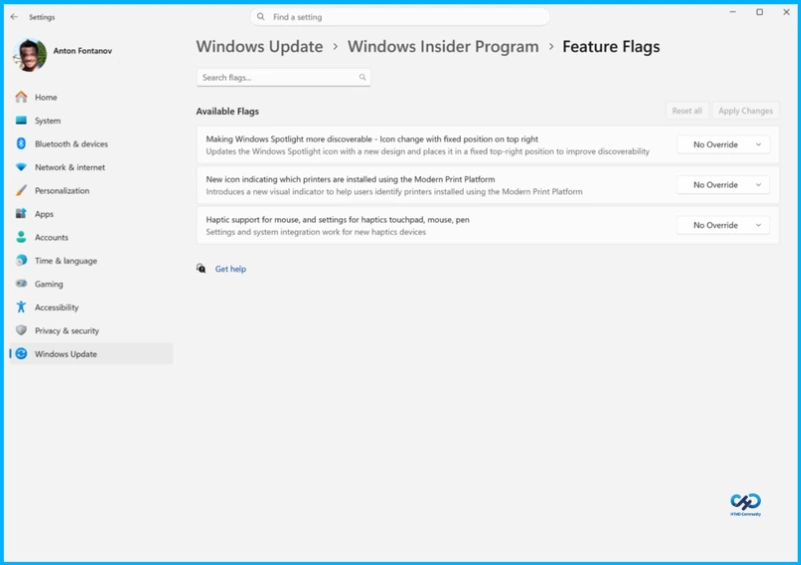
Microsoft explains that some Insiders don’t see announced features because of Controlled Feature Rollout (CFR), a gradual rollout process used to ensure quality before wider release, though it can make the experience unpredictable. To address this, Beta will no longer have gradual rollouts, and Experimental users will get a new Feature flags page to enable or disable specific features.
Feature flags will first apply to visible new features announced in WIP, while less visible changes like bug fixes and system improvements may not be included, and feedback is encouraged on what features should appear there.
Easier Movement Between Channels and Leaving WIP
Microsoft is making changes to simplify moving between channels or leaving the Windows Insider Program, which previously could require wiping your device and doing a clean install. With new behind-the-scenes improvements, most Insiders will be able to switch between Experimental, Beta, and Release Preview on the same Windows core version using an in-place upgrade (IPU), which keeps apps, settings, and data intact, though it may take longer than a regular update.
However, moving away from Experimental Future Platforms builds will still require a clean install since they are not tied to a retail Windows version. Additionally, the Windows Insider Program settings page has been redesigned to load faster and provide a cleaner, more streamlined experience with fewer steps and reboots.
Need Further Assistance or Have Technical Questions?
Join the LinkedIn Page and Telegram group to get the latest step-by-step guides and news updates. Join our Meetup Page to participate in User group meetings. Also, join the WhatsApp Community and the WhatsApp channel to get the latest news on Microsoft Technologies. We are there on Reddit as well.
Author
Anoop C Nair is a Workplace Technology solution architect with 25+ years of experience. Microsoft Certified Trainer. Microsoft MVP from 2015 onwards for consecutive 11+ years! He is a blogger, Speaker, and Founder of HTMD Community and HTMD Conference. His main focus is on Device Management technologies like Intune, Windows, and Cloud PC. He writes about technologies like Intune, SCCM, Windows, Cloud PC, Entra, and Microsoft Security.




Discussion