






Microsoft Introduce New Recent Widgets for Word Excel and PowerPoint for Mac
Hi all, we are discussing Recent Widgets for Word, Excel, and PowerPoint for Mac. As you all know, Microsoft has constantly introduced many new features for Mac users. This time, Microsoft Introduced Recent Widgets for Word, Excel, and PowerPoint.
In August, Microsoft introduced the New Recent Files widget option for iOS users for Recent Widgets for Word, Excel, and PowerPoint. Microsoft recently announced this on Microsoft Docs; with this widget option, users can easily access the most recently used files on their desktops.
As you all know, the Widget is one of our system’s most important sections, whether on a Mac, iOS, or Windows. With the Widget, you get recent information at your fingertips, and the user can get details on weather, events, and more.
The Recent Widgets for Word, Excel, and PowerPoint for Mac would be the best for increasing users’ productivity by reducing the time spent searching for files they have already visited. In this post, we can discuss the overall view of Recent Widgets for Word, Excel, and PowerPoint for Mac Users.

Table of Contents
What are the Benefits of Recent Widgets for Word, Excel, and PowerPoint?
Microsoft Introduces New Recent Widgets for Word Excel and PowerPoint for Mac
The discussion above briefly explains this latest update on Widgets for Windows, Excel, and PowerPoint for Mac. This feature is rolling out to the Current Channel (Preview)and Version 16.91 (Build 24110320) or later. You can easily add recent Word, Excel, and PowerPoint widgets directly to your Mac desktop. To do this, follow the simple steps below.
- Various Ways to Enable or Disable Widgets Feature in Windows 11 GPO Intune Policy Registry
- 3 Easy Methods to Hide and Unhide Files and Folders in Windows 11
- New Widgets Experience in Windows
How to Use Recent Widgets for Mac
It’s very easy to use Recent Widgets for Mac. Right-click on the Mac desktop and select the Edit Widget option. To access recent widgets, click on the Edit Widget option.
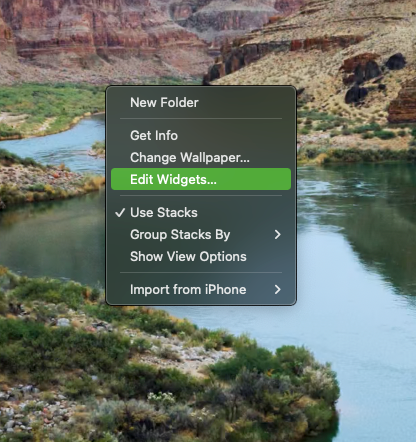
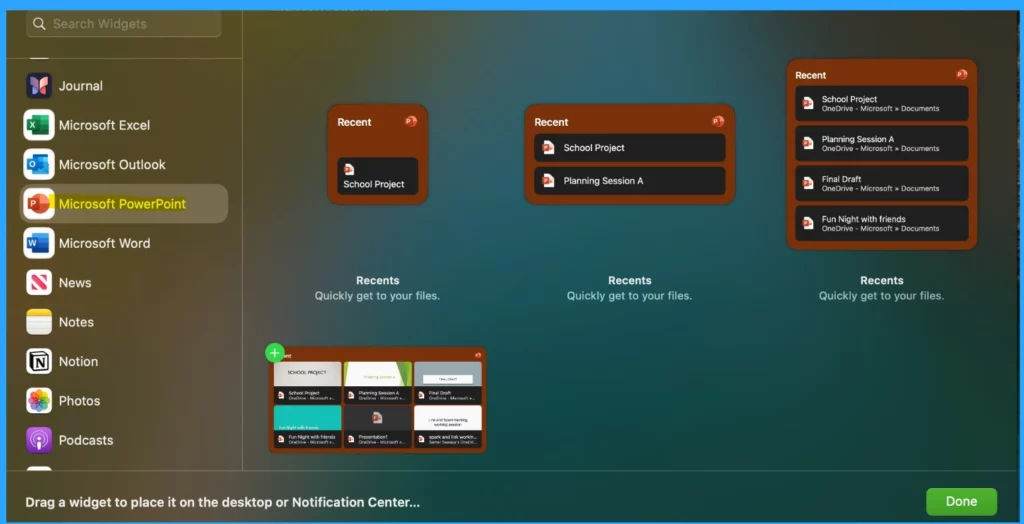
After clicking on the Edit Widget option, you will see the Widget window screen. There, you can see the Word, Excel, and PowerPoint app options and select any app widget you want from the list.
- Click on the Microsoft PowerPoint.
- You can see the different sizes of Widgets you want there and select any of them.
- Then click the green + button in the top left corner.
- Now, you can open a recent file from your desktop. Just click on the file card.
| New Changes |
|---|
| A recent widget allows you to come in different sizes. |
| Click anywhere on the widget except the file cards to open the app’s home page instead of a recent file. |
Need Further Assistance or Have Technical Questions?
Join the LinkedIn Page and Telegram group to get the latest step-by-step guides and news updates. Join our Meetup Page to participate in User group meetings. Also, Join the WhatsApp Community to get the latest news on Microsoft Technologies. We are there on Reddit as well.
Author
Anoop C Nair has been Microsoft MVP from 2015 onwards for ten consecutive years! He is a Workplace Solution Architect with more than 22+ years of experience in Workplace technologies. He is also a Blogger, Speaker, and leader of the Local User Group Community. His primary focus is on Device Management technologies like SCCM and Intune. He writes about technologies like Intune, SCCM, Windows, Cloud PC, Windows, Entra, Microsoft Security, Career, etc.



Discussion