






Report Button Not Removed in Classic Outlook After Setting Use a Non Microsoft Add in Button
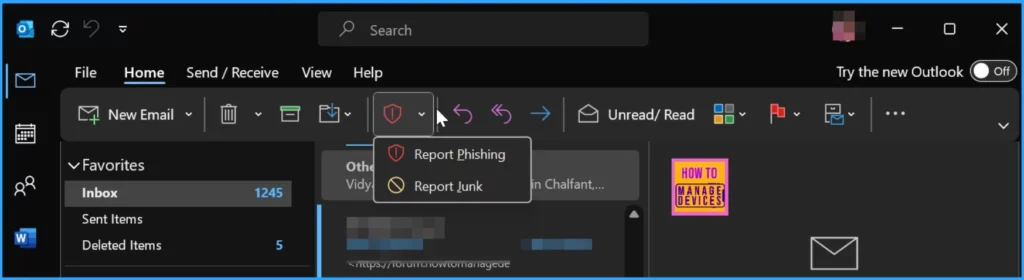
Let’s discuss the Report Button Not Removed in Classic Outlook After Setting Use a Non-Microsoft Add in Button. When you configure the Microsoft Defender portal to “Use a non-Microsoft add-in button” for monitoring reported messages in Outlook, the goal is to replace the default Report button in Outlook with the add-in button.
However, after making this change, saving the settings, and restarting Outlook, you might find the original Report button still visible on the ribbon. This suggests that the change has not taken effect yet, possibly due to settings not applying correctly, delays in synchronization, etc.
Users may experience unexpected closures in Outlook, Word, or OneNote while typing or during tasks like spell check. This issue has been linked to a recent update introducing instability in these applications, leading to crashes. As a result, users may find their work disrupted and need to look for solutions or updates to address this problem.
In this post, you will find all the details regarding the issue where the Report button is not removed in classic Outlook after setting the “Use a non-Microsoft add-in button.” All the details are shown below.

Table of Contents
Why is the Report Button still Visible on the Outlook Ribbon after Saving the Changes and Restarting Outlook?
It may be due to a delay in the settings taking effect, cached data in Outlook, or conflicting configurations.
When will the New Reporting Button be Available in Outlook?
The new built-in reporting button will be available for users of Outlook’s monthly enterprise/current channel build in early August 2024.
Will the New Reporting Buttons be Available for all Outlook Users?
The new features will initially be available for users on the monthly enterprise/current channel build.
Report Button Not Removed in Classic Outlook After Setting Use a Non-Microsoft Add-in Button
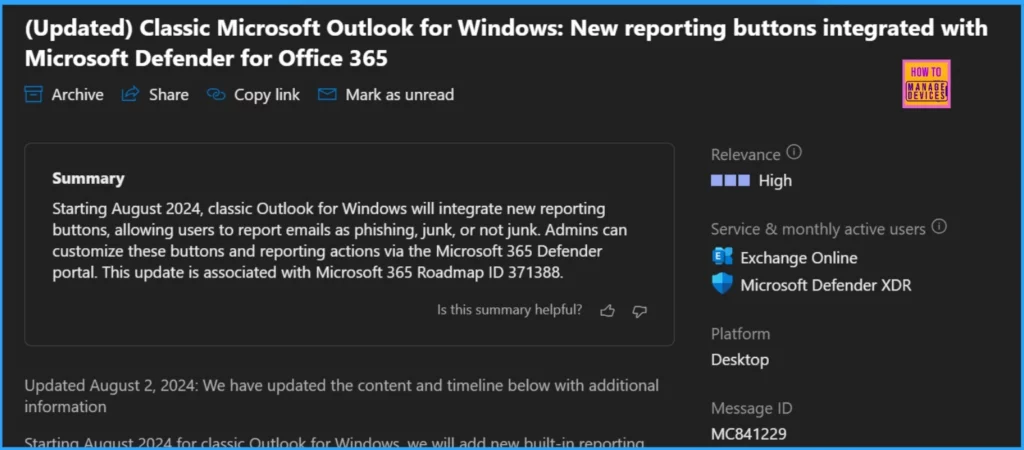
Starting in August 2024, classic Outlook for Windows will introduce new built-in buttons that let users quickly report emails as phishing, junk, or not junk. Administrators can manage how these buttons look and work through the User-reported settings page in the Microsoft 365 Defender portal (security.microsoft.com).
- They can choose where the reported messages go either to a specific reporting mailbox, Microsoft, or both.
- Additionally, admins can customize what users see before and after they report messages using these buttons.
- It’s important to note that the current User-reported settings page will remain unchanged with this update.
- Fix Outlook Error when Updating Meeting in Personal or Shared Calendar
- Classic Outlook Startup Crashes Caused by ucrtbase.dll and Learn How to Run Clean Rules Command
- Outlook Word or OneNote Closing Unexpectedly While Typing
Overview of Reporting Functionality Changes in Outlook
Let’s discuss the Overview of Reporting Functionality Changes in Outlook. The list below will help you to see more details.
- OWA (Outlook on the web) and the new Outlook for Windows have had reporting buttons since November 2022, with no changes.
- The new built-in buttons in classic Outlook for Windows will inherit existing User-reported settings from OWA.
- Versions of Outlook for Mac and mobile (iPhone and Android) will not be affected. Reporting buttons will be added to these platforms in the future.
- If the reporting feature is turned off in the Microsoft 365 Defender User reported settings or a third-party add-in is used, reporting buttons will not be visible in classic Outlook for Windows.
- The Microsoft report message add-in and Microsoft phishing add-in will be supported until further notice. Users will see the add-in and new reporting buttons in the ribbon.
- Once Outlook for Mac and Mobile adds the new reporting buttons, the reporting add-in will no longer be needed and can be removed.
- The selections on the user-reported settings page will determine the reporting experience, whether using the add-in or built-in buttons. Based on the selected settings, both options report to the same destination (Microsoft, custom mailbox, or both).
- The built-in reporting buttons in classic Outlook for Windows do not support reporting from shared and delegated mailboxes.
| Feature | Details |
|---|---|
| Feature | New reporting buttons integrated with Microsoft Defender for Office 365 |
| Relevance | High |
| Service & monthly active users | Exchange Online Microsoft Defender XDR |
| Platform | Desktop |
| Message ID | MC841229 |
| Roadmap ID | 371388 |
- FIX MS Outlook Zero-Click RCE Flaw Executes as Email is Opened
- Unable to Join Teams Meetings Using Links from Outlook Because of ASR Rules
- Change to Classic or Modern Theme in Outlook for Windows 11
- How to Set Out of Office in Outlook
New Reporting Buttons and Menu Options in Outlook Classic
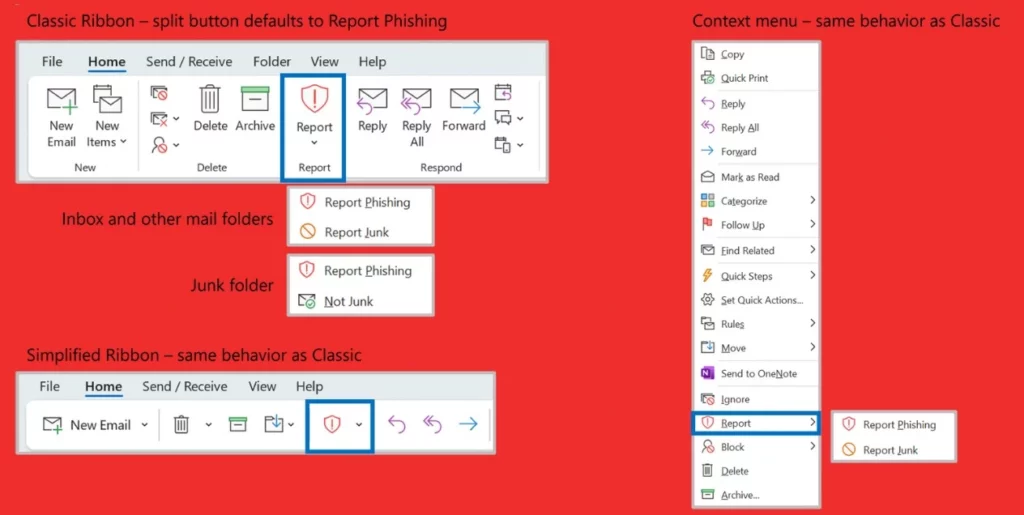
The new built-in buttons in classic Outlook for Windows will make it easy for users to report emails as phishing, junk, or junk directly from the ribbon. Administrators can customize how these buttons look and behave using the Microsoft 365 Defender portal. This update makes reporting more accessible and enhances everyone’s email security.
- Best Guide to Deploy New Intune Company Portal App on Windows using Intune
- Best Way to Automatically Configure Outlook Profile for Windows with Intune
- Easy Way to Disable Device Password Sync with Intune
Investigation into Reporting Button Issue in Outlook
Microsoft is investigating an issue concerning the new reporting buttons integrated with Microsoft Defender in classic Outlook for Windows. The issue has been escalated to the Microsoft Defender Team for resolution.
This feature is associated with Microsoft 365 Roadmap ID 371388, and tenant admins can access further details about the rollout in the Admin Portal under message center post MC841229.
Join the LinkedIn Page and Telegram group to get the latest step-by-step guides and news updates. Join our Meetup Page to participate in User group meetings. Also, Join the WhatsApp Community to get the latest news on Microsoft Technologies. We are there on Reddit as well.
Author
Anoop C Nair has been Microsoft MVP from 2015 onwards for 10 consecutive years! He is a Workplace Solution Architect with more than 22+ years of experience in Workplace technologies. He is also a Blogger, Speaker, and Local User Group Community leader. His primary focus is on Device Management technologies like SCCM and Intune. He writes about technologies like Intune, SCCM, Windows, Cloud PC, Windows, Entra, Microsoft Security, Career, etc.




Discussion