






SCCM Application Deployment Custom Report SQL Query | ConfigMgr
Let’s find out the SCCM Application Deployment Custom Report SQL Query with Collection. I have seen many questions in HTMDForum that we want the application-related reports, how to write a SQL query to write a report on app deployment, etc.
In this post, you will learn how to create a working Configuration Manager SQL query to find application status directly in the database. You can customize the query according to your needs.
The following is a sample query to help you understand the views required to get the ConfigMgr Application report working.
NOTE! – Thanks to Karthik for sharing this query in the Forum.howtomanage.com thread – https://forum.howtomanagedevices.com/endpointmanager/configuration-manager/is-there-any-sql-query-for-finding-the-status-of-deployed-application-in-sccm/

- SCCM Application Deployment Status using SQL Query Custom Report
- SCCM Configuration Manager Application Creation Deployment Installation
- SCCM Application Supported Deployment Types | ConfigMgr | Endpoint Manager
| Index |
|---|
| SQL Query – Application Deployment Custom Report |
| Results – Application Deployment Custom Report |
SQL Query – Application Deployment Custom Report
Once you have initiated the client, push the installation method. The following query is one of many ways to get the application deployment status from ConfigMgr. You can track the status of the application deployment using it.
- Open the SQL Management Studio.
- Click on the New Query button.
- Select the CM_MEM database from the drop-down menu.
- MEM is the ConfigMgr site code.
- Copy the following SQL query to find the application deployment report with collection details.
- Click on the Execute button.
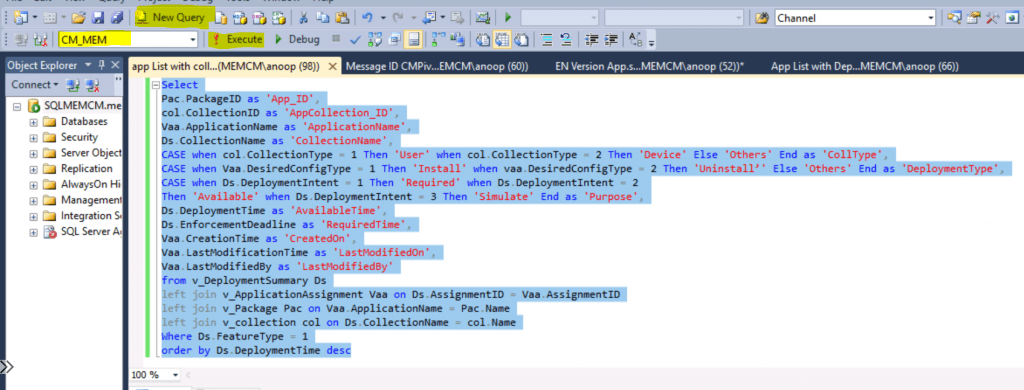
This report includes the following details
- Deployment Types -> Available or Required
- Deployment Time
- Application Creation Time
- Last Modified Time
- Last, Modify by
- Etc.
Select
Pac.PackageID as 'App_ID',
col.CollectionID as 'AppCollection_ID',
Vaa.ApplicationName as 'ApplicationName',
Ds.CollectionName as 'CollectionName',
CASE when col.CollectionType = 1 Then 'User' when col.CollectionType = 2 Then 'Device' Else 'Others' End as 'CollType',
CASE when Vaa.DesiredConfigType = 1 Then 'Install' when vaa.DesiredConfigType = 2 Then 'Uninstall’' Else 'Others' End as 'DeploymentType',
CASE when Ds.DeploymentIntent = 1 Then 'Required' when Ds.DeploymentIntent = 2
Then 'Available' when Ds.DeploymentIntent = 3 Then 'Simulate' End as 'Purpose',
Ds.DeploymentTime as 'AvailableTime',
Ds.EnforcementDeadline as 'RequiredTime',
Vaa.CreationTime as 'CreatedOn',
Vaa.LastModificationTime as 'LastModifiedOn',
Vaa.LastModifiedBy as 'LastModifiedBy'
from v_DeploymentSummary Ds
left join v_ApplicationAssignment Vaa on Ds.AssignmentID = Vaa.AssignmentID
left join v_Package Pac on Vaa.ApplicationName = Pac.Name
left join v_collection col on Ds.CollectionName = col.Name
Where Ds.FeatureType = 1
order by Ds.DeploymentTime desc
Results – Application Deployment Custom Report
The SQL query for application deployment status is very helpful in troubleshooting SCCM app deployment issues. I have seen many scenarios where SCCM admins struggle to get an overview of the deployed and modified apps.

| App_ID | AppCollection_ID | ApplicationName | CollectionName | CollType | DeploymentType | Purpose | AvailableTime | RequiredTime | CreatedOn | LastModifiedOn | LastModifiedBy |
|---|---|---|---|---|---|---|---|---|---|---|---|
| MEM0001F | MEM00014 | Microsoft Edge | HTMD Collection | Device | Install | Required | 41:00.0 | 41:00.0 | 41:49.0 | 41:49.0 | MEMCM\anoop |
| MEM0001E | MEM00014 | ConfigMgr Admin Console | HTMD Collection | Device | Install | Available | 01:00.0 | NULL | 01:47.0 | 01:47.0 | MEMCM\anoop |
| MEM00016 | SMSDM003 | Firefox 75.0 | All Desktop and Server Clients | Device | Install | Required | 36:00.0 | 36:00.0 | 36:07.0 | 07:05.0 | MEMCM\anoop |
| MEM00015 | SMSDM003 | Firefox v74 | All Desktop and Server Clients | Device | Install | Required | 02:00.0 | 02:00.0 | 02:20.0 | 02:20.0 | MEMCM\anoop |
Resources
- Deep Dive SCCM Application Model Troubleshooting – Client End
- How to get a report with Friendly scan errors
We are on WhatsApp. To get the latest step-by-step guides and news updates, Join our Channel. Click here –HTMD WhatsApp.
Author
Anoop C Nair is Microsoft MVP! He is a Device Management Admin with more than 20 years of experience (calculation done in 2021) in IT. He is a Blogger, Speaker, and Local User Group HTMD Community leader. His primary focus is Device Management technologies like SCCM 2012, Current Branch, and Intune. He writes about ConfigMgr, Windows 11, Windows 10, Azure AD, Microsoft Intune, Windows 365, AVD, etc.




StaffVery good Sir. Just created RDL and works perfectly.
StaffThat is great Deepak
Anoop, This provides when the deployment was created and the information of that said Application. Trying to figure out where\how to create a report where the end user can put in application and tell which devices have it?
StaffI know it’s old blog but trying to clear backlog. I am asking help from “A, Karthikeyan” if i need any help/clarification in SQL Queries.
Posting the question to https://forum.howtomanagedevices.com/ is the best way to get all our questions cleared.
Thanks Anoop! I would have never found CollectionType, DesiredConfigType and DeploymentIntent due to the output types. Very Useful report! do you know of better schemas?
StaffThanks and All the Credits to Karthick here. I don’t have further details about this. But can try to find out later.
StaffI know it’s old blog but trying to clear backlog. I am asking help from “A, Karthikeyan” if i need any help/clarification in SQL Queries.
Posting the question to https://forum.howtomanagedevices.com/ is the best way to get all our questions cleared.
Msg 208, Level 16, State 1, Line 1
Invalid object name ‘v_DeploymentSummary’. i am getting this error
Very Good Report Anoop Sir.
Really Worth and use full.. if i get an custom report for individual software deployment wise means thats great..
Hi Sir,
How to find out the application deployment report in SCCM?
Actually we need to deploy latest zoom version on previous installed servers. so we need to know the servers for installing latest version of zoom application.
Kindly help on this.