






SCCM Query All Active Directory Security Groups Dynamic Collection
In today’s post, we will learn the easiest way to create an SCCM query to group users and discover All Active Directory Security Groups. Then, we will see how to use the WQL query to create a Dynamic user Collection.
In Configuration Manager, you can create and execute queries to pinpoint objects within the hierarchy that meet your specific criteria. These objects can encompass various items, such as particular types of computers or user groups. Queries can also retrieve multiple Configuration Manager objects, including sites, collections, applications, and inventory data.
The ConfigMgr 2002 version has 17 out-of-box WQL queries available and ready to use. Today, we will see All Active Directory Security Groups, which contain data only from Active Directory Group Discovery. You can find more details about the Easiest Method to Create SCCM WQL Queries for Collection.
To learn more about creating dynamic collections and queries, refer to the following blog post – How to Create SCCM Dynamic Collection – Part 2. Let’s find some quick and easy ways to create SCCM WQL queries.

- Easiest Method to Create SQL Queries for SCCM without Opening SQL Management Studio
- Convert WQL Queries to SQL Queries using SCCM Trick
- SCCM Query All Active Directory Security Groups
- SQL query to find out SCCM clients registered within the last 60 days
- SQL Query to Find Microsoft 365 Apps
- SCCM SQL Query to Find Collections Used for App Deployment
- SCCM CMPivot Browser Related Queries Default List of Browsers
- ConfigMgr Application Deployment Status SQL Query Custom Report
| Index |
|---|
| SCCM Query |
| All Active Directory Security Groups WQL Query |
| Use WQL Query to Create Dynamic User Group Collection |
| Results |
SCCM Query
As mentioned, the SCCM 2002 version comes with 17 out-of-box WQL queries. Are you not very well versed in creating dynamic collection queries using WQL? Don’t worry! You can get some ready-made WQL queries from this post.
- Navigate to Monitoring workspace – \Monitoring\Overview\Queries
- Right-click on the Query called All Active Directory Security Groups.
- Select Properties.
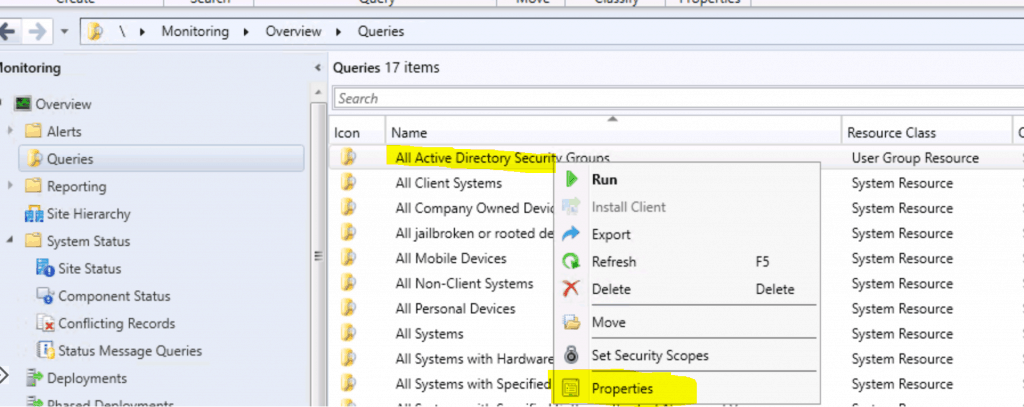
Let’s look into the WQL query available below.
- The query type is User Group Resource.
- Click on the Edit Query Statement button to see more details.
NOTE! – This default SCCM query type is User Group Resource. So, you can create this only user group collection using this dynamic Query.
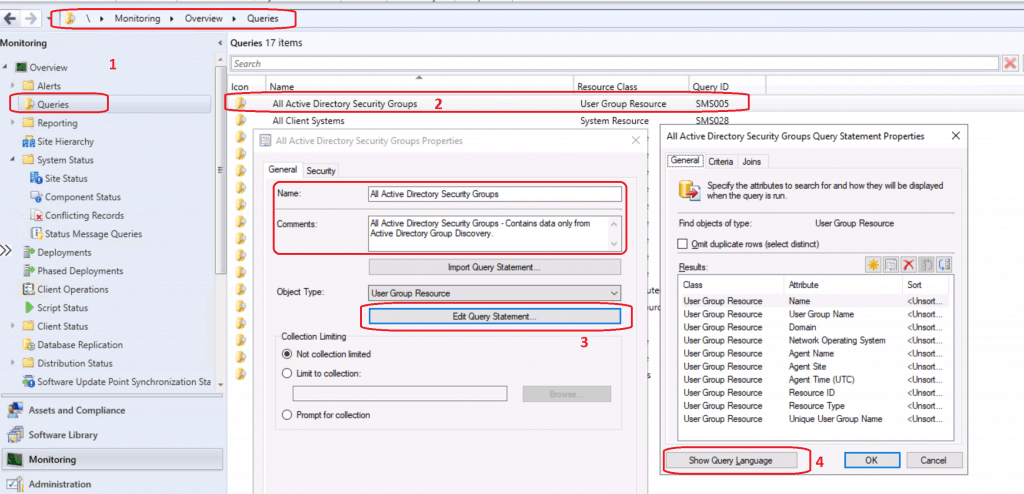
All Active Directory Security Groups WQL Query
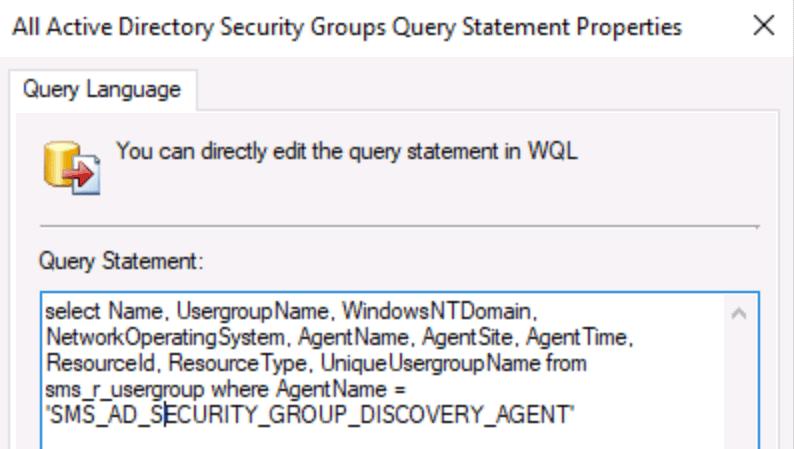
The following Query is available in the dynamic collection. It will help you discover active directory user groups using the SCCM AD security group discovery method.
select Name, UsergroupName, WindowsNTDomain, NetworkOperatingSystem, AgentName, AgentSite, AgentTime, ResourceId, ResourceType, UniqueUsergroupName from sms_r_usergroup where AgentName = 'SMS_AD_SECURITY_GROUP_DISCOVERY_AGENT'
Use WQL Query to Create Dynamic User Group Collection
Let’s try using the WQL query to make a dynamic user group collection. More details about the process of creating a dynamic collection are explained here.
- Navigate to the SCCM console – Assets and Compliance – User Collections.
- Right-click and select “Create User Collection” from the User Collections node.
- On the General page, provide a Name and a Comment. Then, in Limiting collection, choose Browse to select a limiting collection. The collection will only contain members from the limited collection.
- On the Membership Rules page of the Create User Collection Wizard, in the Add Rule list, select the Query Rule membership rule type for this collection. You can configure multiple rules for each collection.
- On the Membership Rules page of the Create User Collection Wizard, in the Add Rule list, select Query Rule.
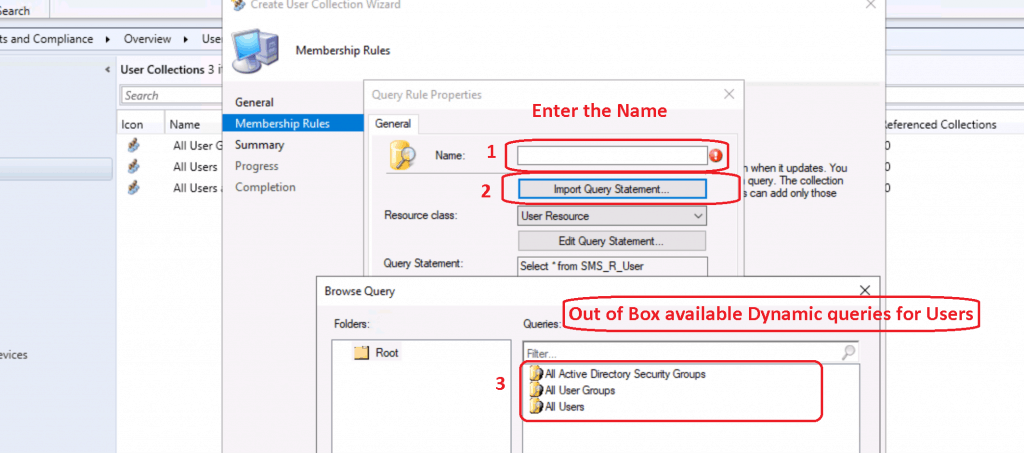
- On the Query Rule Properties windows
- Name: Specify a unique name (my query name = User Name Starts with Anoop).
- Resource class: Select the type of resource you want to search for and add to the collection. You must select the User Resource to create a Dynamic User Collection in SCCM.
- Click on Import Query Statement
- Select User resource type queries available.
- Select All Active Directory Security Groups query.
- Click OK, OK, and OK to complete the wizard.
Results
You can run the All Active Directory Security Groups.
- \Monitoring\Overview\Queries\Results for All Active Directory Security Groups

You can check the dynamic user collection results.
- \Assets and Compliance\Overview\Users\AD Group
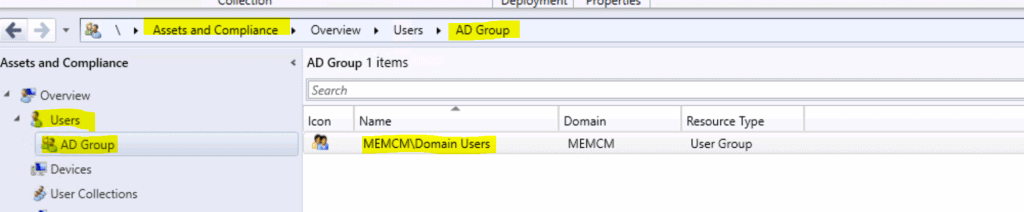
And both the results are the same as expected!
Resources
We are on WhatsApp. To get the latest step-by-step guides and news updates, Join our Channel. Click here –HTMD WhatsApp.
Author
Anoop C Nair is Microsoft MVP! He is a Device Management Admin with more than 20 years of experience (calculation done in 2021) in IT. He is a Blogger, Speaker, and Local User Group HTMD Community leader. His primary focus is Device Management technologies like SCCM 2012, Current Branch, and Intune. He writes about ConfigMgr, Windows 11, Windows 10, Azure AD, Microsoft Intune, Windows 365, AVD, etc.




Discussion