






Thank You SCCM 2007 Time to Say Good Bye
Yes, big thanks to SCCM 2007. You served us very well. It’s time for you to rest. Today (9th July 2019 – It’s already 9th July in India) is the day we should officially say bye-bye to SCCM 2007 with a well-deserved firewall!
It’s July 9th, 2019, and it is officially over. This 2007 version taught me many things about SCCM, and I’ve gained much knowledge about the system and its capabilities.
As an application deployment engineer, I started my device management career with SMS 2003. But SCCM 2007 is closer to my heart.
With it, I started working on more complex SCCM infrastructure admin-related tasks with more responsibilities. I’m grateful for the opportunity to work with it and expand my skills in this area.

| Index |
|---|
| SCCM 2007 End of Support |
| RISK |
| Migration |
| What is Next? |
| Video Guide |
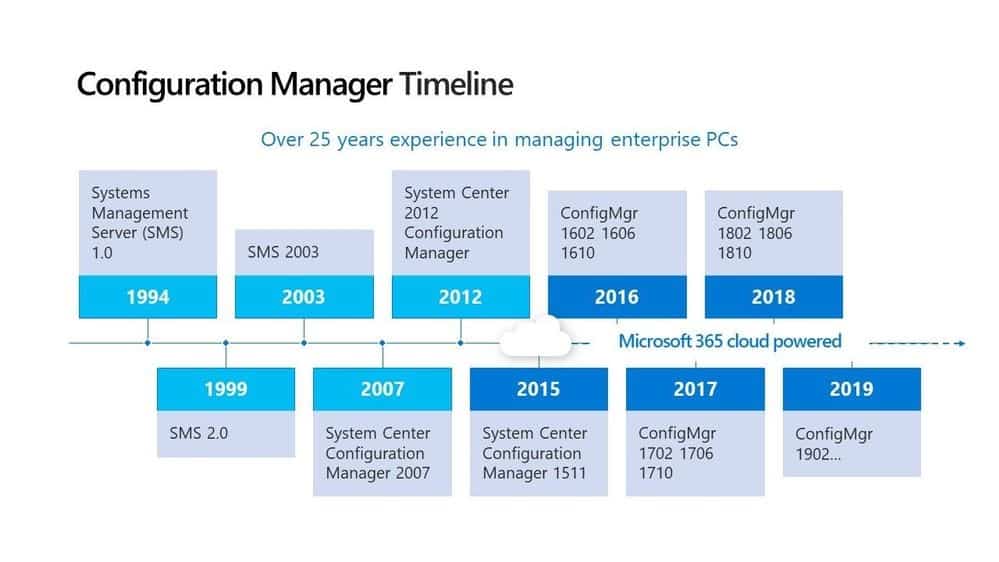
SCCM 2007 End of Support
It’s important to note that extended support for SCCM 2007 officially ended on July 9th, 2019. If you are currently using ConfigMgr (SCCM) 2007, it is highly recommended that you discontinue it. I know it’s easy to say STOP using it, but the organizations are still using it and will continue to use it for many more months.

RISK
OK, Are you planning to use SCCM 2007? Let me warn you. It’s a RISKY affair!
Ensure your internal security team knows you are using SCCM version 2007, a device management application over 12 years old. Microsoft no longer supports any of its components!
Do you want more details about the risks of running an old SCCM application in your organization? If so, check out the various SCCM KB articles and known issues of SCCM 2012 & CB (Current Branch) versions of ConfigMgr.
Migration
How do we directly migrate from SCCM version 2007 to SCCM CB? Do you need to migrate from SCCM 2007 to SCCM 2012?
The answer is NO! You don’t need to upgrade from 2007 to SCCM 2012 before entering SCCM CB. However, an In-place upgrade from 2007 to CB is NOT supported. You might need to go through side-by-side migration scenarios.
You might need to create other SCCM CB infrastructure with the latest SCCM version, 1902, and migrate SCCM version 2007 objects and devices to SCCM 1902. For more details, see SCCM 2007 migration strategies.
NOTE! – The SCCM 1902 is a baseline version; you can download SCCM 1902 ISO from VLSC or Microsoft Eval center.
What is Next?
OK, SCCM 2007 is done and dusted. That’s the end of the Story. What is going out of support in the device management world (SCCM) next?
Next is SCCM (ConfigMgr) 2012! Get ready to migrate to SCCM’s current branch (CB) versions as soon as possible. SCCM 2012 is already out of mainstream support as of 11th July 2017.
SCCM (ConfigMgr) 2012 – Extended Support END date >>12th July 2022
Video Guide
We have a video guide about SCCM 2007 End of Support.
Resources
We are on WhatsApp. To get the latest step-by-step guides and news updates, Join our Channel. Click here –HTMD WhatsApp.
Author
Anoop C Nair is Microsoft MVP! He is a Device Management Admin with more than 20 years of experience (calculation done in 2021) in IT. He is a Blogger, Speaker, and Local User Group HTMD Community leader. His primary focus is Device Management technologies like SCCM 2012, Current Branch, and Intune. He writes about ConfigMgr, Windows 11, Windows 10, Azure AD, Microsoft Intune, Windows 365, AVD, etc.




I share your same sentiment, I was working in a company where I helped transition from 2003 to 2007 and worked on it for almost 5 years where they were about to migrate to SCCM 2012. I didn’t stay to help them migrate and changed jobs to another company that was in the same position but they didn’t want to upgrade, so I worked on it for another 4 years hoping they would have had the money for CB.
I had at least 9 years of working with the product and it became increasingly difficult to find MS support engineers knowledge in that version. Towards the end of my 4~ years at that company, 2003 server was out of support so we had to build and restore 4 site servers on to Windows 2008 R2 servers and SQL 2008 R2 then built out the infrastructure to support IBCM. Unfortunately, they let us go before I was able to troubleshoot why the patching part wasn’t reporting properly.
StaffThank you for sharing your story and connections with SCCM 2007 !!
Ah…
The end of an era in SMS history.
Started my own SMS journey with SCCM 2007 R2, but working in the EduTech space where we are covered by DoE SA’s, I’ve been fortunate enough to be able to upgrade to the latest and greatest as it comes out.
SCCM 2007 could be temperamental, compared to SCCM CB is.
StaffChange is constant in sccm CB. SCCM 2007 was stable like a rock
Yes, Anoop. Very true in the SAAS/IAAS/PAAS world we live in. 🙂