






Great news! WhatsApp Messaging in Azure offers a powerful communication solution for businesses. Azure Communication Services makes sending and receiving messages through WhatsApp easy using a unique tool called the Azure Communication Services Messaging SDK.
This tool is like a helper that lets you chat with customers about things like asking about products or helping with any questions. It’s also great for sending messages like reminders about appointments, giving shipping updates, and ensuring items are secure with two-factor authentication.
It is a handy tool for all sorts of messages you might need to send. The Advanced Messaging for WhatsApp in Azure Communication Services is currently in public preview. This means that it is not the final, fully polished version. So, it doesn’t come with a guaranteed level of service, and Microsoft doesn’t suggest using it for essential business tasks just yet.
We have an article highlighting installing and using the WhatsApp app on Windows. WhatsApp is a very widely used messaging app (similar to Telegram) on your mobile, and you can also use the App on your Computer by downloading it from the MS Store.

- Enable Trusted Launch for Azure Virtual Machines
- 2023 Gartner Magic Quadrant for Container Management Recognizes Microsoft Azure Kubernetes Service as Leader
- What is Azure Backup Center
- Best way to use Azure Capacity Reservation to Reduce the Azure Cost
What is WhatsApp Messaging in Azure?
WhatsApp Messaging in Azure is a service that allows businesses to send and receive messages through WhatsApp using the Azure Communication Services platform. It provides advanced features to streamline communication with customers.
How Does WhatsApp Messaging in Azure Benefit Businesses?
This service enables businesses to get the popularity and convenience of WhatsApp for customer interactions. It helps in tasks like product inquiries, customer service, appointment reminders, shipping updates, and more, making communication efficient and effective.
Is WhatsApp Messaging in Azure Currently Available for Use?
Yes, it is available in a public preview version. However, please note that this preview version does not have a service-level agreement, so it’s not recommended for critical production workloads.
WhatsApp Messaging in Azure | Powerful Communication with Advanced Services
You can now test out a cool “WhatsApp Business Platform” feature with Azure Communication Services in a particular early version called “public preview.” This feature comes with a handy tool called the “Advanced Messaging SDK,” which lets businesses connect with many customers and reliably send messages worldwide.
Effortlessly Connect with WhatsApp Users
Now, businesses can directly communicate with WhatsApp users from their Azure applications. This means they can reach out to their customers quickly, personally, and safely. WhatsApp is a widely used messaging app, so it is an excellent way for businesses to connect with people who want to hear from them.
- This opens up an efficient and effective channel for businesses to communicate with their audience.
- It’s all about ensuring customers can interact with their favorite brands naturally and securely.
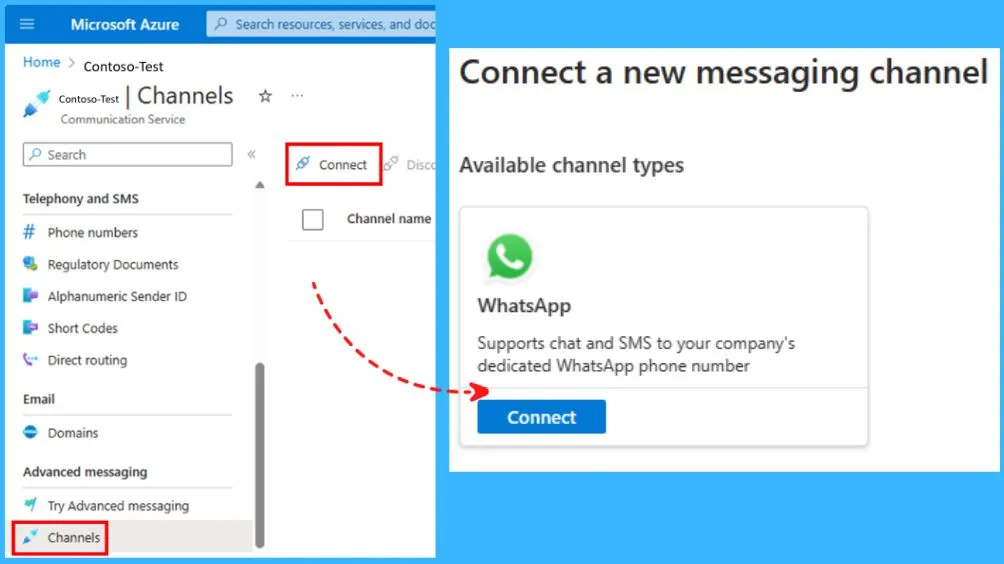
Advanced Messaging for WhatsApp Features
Let’s discuss the advanced messaging for WhatsApp feature. Here are some main highlights of Advanced Messaging for WhatsApp in Azure Communication Services.
- Create new or link existing WhatsApp Business Accounts to Azure Communication Services.
- Engage in conversations with WhatsApp users globally.
- Support for business-initiated and customer-initiated conversations.
- Start conversations with WhatsApp users using pre-defined templates.
- Respond to user inquiries and automate actions using Azure Event Grid notifications.
- Receive detailed reports on message status, including sent, delivered, and read notifications.
Enhancing Communication Scenarios with Advanced Messaging and WhatsApp Integration
You can easily do a lot with Advanced Messaging and set up conversations for things like customer support and giving professional advice. You can also send out notifications, like appointment reminders or shipping updates.
- You can even use WhatsApp and other ways to talk, like SMS, email, chat, voice, and video, through Azure Communication Services.
- By adding WhatsApp, you can connect with a vast global community of users.
- It is a powerful tool to keep in touch with customers.
You can connect to WhatsApp with Azure using the following steps.
- Link WhatsApp business account
You will be guided to linking your WhatsApp business account.
Login with Facebook - Verify your phone number with WhatsApp
You will be asked to verify your phone number by receiving a verification code.
Make sure you have access to this phone number and can receive a verification code - Confirm your WhatsApp business account phone number
Enter the phone number you connected to your WhatsApp business account.
+18001234567
Connet your Account to Microsoft Azure
You’ll need to share account and billing permissions to allow Microsoft Azure to manage your WhatsApp Business Account.
- Permissions you’ll share with Microsoft Azure
- WhatsApp Business Account Access
- Microsoft Azure will be able to add phone numbers, create message templates, send messages to your customers, assign users to your account, and access your metrics.
- WhatsApp Business Account Access
- Meta Business Account Access
- Microsoft Azure will have permission to access your business assets on Facebook
- Billing Management
- Microsoft Azure will have permission to attach a credit line and bill you directly.
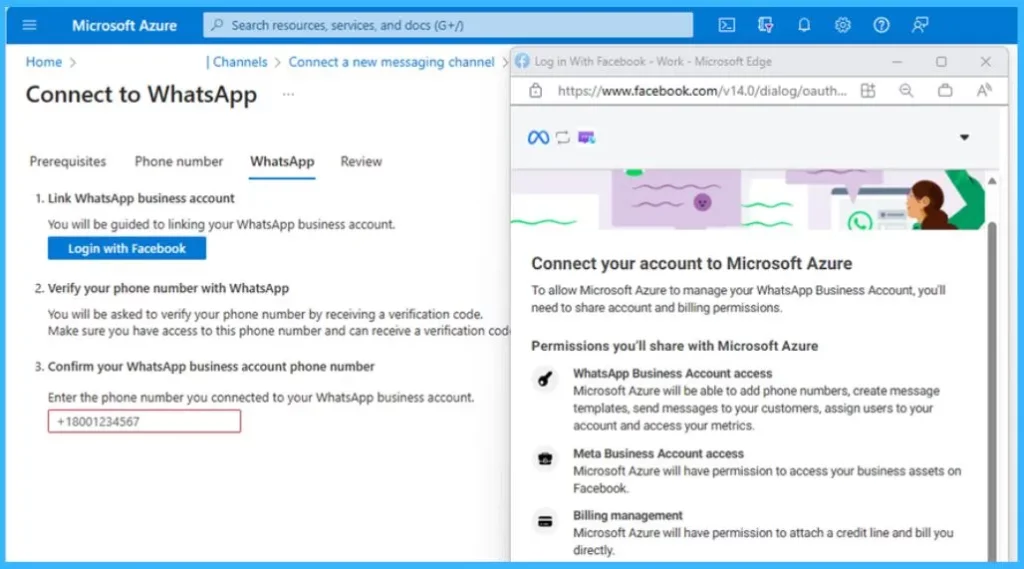
Connect your account to Microsoft Azure: To allow Microsoft Azure to manage your WhatsApp Business Account, you’ll need to share account and billing permissions. Check out the Permissions you’ll share with Microsoft Azure.
- WhatsApp Business Account Access
- Microsoft Azure will be able to add phone numbers, create message templates, send messages to your customers, assign users to your account, and access your metrics.
- Meta Business Account Access
- Microsoft Azure will have permission to access your business assets on Facebook.
- Billing management
- Microsoft Azure will have permission to attach a credit line and bill you directly.
We are on WhatsApp. To get the latest step-by-step guides, and news, updates, Join our Channel. Click here – HTMD WhatsApp
Author
About the Author – Vidya is a computer enthusiast. She is here to share quick tips and tricks with Windows 11 or Windows 10 users. She loves writing on Windows 11 and related technologies. She is also keen to find solutions and write about day-to-day tech problems.



Discussion