






AVD Management with Intune | Azure Virtual Desktop | AVD | Windows Virtual Desktop
Today, I will explore AVD Management with Intune, Azure Virtual Desktop, AVD, and Windows Virtual Desktop. I spoke at a global AVD event (Microsoft meets Community: Windows virtual Desktop virtual event 3rd XXL edition) on the 11th of December about AVD Management with Intune.
In this post, I share details about the presentation and Windows Virtual Desktop experience with modern management tools like Intune.
My session was the fourth (4th) event, and the topic was Sharing Tips and Tricks on how to Manage Windows Virtual Desktop via Intune in Microsoft Endpoint Manager. You can download the PDF version of the presentation and have a recording of the event soon.
Update: AVD Windows 10/11 multi-session VMs are supported by Microsoft Endpoint Manager Intune. More Details -> How To Add Azure Virtual Desktop Session Host To Azure AD Join Guide AVD and Azure Virtual Desktop Azure AD Join Support With Intune Management.

Table of Contents
Azure Virtual Desktop Enrollment Experience – Video Tutorial
The following video will explain how we can improve the Enrollment Experience in Azure Virtual Desktop Enrollment Experience.
- 63 Episodes of Free Intune Training for Device Management Admins
- Windows 10 21H1 Upgrade Using SCCM Task Sequence | ConfigMgr | Best Guide
- Learning How to Learn SCCM Intune Azure
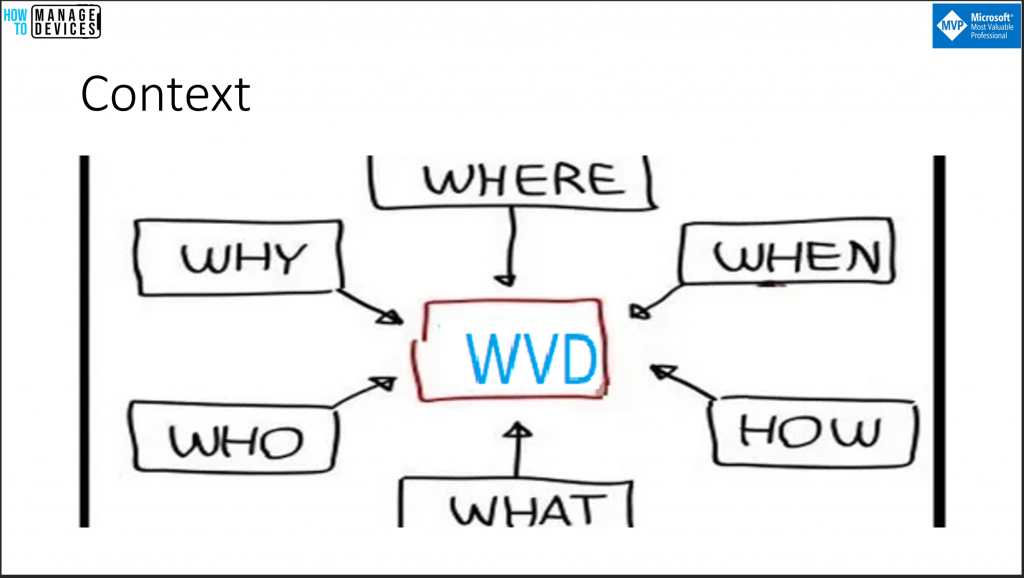
Context
I tried to set the context of the AVD management in the first slide.
- Why do you want to manage aVD with Intune?
- When should you start AVD Management with Intune?
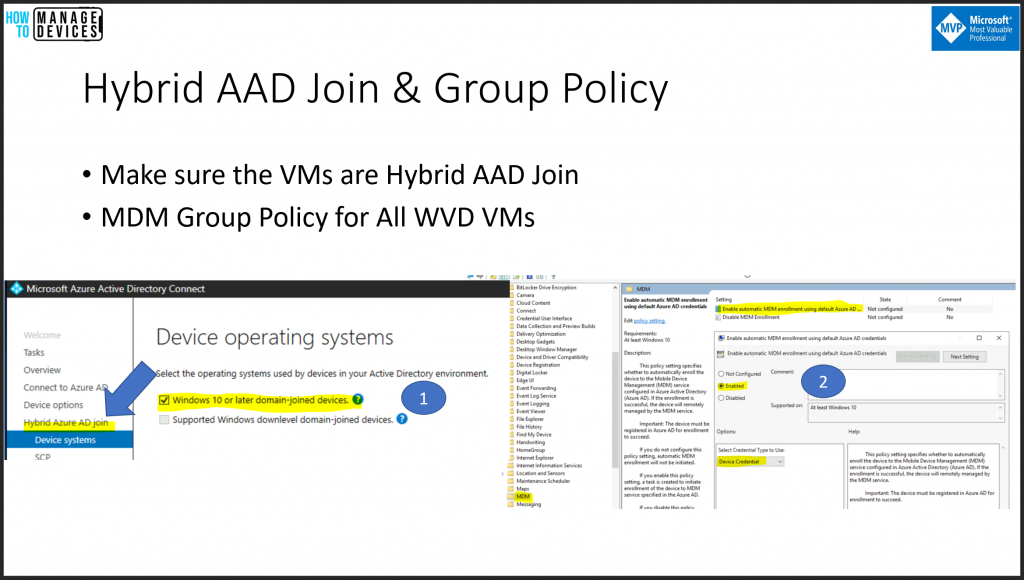
Hybrid AAD Join & Group Policy
Let’s review some of the technical configurations and prerequisites we need to complete before AVD Intune management.
- Make sure the VMs are Hybrid AAD Join
- MDM Group Policy for All AVD VMs
Windows 10 Intune Enrollment using Group Policy | Automatic Enrollment | AVD https://www.anoopcnair.com/windows-10-intune-enrollment-using-group-policy-automatic-enrollment-wvd/
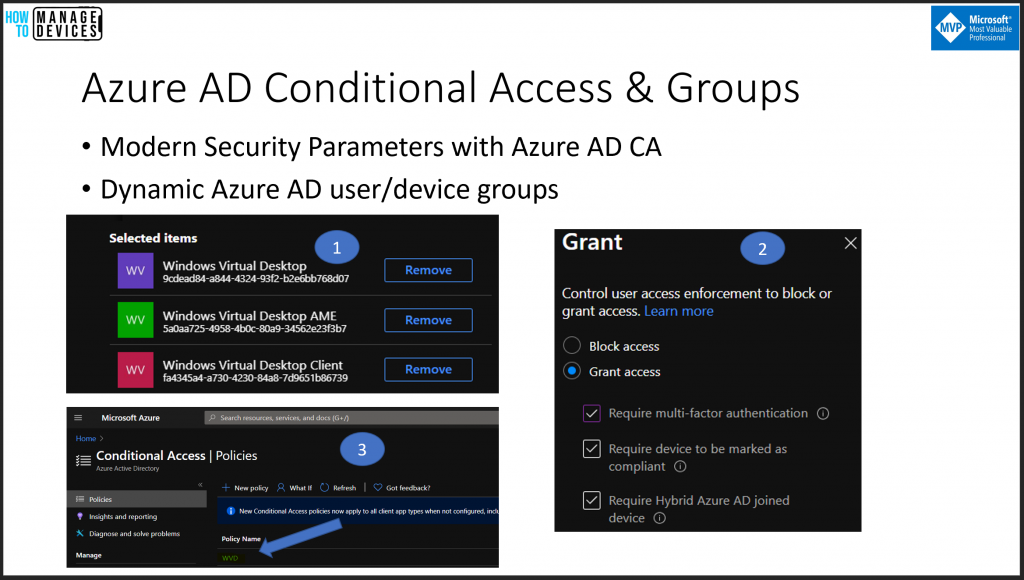
Azure AD Conditional Access & Groups
Modern management of AVD with Intune and Azure AD offers some quick wins. This modern management helps enable multi-factor authentication (MFA) without any complex infrastructure.
- Modern Security Parameters with Azure AD CA
- Dynamic Azure AD user/device groups
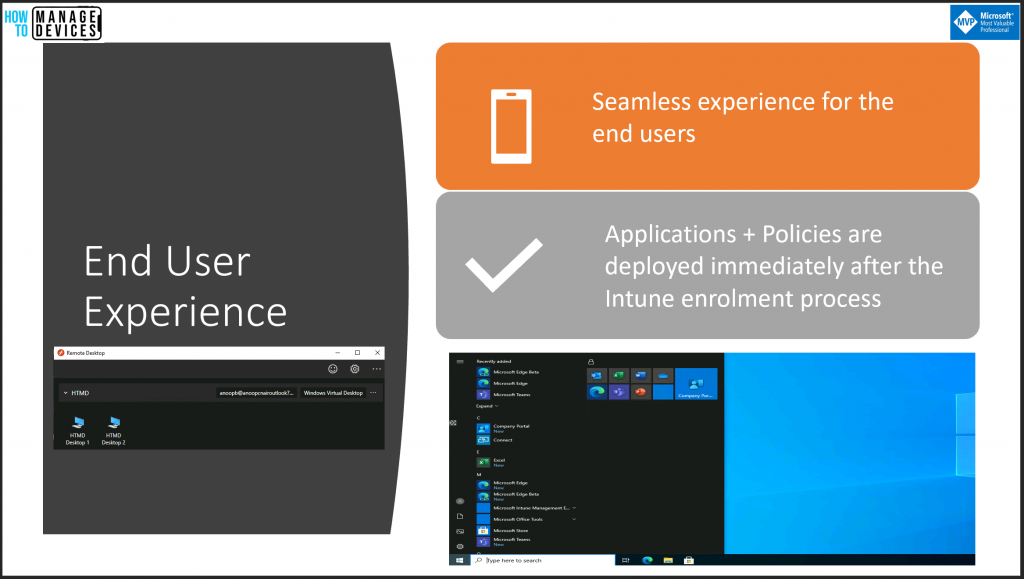
End-User Experience
Let’s check what is the end-user experience for single session users. Microsoft is improving the enrollment experience in the coming months. Let’s wait and see.
- The AVD VM will be ready to use immediately after the Intune enrollment
- Azure AD registration of the VMs happens immediately after the VM provisioning process.
Security Policies for AVD
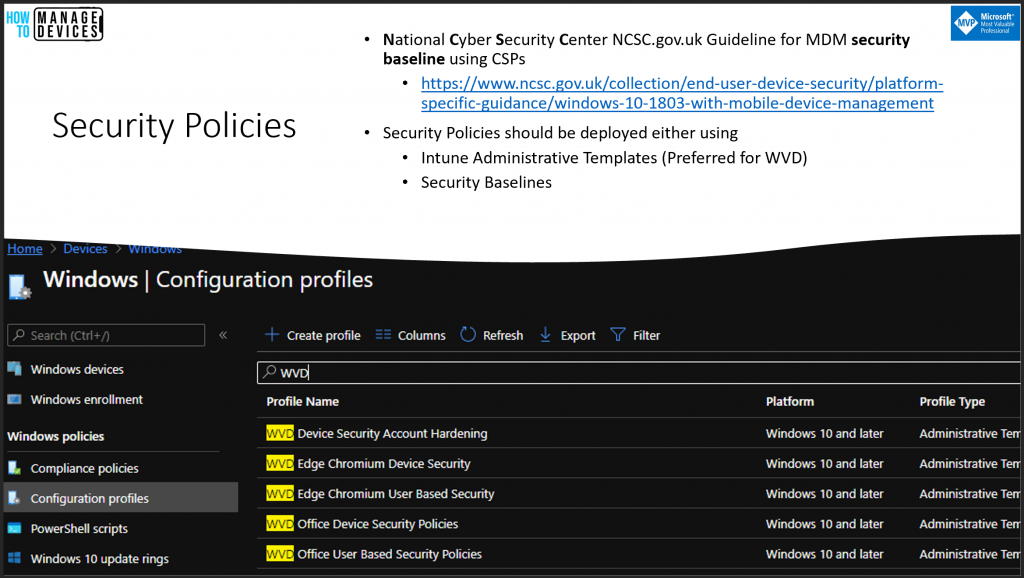
Let’s check how to deploy security policies in the modern management world of AVD with Intune. Organizations follow the CIS benchmark system to Secure Windows Desktop and laptop devices. However, Windows 10 CSPs changed the way security policies are applied.
This is the modern way of securing devices with MDM policies. As you can see in the slide, the National Cyber Security Center of the UK Government did an excellent job of releasing a benchmark for securing Windows 10 devices using CSPs.
- National Cyber Security Center NCSC.gov.uk Guideline for MDM security baseline using CSPs
- https://www.ncsc.gov.uk/collection/end-user-device-security/platform-specific-guidance/windows-10-1803-with-mobile-device-management
- Security Policies should be deployed either using
- Intune Administrative Templates (Preferred for AVD)
- Security Baselines
Application Deployment
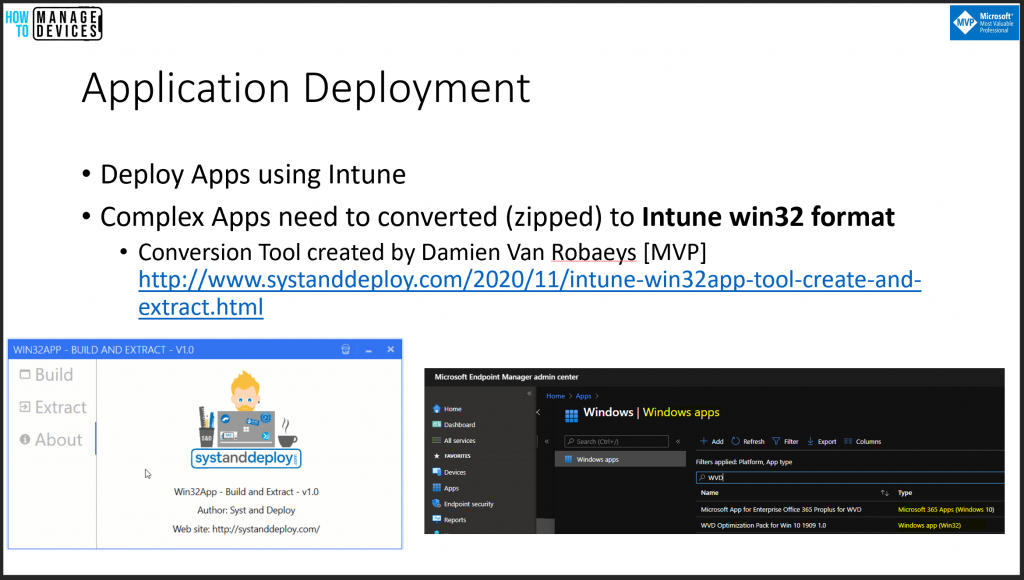
In this slide, we will understand Intune application deployment options for AVD. You can deploy almost all types of applications using Intune app deployment frameworks. Some app types, such as MSIX and simple MSI, are supported natively by Windows 10 MDM management tools.
- Deploy Apps using Intune.
- Complex Apps need to be converted (zipped) to Intune win32 format
- Conversion Tool created by Damien Van Robaeys [MVP]
Patching & Windows 10 Upgrade
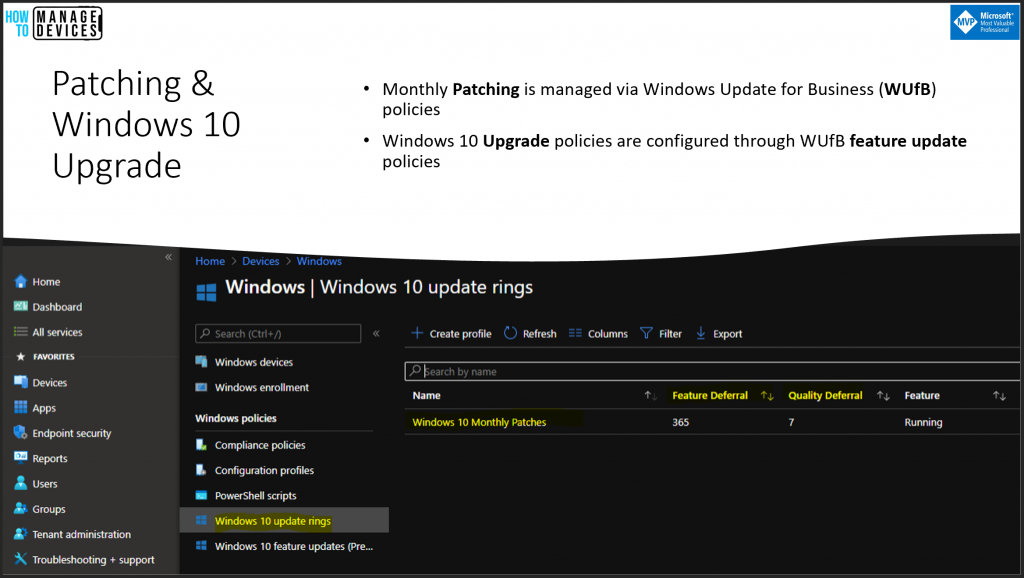
Let’s examine patching scenarios in the AVD modern management world with Intune. I have also explained how the monthly patching and Windows 10 upgrade scenarios are handled. The big difference with Intune management is that it uses Windows Update for Business instead of WSUS.
- Monthly Patching is managed via Windows Updates for Business (WUfB) policies.
- Windows 10 Upgrade policies are configured through WUfB feature update policies.
Download
Let’s download the PDF from the GitHub repository – https://github.com/AnoopCNair/WVD-Intune-Management-PDF
Recording
Topic: Sharing Tips and Tricks on how to Manage Windows Virtual Desktop via Intune in Microsoft Endpoint Manager.
Indian Windows Virtual Desktop User Group #INWVDUG
Today, we announced the Indian Windows Virtual Desktop User Group (#INWVDUG)—Welcome Windows Virtual Desktop (AVD) enthusiasts worldwide.
There are several options to connect with us online. The following are some of the options:
- Twitter https://twitter.com/inwvdug
- Meetup Group https://www.meetup.com/inwvdug-indian-wvd-user-group/
- Telegram Group https://t.me/wvdcommunity
- Linkedin Group https://www.linkedin.com/groups/10491724/
- Facebook Group https://www.facebook.com/groups/244834119748980
Resources
- Microsoft WVD Documentation on HTMD
- WVD Disable Shutdown Button for Windows 10 Devices Using Intune
- Intune WVD management related posts.
- Convert Windows 10 CSP to OMA-URI for Intune Custom Policies
We are on WhatsApp. To get the latest step-by-step guides and news updates, Join our Channel. Click here –HTMD WhatsApp.
Author
Anoop C Nair is Microsoft MVP! He is a Device Management Admin with more than 20 years of experience (calculation done in 2021) in IT. He is a Blogger, Speaker, and Local User Group HTMD Community leader. His primary focus is Device Management technologies like SCCM 2012, Current Branch, and Intune. He writes about ConfigMgr, Windows 11, Windows 10, Azure AD, Microsoft Intune, Windows 365, AVD, etc.




Hi,
thanks for the great post. Unfortunately I have an issue that all my WIn32 Apps will not get deployed as required to WVD Personal Host and I don’t even see the apps in my Company Portal. Is there some issue you know from?
Thanks in advance and best regards
StaffHi, it works fine for me for single session vms.
You have to assign applications to device group if it’s a mandatory application. And it won’t show up in Company portal because it’s mandatory app.
The available app should be deployed to user group and it will show up in company portal.
Does that make sense
Hi Anoop,
First of all, thanks for your time in putting together this content. My question is, does the config you describe here work with multi session WVD VM setups? or does it currently only work with single session setups?
Thanks again.
StaffWell, I tried that very long back and I don’t think it’s supported at all
https://www.anoopcnair.com/wvd-multi-session-intune-hybrid-azure-ad/
Great content. Thanks!
StaffThank you JB!
Multi-session is now supported
https://docs.microsoft.com/en-us/mem/intune/fundamentals/azure-virtual-desktop-multi-session
StaffYes of course. We have different posts on this topic. I have updated this post with additional resources. https://www.anoopcnair.com/azure-virtual-desktop-azure-ad-join-support-wvd/ and https://www.anoopcnair.com/azure-virtual-desktop-session-host-to-azure-ad/
What is your recommendation for handling Windows OS updates for AVD multi-session? Per MS article, “Windows Update for Business policies aren’t currently supported.” See last issue noted in below URL.
https://learn.microsoft.com/en-us/mem/intune/fundamentals/azure-virtual-desktop-multi-session#configuration-issues
Is there an alternative option for session hosts joined to Azure AD DS?
With Azure AD DS, this config doesn’t support hybrid joined so are there alternative options to enrol multi-session devices onto defender for endpoint?
Mike
How can we enroll, existing AVDs to Intune. AVD part of session host, Configured GPOs (MDM) , and enabled automatic enrollment from Intune.
The devices are not reflected to Intune portal, Please help with your input. The device joined to AzureAD.
Hi,
We are experiencing an issue with the application of Firefox policies on Intune-managed multisession Azure Virtual Desktops (AVDs).
Following the Firefox documentation, I created an OMA-URI-based Intune configuration profile and assigned it to a device-based group containing multisession AVDs.
OMA-URI: ./Device/Vendor/MSFT/Policy/ConfigOperations/ADMXInstall/Firefox/Policy/FirefoxAdmx
Data type: String
Value: Copied all of the text from the latest firefox.admx
and configured some supported settings (New tab page and Disable Firefox Account)
This method works correctly with Intune-managed physical laptops; however, it is marked as “not applicable” for multisession AVDs.
We also attempted an alternative approach. We imported the firefox.admx and adml files into Intune and created a Firefox policy based on the imported administrative template. We configured a device-based setting, “Disable Firefox Accounts (device),” set it to enabled, and assigned the configuration profile to a device-based group containing multisession AVDs. Unfortunately, the configuration profile is again marked as “not applicable.”
Is it possible to manage Firefox browser with Intune policies on multisession AVDs?
or is any OMA-URI based policy working woth multisession AVDs?