






What is Azure Virtual Desktop AVD
Today, I will explore What Azure Virtual Desktop AVD is. Windows Virtual Desktop’s brand name has been changed to Azure Virtual Desktop (a.k.a AVD). Kam VedBrat, Partner Group Program Manager, announced a blog post about the new branding for Windows Virtual Desktop.
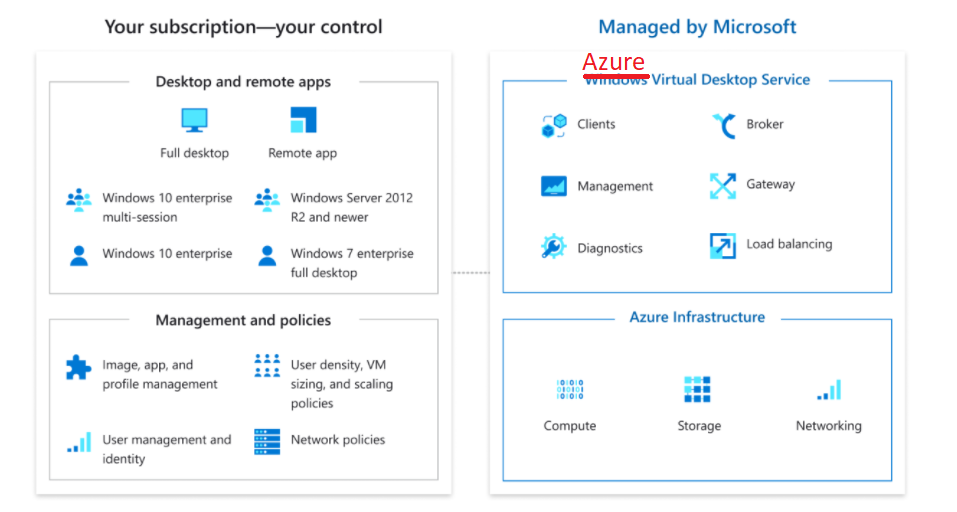
As per the Microsoft blog post, WVD is a modern VDI platform that needs to be secure, scalable, and easy to manage. It should also deliver a seamless, high-performance experience to end-users and empower organizations with the flexibility to customize and build solutions.
Microsoft’s vision for WVD has changed with the current pandemic situation, and it seems necessary to change the brand name to support the newer vision of the modern VDI platform. Hence, the name of the Windows Virtual Desktop (a.k.a. WVD) service has been changed to Azure Virtual Desktop.
AVD is an excellent brand name for modern VDI solutions. I need to change the documentation everywhere to reflect the new naming standard.

Table of Contents
Windows Virtual Desktop is Azure Virtual Desktop
Windows Virtual Desktop is AVD should be there from the start. In the future, offering a wider range of non-Windows features from the AVD service makes sense.
Maybe Microsoft can host Linux VMs for vendor application testing, as hinted in one of the remote app streaming services for software vendors to deliver their app as a SaaS solution. I know this is a crazy idea; maybe this will never happen.
Let’s assume non-Windows services will be hosted from a modern VDI platform. Now, consider the name Windows Virtual Desktop. Does it make sense? I don’t think so.
- How to Add Azure Virtual Desktop Session Host to Azure AD Join Guide AVD
- Fixed AVD Azure Virtual Desktop Patching Issue while Using SCCM WSUS for Patching
- Azure Virtual Desktop End-User Experience Journey with Intune Management
Windows Next Generation Announcement Vs Azure Virtual Desktop
As we know, the next-generation version of Windows will be announced on 24th June 2021. I have a blog post to get more details on this topic. Windows 11 Next Generation Windows Announcement Is On 24th June 2021 | Watch The Livestream | Windows 365.
Is there any relation between this WVD brand name change and the upcoming Windows brand name change? Let me know in the comments section below.
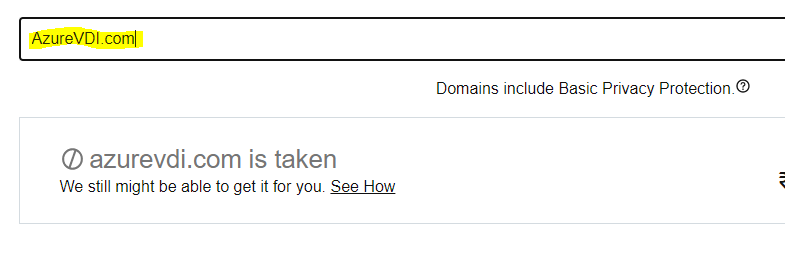
Azure VDI Domain?
Funny, how many of you registered a new domain with AVD? AzureVDI.com? It’s already been taken by someone!!
Resources
- Azure Virtual Desktop: The flexible cloud VDI platform for the hybrid workplace | Azure Blog and Updates | Microsoft Azure
- WVD – How To Manage Devices (anoopcnair.com)
We are on WhatsApp. To get the latest step-by-step guides and news updates, Join our Channel. Click here –HTMD WhatsApp.
Author
Anoop C Nair has been Microsoft MVP for 10 consecutive years from 2015 onwards. He is a Workplace Solution Architect with more than 22+ years of experience in Workplace technologies. He is a Blogger, Speaker, and Local User Group Community leader. His primary focus is on Device Management technologies like SCCM and Intune. He writes about technologies like Intune, SCCM, Windows, Cloud PC, Windows, Entra, Microsoft Security, Career, etc.




Azure Virtual Desktop (AVD) is a cloud-based desktop and application virtualization service provided by Microsoft Azure. It allows users to access their desktop environments and applications remotely from any device with an internet connection. With AVD, you can centrally manage and secure your virtual desktop infrastructure, making it easier to scale resources and accommodate fluctuating workloads. Additionally, AVD offers features such as multi-session Windows 10, seamless integration with Microsoft 365, and compatibility with various third-party applications. Overall, Azure Virtual Desktop provides a flexible and efficient solution for organizations seeking to optimize their remote work capabilities and enhance productivity.