






Enhanced Device Protection in Microsoft Defender for Endpoint on iOS
Let’s the Enhanced Device Protection in Microsoft Defender for Endpoint on iOS. As you all know that Microsoft Defender for Endpoint is one of the biggest platforms to deal with the cybersecurity. In most of cyberthreats Microsoft defender for Endpoint mobile app is protecting enterprise devices from threats.
Recently Microsoft updated and it make the app easier to use and more powerful. These updates are focused on making the app more user-friendly. One of the most important changes are going on to the Device Protection feature card for the enterprise users.
This is essential tools like Web Protection, Device Health, and Jailbreak detection together in one place. This unified feature card ensures users can access critical functions easily and quickly. Also, Microsoft revealed that it not only changed Device protection card it also recommendation cards that highlight active alerts.
Which will help to take action aginst the alerts in real time. This is most important part for a user to know about the threats because it keeps users informed and helps them resolve security issues more efficiently. In this post we can look what are the changes.

Table of Contents
Enhanced Device Protection in Microsoft Defender for Endpoint on iOS
Above, we discussed a lot of things about new Microsoft updates towards the Endpoint mobile app. Specially updated the feature card and the recommendation cards. This feature card combining 3 tools that I also mention that Web Protection, Device Health, and Jailbreak detection. The Main Changes are Involved in the:
- Main dashboard changes
- List the features inside one feature card
- Detailed features experience
- Recommendation cards for alerts
| Device Protection feature card | Info |
|---|---|
| Web Protection | Ensures safe browsing by blocking harmful websites |
| Device Health | Monitors and checks the device’s performance. |
| Jailbreak Detection | Detects and tracks unauthorized changes to the device. |
- Native Data Protection for Unmanaged Devices and AI App Security with Microsoft Edge for Business
- Enable Disable Bypassing Microsoft Defender SmartScreen Prompts for Sites using Intune Policy
- Manage System Integrity Protection for macOS devices using Intune
Main Dashboard Changes
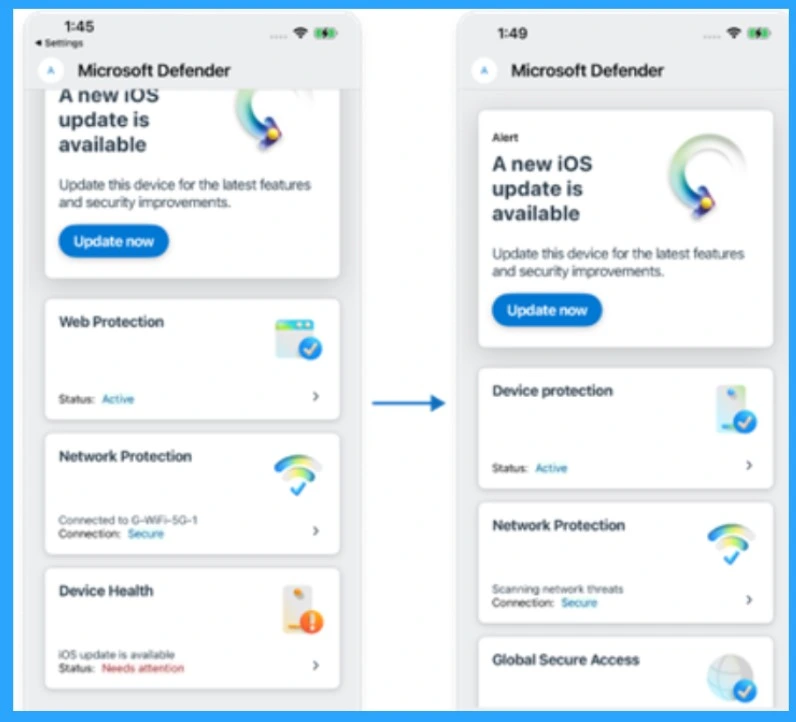
The user interface has been redesigned for easier navigation. All key tools are now in one place, and it will make things simpler for users to manage their device’s security. You can see the main important tools like Device protection, Network protection, global secure access in main Dashboard.
- In the previous design there are many cards for features like Wbprotection Devicce health and Jailbreak Detection.
- In new Design all three features Web Protection, Device Health, and Jailbreak Detection are now combined into one unified card called Device Protection.
Device Protection
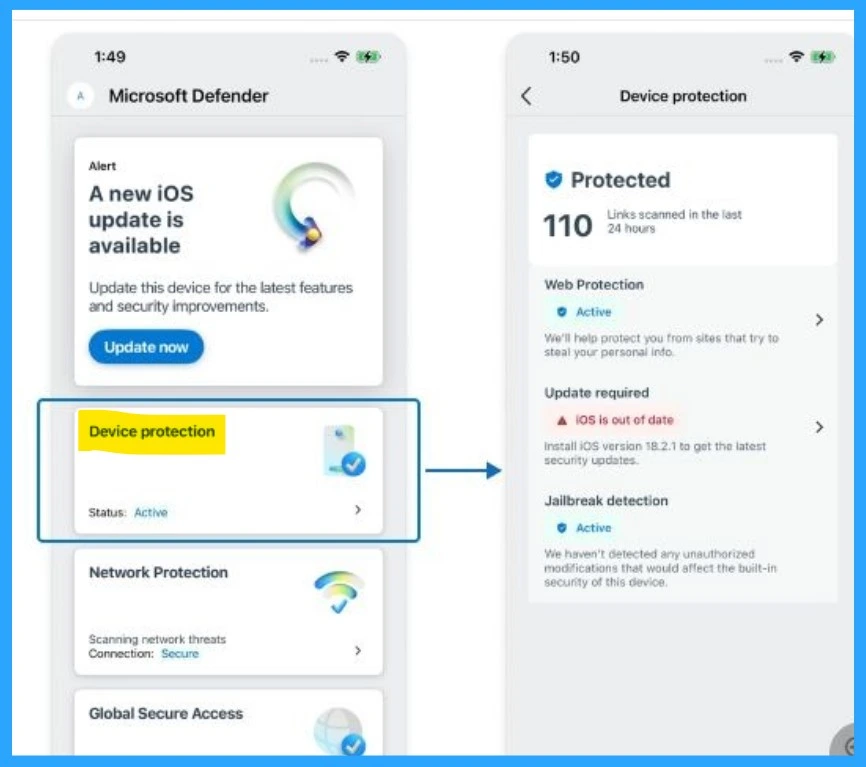
In the new dashboard you can see that Device protection when you click on that, you will get the device protection details. here how many links are to be scanned to be mentioned in this device protection card. Also you will get the details of Webprotection is it active or not.
| Device Protection | Info |
|---|---|
| Web Protection- Active | It help to protect you from sites that try to steal your personal info. |
| Update required ( Mentioning that iOS is outofdate.) | Install iOS version 18.2.1 to get the latest security updates. |
| Jailbreak detection | It haven’t detected any unauthorized modifications that would affect the built-in security of this device. |
Recommendation Cards for Alerts
These cards show important alerts and tips in real-time, helping users stay informed and take action quickly. So the user can get notified that If its not protected, so the user can easily turn on the Web Protection. Web protection to help keep it safe from potential threats.
- These cards are designed to display important alerts and notifications, such as Web Protection and Device Health (iOS Update).

Need Further Assistance or Have Technical Questions?
Join the LinkedIn Page and Telegram group to get the latest step-by-step guides and news updates. Join our Meetup Page to participate in User group meetings. Also, Join the WhatsApp Community to get the latest news on Microsoft Technologies. We are there on Reddit as well.
Resources
User Experiences in Microsoft Defender for Endpoint on iOS
Author
Anoop C Nair has been a Microsoft MVP from 2015 onwards for 10 consecutive years! He is a Workplace Solution Architect with more than 22+ years of experience in Workplace technologies. He is also a Blogger, Speaker, and leader of the Local User Group Community. His primary focus is on Device Management technologies like SCCM and Intune. He writes about technologies like Intune, SCCM, Windows, Cloud PC, Windows, Entra, Microsoft Security, Career, etc.
Discussion