






Entra ID Select Multiple Users and Bulk Update User Properties
Let’s discuss Entra ID Select Multiple Users and Bulk Update User Properties. Microsoft improved the User blade in Microsoft Entra Blade. This new improvement makes the User Blade more user-friendly and easily manageable.
Microsoft is committed to providing immersive features on Microsoft Entra. This time, they changed the User Interface of the Entra user blade. It is the greatest news for Microsoft Entra users. This update makes user management much more efficient.
Do you know what the Users Blade in Entra Portal is? The User Blade in the Microsoft Entra portal allows administrators to manage various aspects of user accounts, including passwords, authentication, contact information, etc.
With this new update, you can select multiple users, bulk update their user properties, set a Manager, disable/enable accounts, and even revoke sign-in sessions from the Entra portal. In this blog post, I will share more about the latest updates.

Table of Contents
Entra ID Edit Properties and Revoke Sessions With Improved Users Blade
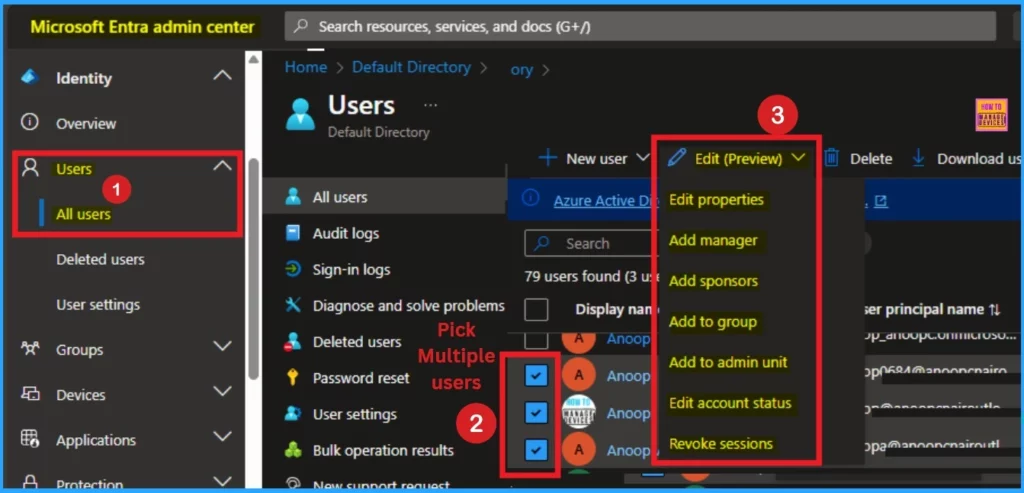
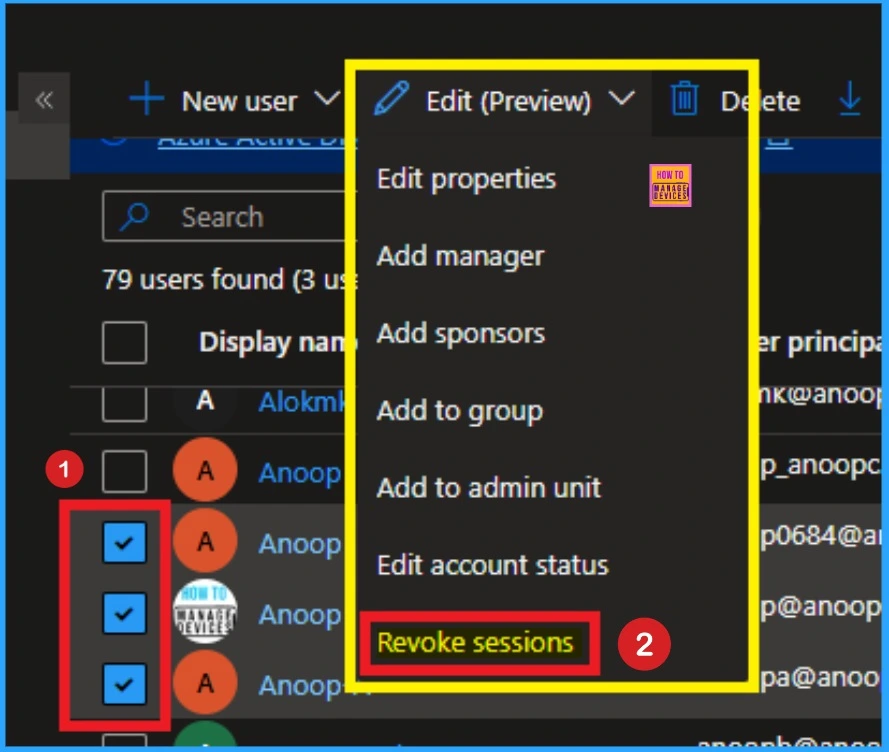
As mentioned above, you can select multiple users and bulk update their user properties. With this update, you can start taking advantage of the new features in Entra Portal. On the portal, you can see the Edit (Preview) option on the user’s blade. You can see several features on the Edit (Preview) option.
Mr Meril Fernando, Microsoft’s Product Manager, shared this new improvement in Entra Portal. I will share details about Edit Properties and Revoke Sessions in this blog post. The table and screenshot below show how to access the User Blade in Entra.
- Open Microsoft Entra admin center
- Navigate Users > All User
- Pick Multiple Users
- Click on the Edit (Preview) option.
| Options in Edit Preview | Details |
|---|---|
| Edit properties | It allows admins to modify various user profile details |
| Add managers | Administrators can assign or change the manager of a user. |
| Add sponsors | This option is used to assign sponsors to users, |
| Add to group | Administrators can add users to specific groups |
| Add to admin unit | This feature allows adding users to administrative units |
| Edit account status | This option lets administrators enable or disable user accounts, providing control over user access. |
| Revoke sessions | Administrators can revoke active user sessions, forcing users to sign in again. |
- Entra Refresh Tokens Valid for 90 Days Key Actions based on your Licensing Entra ID Free E3 P1 and E5 P2
- New Least Privilege Microsoft Graph Permissions in Entra Strengthen your App Security
- New Entra RBAC Role People Administrator Details
Edit Properties in User Blade
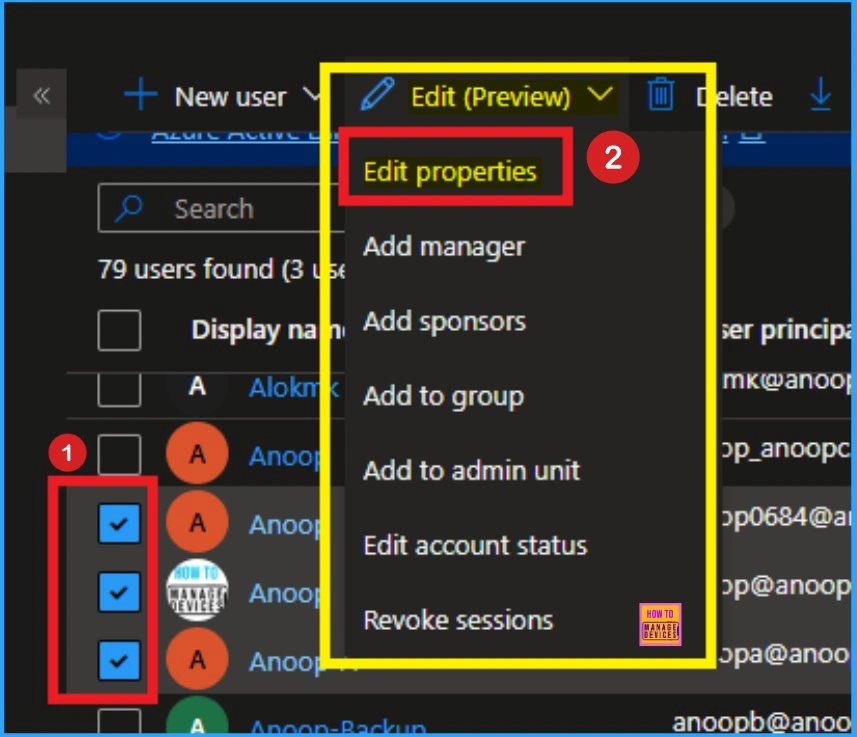
User profile details can be modified by admins with various user profile details, such as identity information (name, user principal name), contact information (email, phone number), job title, department, and custom attributes. To access Edit Properties, go to the user’s blade, select multiple users, and then select the Edit Properties option from Edit Preview).
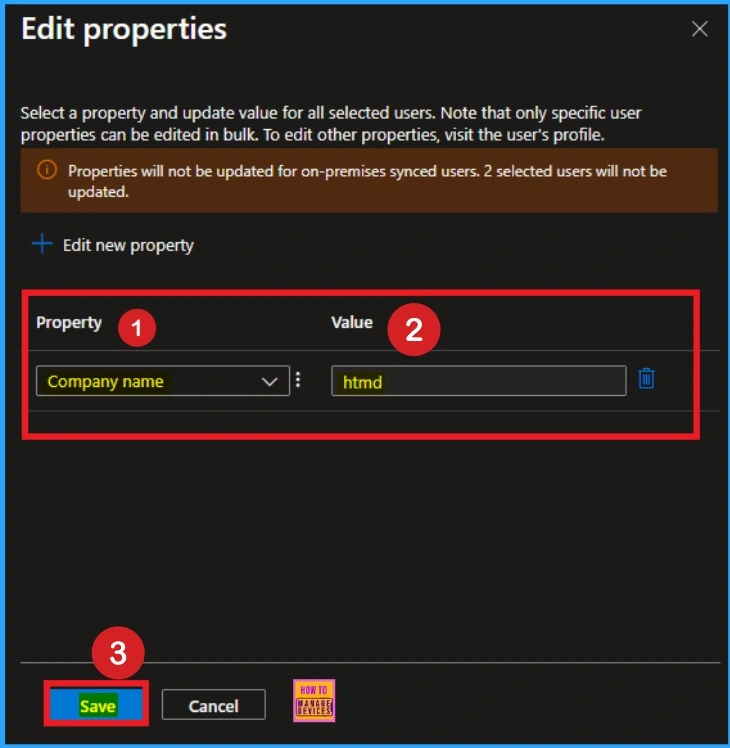
After selecting Edit Properties you will get another window that shows options to edit properties. Select a property and update the value for all selected users. Note that only specific user properties can be edited in bulk. To edit other properties, visit the user’s profile.
- In this window, click on the drop-down arrow under properties.
- It shows options like City, company name, company region, department, employee hire date etc.
- Here i select Company Name
- And value selected as HTMD
- Click on the Save button
Revoke sessions in User Blade
Revoke sessions in Users Blade in Entra portal helps admins to invalidate a user’s active sessions. When a session is revoked, the user is forced to re-authenticate the next time they try to access a resource. This feature can be users for protect sensitive information.
To access Revoke Session in Users Blade, open the Entra portal and go to Users > All users. Then select multiple account and select Revoke Sessions from the Edit (Preview). Look at the screenshot below.
After clicking on the Revoke sessions, you will get a window which shows Do you want to revoke all sessions for the user? Do you want to revoke all sessions for the user? This will revoke all sessions for 1 selected users, requiring users to re-sign in from all devices. Cannot revoke for on-premises synced users. Selected users which are on-premises synced will not have sessions revoked.
- Click on the Yes button

Need Further Assistance or Have Technical Questions?
Join the LinkedIn Page and Telegram group to get the latest step-by-step guides and news updates. Join our Meetup Page to participate in User group meetings. Also, Join the WhatsApp Community to get the latest news on Microsoft Technologies. We are there on Reddit as well.
Resource
Add or update a user’s profile information and settings in the Microsoft Entra admin center
Author
Anoop C Nair has been Microsoft MVP for 10 consecutive years from 2015 onwards. He is a Workplace Solution Architect with more than 22+ years of experience in Workplace technologies. He is a Blogger, Speaker, and Local User Group Community leader. His primary focus is on Device Management technologies like SCCM and Intune. He writes about technologies like Intune, SCCM, Windows, Cloud PC, Windows, Entra, Microsoft Security, Career, etc.




Discussion