






New Error Detecting Feature in Edge Browser using Copilot
Exciting News for Windows Users! A new Error Detecting Feature in Edge browser using Copilot arrived. It is an experimental DevTool that allows users to solve errors occurring in Microsoft Edge. This DevTool resolves the errors with Copilot.
Copilot is an AI assistant developed by Microsoft that provides different options to users. Copilot makes many contributions to the Microsoft Edge browser and the Error Detecting Feature in the new one. This feature is beneficial for web development users.
Web developers face difficulties when errors occur during the development process, especially for beginners. And the users didn’t know about the error displayed on the browser. The new Error Detecting Tool can detect and fix the bugs.
The Error-Detecting Tool will give you a new experience and be a lifesaver for Web developers. This experimental DevTool can explain the errors and solve your error with Copilot. This blog post will give you the details of the new error-detecting feature in the Edge browser using Copilot.

- Bing Chat Enterprise is Copilot Now | Data Protection for organizations
- Easy Steps to Enable Disable Copilot in Windows 11
New Error Detecting Feature in Edge Browser using Copilot
The new Error Detecting Feature in Edge Browser using Copilot can resolve any error or warning and any code snippet by using Copilot in Edge. Computer languages like C++ give you a lot of information at compilation time.
However, Javascript runtime errors can only be detected via the DevTools console. Compilers and JS engineers are similar in that they don’t always make it easy to understand what they are trying to say. Some common solutions are shown below.
| Common Solutions for Understanding Errors |
|---|
| Searching for the error message online, hoping to find a useful answer |
| Or asking a coworker for help |
How to Work Copilot for Detecting Errors
This is not a good solution for all time. Copilot will assist you in solving the errors of users who are using the Edge browser for Web development. This feature is available in Microsoft Edge version 120. You can ask the copilot to explain console errors and warnings as well as source code.
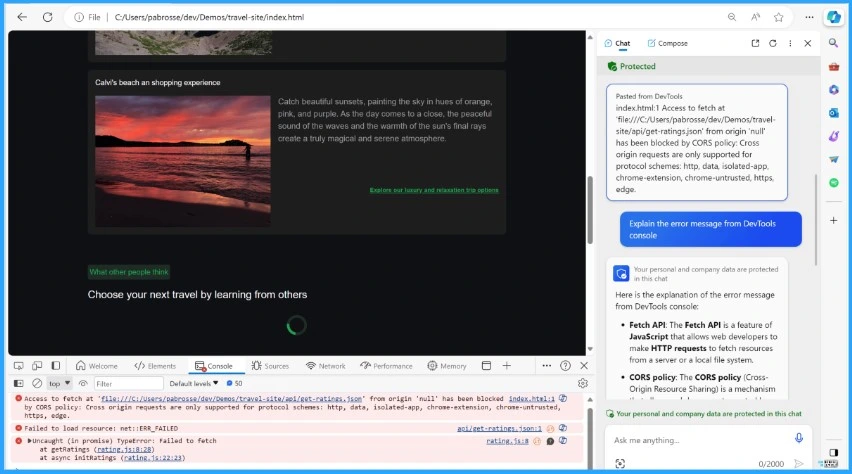
You can ask Copilot to explain any error or warning displayed in the Console. To do this, click on the Copilot button next to an error. The screenshot below will guide you.

- Microsoft is a Copilot Company says Satya Nadella
- Windows 11 Issue with Copilot and Desktop icons might move unexpectedly between monitors
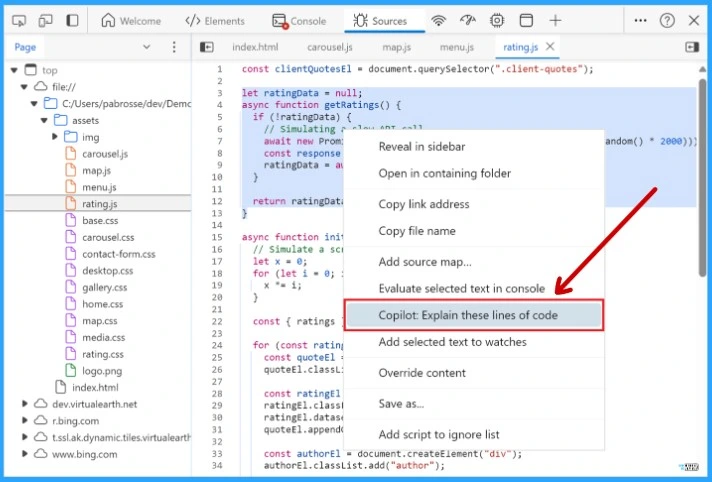
After that, you can ask Copilot to explain any snippet of code selected in the Source tool. Select some code and right-click. Select the Copilot: Explain these lines of code options from the pop-up window. When the users do any of these 2 actions, the copilot icon will appear on the Edge sidebar.
You can see a conversation about the error, warning, or code you selected. Copilot wants to know the reason for the particular problem you are facing, and It will generate an explanation.
Note: The new detecting tool is only the beginning, and Microsoft has more ideas.
Reference
Navigate the unexpected: using Copilot in Edge and DevTools – Microsoft Edge Blog (windows.com)
We are on WhatsApp. To get the latest step-by-step guides and news updates, Join our Channel. Click here –HTMD WhatsApp
Author
Gopika S Nair is a computer enthusiast. She loves writing on Windows 11 and related technologies. She is here to share quick tips and tricks with Windows 11 or Windows 10 users. She is Post Graduate Diploma Holder in Computer Science.



Discussion